

Hotbxevumi.today is a deceptive website that abuses push notification permissions through misleading alerts

If you frequently encounter pop-ups from Hotbxevumi.today on your desktop, it is likely that you have been misled by a deceptive message while browsing online. Redirects to such scam sites typically happen after interacting with a compromised link elsewhere or when adware is present on the device.
Once redirected, users are shown false prompts, often designed to trick them into clicking “Allow.” These may appear as verification requests, such as confirming they are not robots or meeting an age requirement. However, instead of genuine validation, clicking the button grants the website permission to send unlimited push notifications, which can then appear as long as the browser remains active.
These notifications are not only intrusive but could also be harmful. Cybercriminals frequently exploit such ads to spread malicious software, including Trojans and other forms of malware. Interacting with the wrong notification may result in system infection, leading to further security risks.
| Name | Hotbxevumi.today |
| Type | Push notifications, pop-ups, ads, scam |
| Distribution | The website gains access to deliver any information as soon as the “Allow” button is pressed within the push notification prompt |
| Symptoms | Push notifications show on the desktop at random time intervals. These pop-ups show fake notices and push scams. Links can also lead to malware-laden sites |
| Risks | The ads shown within push notifications might include misleading messages and links to malicious websites. If clicked, you might end up infecting your system with malware, disclosing your personal information, or losing money |
| Removal | You can disable the push notifications from any website via browser settings. Scanning the system with SpyHunterCombo Cleaner can also ensure that it's clean and secure |
| Other checks | Remove caches and other web data after the elimination of adware to prevent data tracking with the FortectIntego repair and maintenance tool. You can also repair damaged system components with it |
Deceptive tactics used to manipulate users
Push notification scam websites are widespread, and unsuspecting users may come across them at any moment while browsing. Hotbxevumi.today operates in the same way as many others, following the same fraudulent pattern seen with similar sites.
These scams are not just alike in purpose—they are virtually identical in design. The messages, images, and overall layout are often direct copies from previously created scam pages. Below are some common misleading prompts used to manipulate users:
- Click Allow to verify you are not a robot
- Confirm you are 18+ by clicking Allow
- Video playback error! Click Allow to enable viewing
- Click Allow to claim your reward instantly
- Your file is ready for download – press Allow to continue
The primary objective of these deceptive messages is to trick users into believing that the push notification request serves a legitimate function. Social engineering techniques play a major role in this, exploiting familiarity to lower suspicion.
Since many users have encountered captchas or verification pop-ups before, they may assume this is just another routine check. In other cases, the lure of exclusive content, downloads, or prizes is used to encourage clicks – none of which are real.

Push notification spam is not the same as a virus infection
Ever since push notifications were introduced to desktop versions of Google Chrome, scams abusing this feature have been a persistent issue. Deceptive websites like Hotbxevumi.today take advantage of this system by tricking users into enabling notifications under false pretenses. However, it’s important to note that while these scams can be intrusive and misleading, they are not the same as traditional malware infections. At the same time, many legitimate websites use push notifications responsibly without flooding users with unwanted or harmful content.
The push notification system is built into web browsers and functions through an API (Application Programming Interface). When a site asks for notification permissions and a user grants them, that website gains the ability to send messages directly to the desktop. Because these alerts appear at the system level, they are designed to be noticeable, making them an attractive tool for scammers looking to push unwanted ads or fraudulent messages.
Many users associate sudden pop-ups with a potential virus infection, which is understandable. Some forms of malware, such as adware, can generate intrusive ads or redirects, creating a similar experience. While malicious push notifications and malware-driven pop-ups can both be harmful, they operate differently.
If Hotbxevumi.today notifications are disrupting your browsing, you can stop them by adjusting browser settings to block the site. However, if you experience excessive ads, frequent redirects, or suspicious activity in your browser, it might indicate an underlying infection. Running a scan with SpyHunterCombo Cleaner or MalwarebytesMalwarebytes security tools can help detect threats, while FortectIntego can assist in clearing browser data to eliminate tracking cookies left behind by unwanted sites.
Removing the annoying push notifications
If you have mistakenly allowed push notifications from a deceptive website like Hotbxevumi.today, the situation is not as severe as it may seem – provided you refrain from clicking on any ads or links that appear. These notifications can be intrusive and potentially harmful, but as long as they are ignored, they do not pose an immediate threat.
If you are unsure how to block a website from sending push notifications, you can follow the steps below. Select your browser and proceed with the necessary actions to disable unwanted alerts:
Google Chrome (desktop)
- Open the Google Chrome browser and go to Menu > Settings.
- Scroll down and click on Advanced.
- Locate the Privacy and security section and pick Site Settings > Notifications.
- Look at the Allow section and look for a suspicious URL.
- Click the three vertical dots next to it and pick Block. This should remove unwanted notifications from Google Chrome.


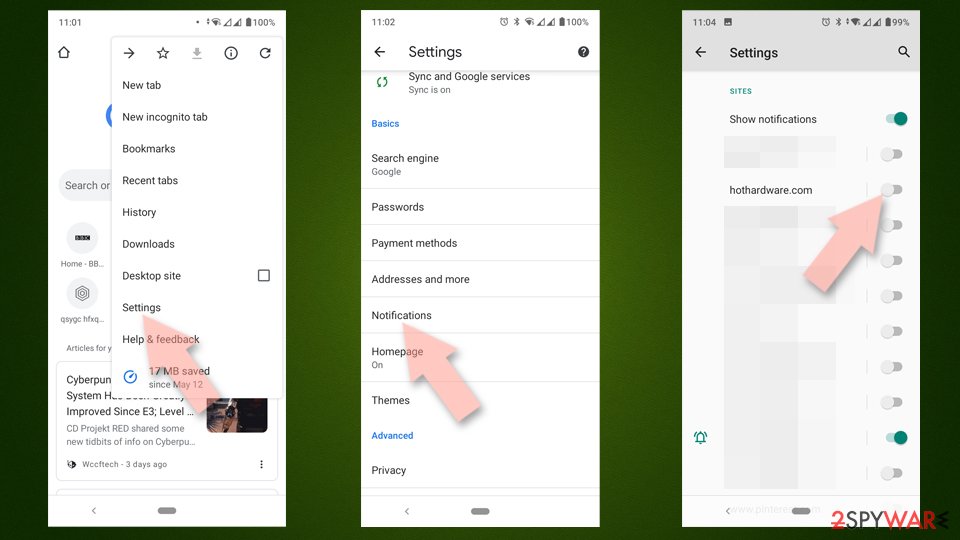
Google Chrome (Android)
- Open Google Chrome and tap on Settings (three vertical dots).
- Select Notifications.
- Scroll down to the Sites section.
- Locate the unwanted URL and toggle the button to the left (Off setting).

Mozilla Firefox
- Open Mozilla Firefox and go to Menu > Options.
- Click on Privacy & Security section.
- Under Permissions, you should be able to see Notifications. Click the Settings button next to it.
- In the Settings – Notification Permissions window, click on the drop-down menu by the URL in question.
- Select Block and then click on Save Changes. This should remove unwanted notifications from Mozilla Firefox.


MS Edge (Chromium)
- Open Microsoft Edge, and go to Settings.
- Select Site permissions.
- Go to Notifications on the right.
- Under Allow, you will find the unwanted entry.
- Click on More actions and select Block.


Safari
- Click on Safari > Preferences…
- Go to the Websites tab and, under General, select Notifications.
- Select the web address in question, click the drop-down menu and select Deny.


Internet Explorer
- Open Internet Explorer, and click on the Gear icon at the top-right of the window.
- Select Internet options and go to the Privacy tab.
- In the Pop-up Blocker section, click on Settings.
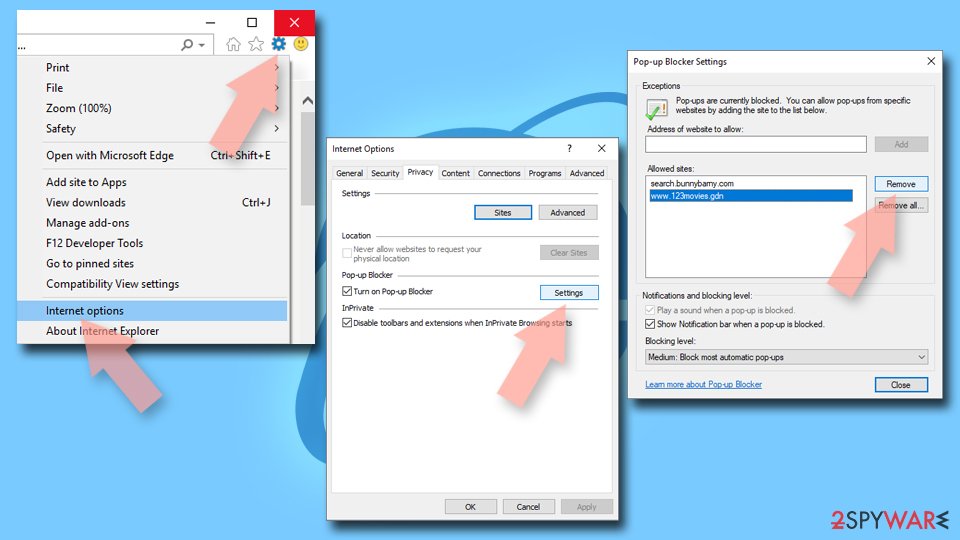
- Locate the web address in question under Allowed sites and pick Remove.

Did this guide help?
Be the first to comment