

Hotbwejadi.today is a deceptive website created to lure unsuspecting users into enabling push notifications that later become intrusive and misleading
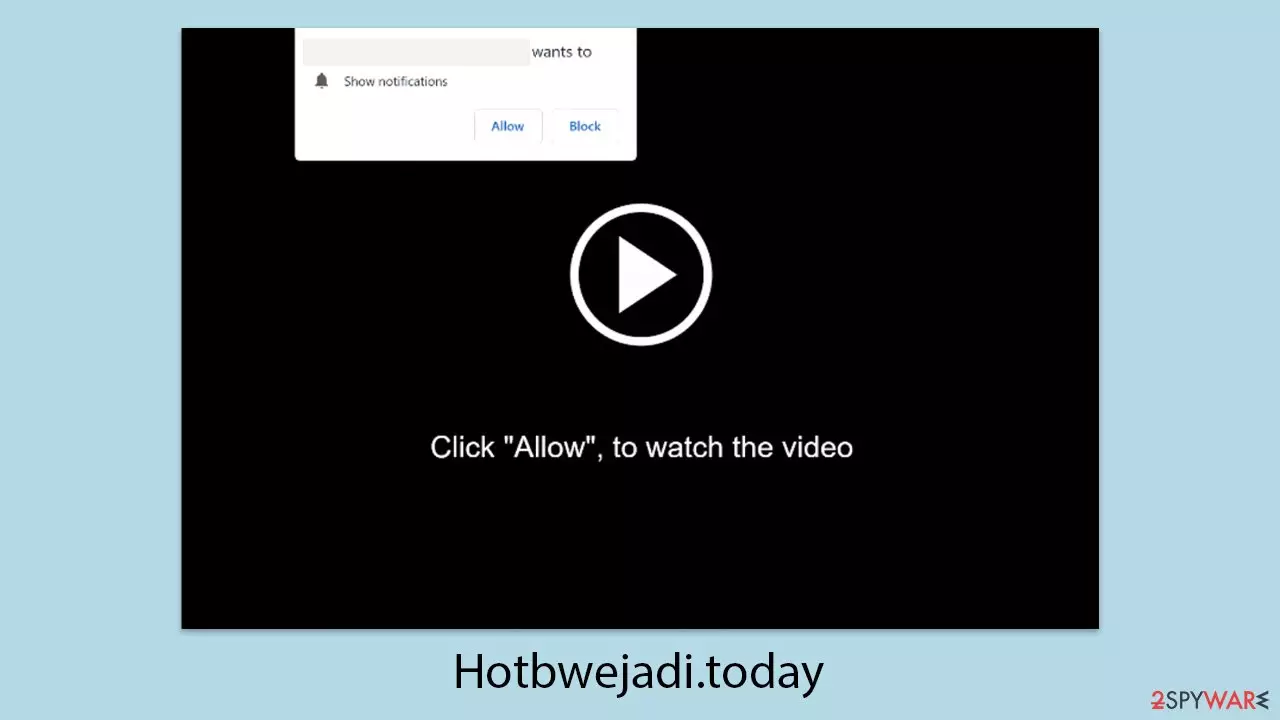
Hotbwejadi.today operates as a deceptive platform engineered by fraudsters to ensnare unsuspecting individuals into enabling persistent push notifications. This site is among a vast network of fraudulent web pages that exploit notification features to bombard users with unwanted advertisements or extract sensitive data. Typically, the name Hotbwejadi.today doesn’t linger in people’s minds; rather, it’s the unexpected and disruptive pop-ups flashing across their screens that leave a lasting impression.
For many, push notifications represent an unfamiliar intrusion, as the advertisements they deliver differ sharply from typical online banners. The trap is set when users, misled by cunning phishing tactics, inadvertently agree to receive these notifications, only to encounter a barrage of invasive ads at a later time. The links embedded within Hotbwejadi.today’s notifications can redirect to harmful destinations, potentially coaxing individuals into surrendering personal details, downloading dangerous software, or squandering funds on fraudulent offerings.
| Name | Hotbwejadi.today |
| Type | Push notifications, ads, pop-ups, scam |
| Distribution | Users allow push notifications after they click the “Allow” button within the prompt on the website |
| Symptoms | Pop-ups show up on a regular basis on the screen – these ads often include inappropriate, scam, phishing, or other similar content |
| Risks | You might suffer from monetary losses, install malware or potentially unwanted programs, or disclose sensitive data to cybercriminals |
| Termination | To stop the intrusive pop-ups, you need to access the settings section of your browser. You should also check your system with security software to eliminate adware and malware |
| Recovery | Following adware removal, use FortectIntego to erase caches and web data, thereby preventing tracking. Additionally, this tool can repair any compromised system components |
How scammers reach their goals
The effectiveness of the Hotbwejadi.today scam hinges on its ability to exploit human psychology through carefully orchestrated social engineering tactics. The scam’s success begins with an element of surprise, often catching users off guard as they stumble upon the site unintentionally.
This frequently occurs when individuals navigate to unsecured corners of the internet, such as torrent hubs or platforms distributing pirated software, where redirects to Hotbwejadi.today can occur unexpectedly.
Upon landing on the page, users encounter prompts that disrupt their expectations, presenting requests that appear reasonable in the moment yet blur the line between fraud and familiarity. Examples of these prompts include:
- Press “Allow” to verify, that you are not a robot
- Click Allow to watch the video
- Click “Allow” to win a prize and get it in our shop!
- If you are 18+, click Allow
- Your file is ready to download – press Allow to continue
These messages are deliberately designed to mimic legitimate interactions users have experienced elsewhere, such as age verification checks or CAPTCHA prompts distinguishing humans from bots. In other instances, the site provides plausible explanations – like a browser supposedly blocking video autoplay – to nudge users toward compliance.
This is the essence of social engineering at play, a method expertly wielded by the perpetrators behind Hotbwejadi.today. While the push notification feature itself is benign, intended for valid uses, scammers have hijacked it as a tool to deliver disruptive and potentially harmful advertisements straight to users’ screens. The key lies in crafting a convincing pretext to trick individuals into clicking “Allow,” transforming an innocent action into an entry point for exploitation.

Take care of the infections
Adware and other malicious programs, such as those associated with Hotbwejadi.today, present a ongoing risk by infiltrating devices through cunning methods. This unwanted software often hitches a ride via bundled downloads from dubious third-party websites, fraudulent ads, or even deliberate installations by users who don’t fully grasp its consequences. Once embedded, adware unleashes a stream of intrusive pop-ups or banners and may covertly monitor online habits to sharpen its ad-targeting precision.
Staying cautious is critical when sourcing software, especially from unverified platforms. Users must pay close attention to any alerts or prompts that might signal adware’s presence during downloads. An uptick in ads or unexpected detours to questionable sites like Hotbwejadi.today is a clear warning, urging a prompt check for system infections.
The simplest way to tackle this is by scanning the device with trusted anti-malware tools like SpyHunterCombo Cleaner or MalwarebytesMalwarebytes, which can pinpoint and purge adware efficiently. However, these solutions might leave behind residual files such as cookies. For a thorough purge, using a maintenance tool like FortectIntego is recommended. Beyond clearing leftover traces, it can also mend system issues – think crashes, errors, or lag – inflicted by malware, returning the device to smooth operation.
Remove the unwanted pop-ups
Recognizing that push notifications from sites like Hotbwejadi.today cannot be eliminated using security software or automated tools is essential; resolving this issue requires direct action on your part. Many individuals, misled into enabling notifications from deceptive websites, remain uncertain about the problem or how to address it. Fortunately, the fix is straightforward: you simply need to block the site’s URL through your browser’s settings. Below is the process to achieve this.
Google Chrome
- Open the Google Chrome browser and go to Menu > Settings.
- Scroll down and click on Advanced.
- Locate the Privacy and security section and pick Site Settings > Notifications.
- Look at the Allow section and look for a suspicious URL.
- Click the three vertical dots next to it and pick Block. This should remove unwanted notifications from Google Chrome.


Google Chrome (Android)
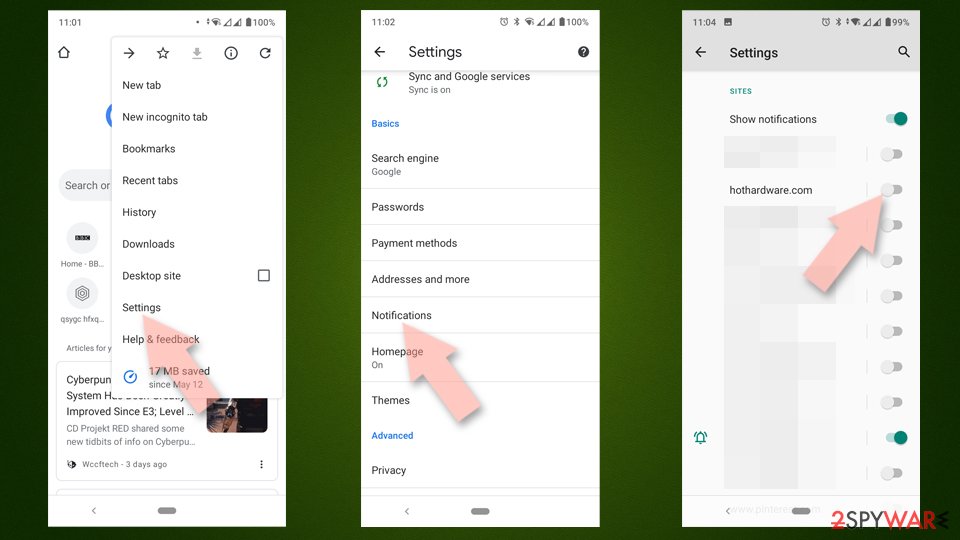
- Open Google Chrome and tap on Settings (three vertical dots).
- Select Notifications.
- Scroll down to the Sites section.
- Locate the unwanted URL and toggle the button to the left (Off position).

Mozilla Firefox
- Open Mozilla Firefox and go to Menu > Options.
- Click on Privacy & Security section.
- Under Permissions, you should be able to see Notifications. Click the Settings button next to it.
- In the Settings – Notification Permissions window, click on the drop-down menu by the URL in question.
- Select Block and then click on Save Changes. This should remove unwanted notifications from Mozilla Firefox.


Safari
- Click on Safari > Preferences…
- Go to the Websites tab and, under General, select Notifications.
- Select the web address in question, click the drop-down menu and select Deny.


MS Edge
- Open Microsoft Edge, and go to Settings.
- Select Site permissions.
- Go to Notifications on the right.
- Under Allow, you will find the unwanted entry.
- Click on More actions and select Block.


Internet Explorer
- Open Internet Explorer, and click on the Gear icon at the top-right of the window.
- Select Internet options and go to the Privacy tab.
- In the Pop-up Blocker section, click on Settings.
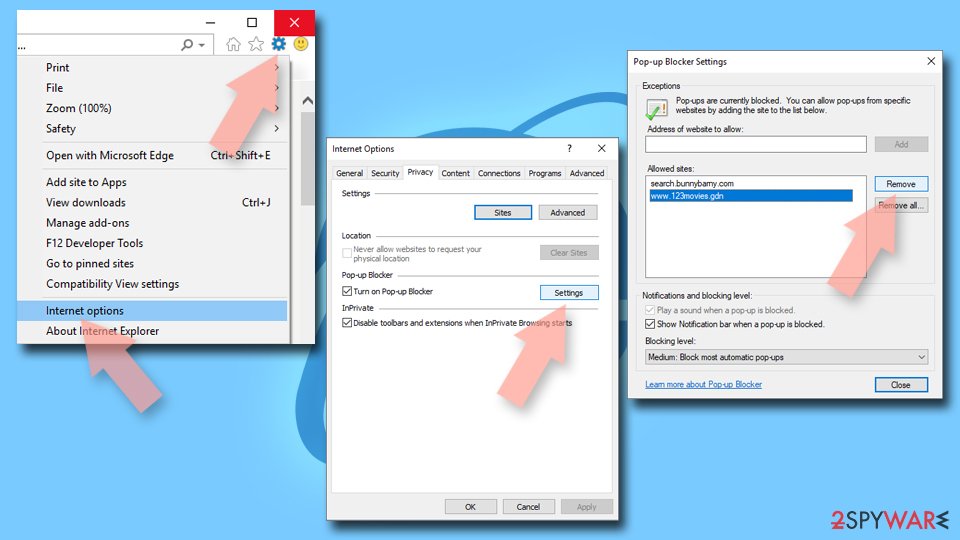
- Locate the web address in question under Allowed sites and pick Remove.

Did this guide help?
Be the first to comment