

Fripolonishnity.co.in ads can bring malicious links directly to your screen
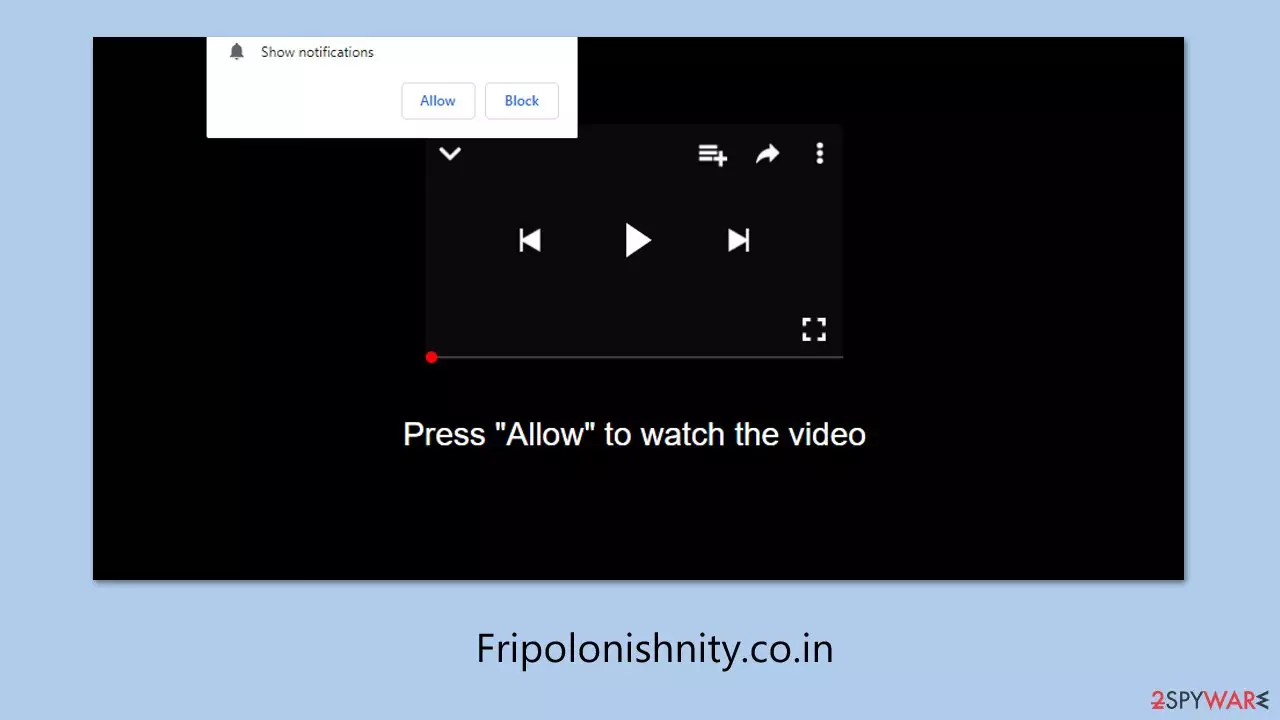
Fripolonishnity.co.in is a questionable site that people might encounter while visiting low-trust websites, such as those offering game cheats, adult material, or illegal video streams. In many cases, users don’t go there on purpose – redirects may occur due to hidden adware operating silently in the background, which is often designed to push users toward shady online locations and display misleading content.
What makes Fripolonishnity.co.in concerning is not necessarily the website itself, but the behavior it promotes. After landing on the page, users are typically shown misleading instructions that urge them to enable push notifications.
When they do this, the site gains the authority to show advertisements in the shape of pop-up windows on their screen even when the browser is not running or open for anything else. The alerts that these notifications show can be fake offers, deceptive warnings, or pointers towards risky websites, which can infringe users' data or equipment.
| Name | Fripolonishnity.co.in |
| Type | Push notifications, ads, pop-ups, scam |
| Distribution | The website gains access to deliver any information as soon as the “Allow” button is pressed within the push notification prompt |
| Symptoms | Notifications appear in the bottom-right corner of the screen, often containing fraudulent content or links to potentially harmful websites |
| Risks | Numerous security issues arise from exposure to scams, financial losses, system infections, and more |
| Removal | Navigate to browser settings to disable intrusive push notifications. Then, verify that your system is free from adware or malware by scanning with SpyHunterCombo Cleaner |
| Other tips | After eliminating PUPs and malware, we suggest scanning the system with FortectIntego to clear browser caches and automatically repair virus-related damage. |
How scammers mislead people
The purpose behind deceptive websites like Fripolonishnity.co.in is often centered around generating profit through advertising. However, instead of using legitimate methods, scammers tend to rely on shady advertising networks that offer little to no quality control. Because of this, people who unknowingly subscribe to push notifications from such sites may begin receiving harmful or misleading ads straight to their devices.
These questionable ad networks are attractive to scammers because they offer decent payouts, encouraging the use of dishonest practices. The only ones who end up losing are the users themselves. Since most people would never willingly agree to constant spam messages or risky links, scammers try to hide their intentions by using trick messages to gain permission. Here are some examples commonly used on sites like Fripolonishnity.co.in:
- Press “Allow” to verify, that you are not a robot
- Click “Allow” to start downloading
- Can't play this video! Perhaps your browser doesn't allow video playback. Please click the Allow button to watch the video
- Click “Allow” to win a prize and get it in our shop!
- Please tap Allow to continue
- If you are 18+, click Allow, etc.
These prompts are intentionally misleading, making users believe they are taking a harmless action. In reality, clicking “Allow” grants the site permission to send notifications whenever the browser is open, often leading to a flood of unwanted content.

What dangers do Fripolonishnity.co.in ads entail?
Push notifications can be a useful feature if used by trustworthy websites, such as news websites or social networking websites, as they provide timely reminders or important alerts. These websites usually use the feature responsibly and do not flood users with too many pop-ups or useless messages.
The situation changes completely when push notifications come from websites like Fripolonishnity.co.in, which do not prioritize user safety. Once someone is misled into clicking “Allow,” they might soon notice a stream of intrusive alerts appearing directly on their desktop or mobile screen. These notifications are often far from harmless and can become a serious nuisance.
In many cases, the ads shown through these notifications promote questionable or even dangerous content. Examples may include:
- Promises of fast and easy money
- False alerts about malware infections
- Fake prize winnings or surveys
- Ads pushing suspicious software or browser extensions
Receiving such messages can lead to real risks – users might be tricked into entering sensitive information, installing harmful software, or falling for scams that result in financial loss. For these reasons, it’s extremely important not to click on any of the notifications and take action to stop them as soon as possible. Instructions for disabling them can be found below.
Remove Fripolonishnity.co.in ads easily
Before blocking unwanted push notifications from suspicious sites, it's necessary to verify whether your device is infected with adware or other types of potentially unwanted software. Adware is one of the primary causes of users being redirected to phishing sites unknowingly, and it usually propagates through deceptive installers or bundled downloads, which makes it difficult to detect immediately.
In order to quickly remove all possible threats, it's recommended to scan your system with SpyHunterCombo Cleaner or MalwarebytesMalwarebytes security software, which can effectively detect and remove malware. In addition, using FortectIntego can help to clean browser data, remove trash files, and repair issues that might have been caused by adware or system errors.
Once that’s done, you can follow the instructions below to disable push notifications coming from Fripolonishnity.co.in and prevent further pop-up interruptions.
Google Chrome
- Open the Google Chrome browser and go to Menu > Settings.
- Scroll down and click on Advanced.
- Locate the Privacy and security section and pick Site Settings > Notifications.
- Look at the Allow section and look for a suspicious URL.
- Click the three vertical dots next to it and pick Block. This should remove unwanted notifications from Google Chrome.


Google Chrome (Android)
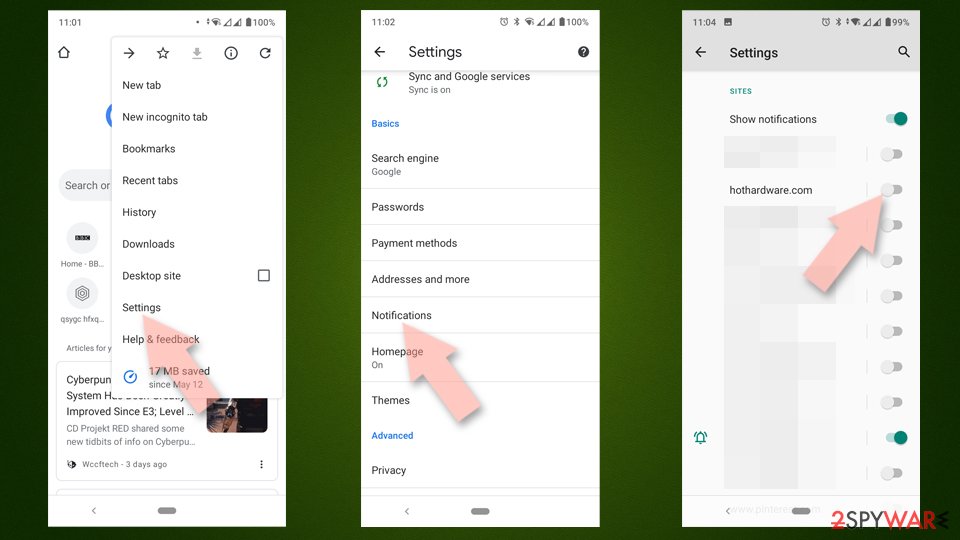
- Open Google Chrome and tap on Settings (three vertical dots).
- Select Notifications.
- Scroll down to the Sites section.
- Locate the unwanted URL and toggle the button to the left (Off position).

Mozilla Firefox
- Open Mozilla Firefox and go to Menu > Options.
- Click on Privacy & Security section.
- Under Permissions, you should be able to see Notifications. Click the Settings button next to it.
- In the Settings – Notification Permissions window, click on the drop-down menu by the URL in question.
- Select Block and then click on Save Changes. This should remove unwanted notifications from Mozilla Firefox.


Safari
- Click on Safari > Preferences…
- Go to the Websites tab and, under General, select Notifications.
- Select the web address in question, click the drop-down menu and select Deny.


MS Edge
- Open Microsoft Edge, and go to Settings.
- Select Site permissions.
- Go to Notifications on the right.
- Under Allow, you will find the unwanted entry.
- Click on More actions and select Block.


Internet Explorer
- Open Internet Explorer, and click on the Gear icon at the top-right of the window.
- Select Internet options and go to the Privacy tab.
- In the Pop-up Blocker section, click on Settings.
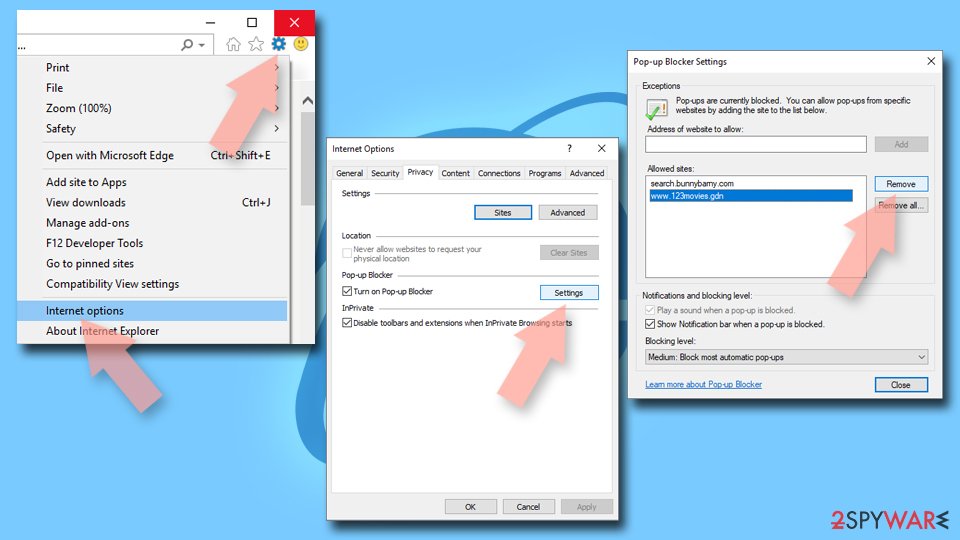
- Locate the web address in question under Allowed sites and pick Remove.

Did this guide help?
Be the first to comment