

Pphouse3.fun Ads and notifications deliver false claims about infections on your machine
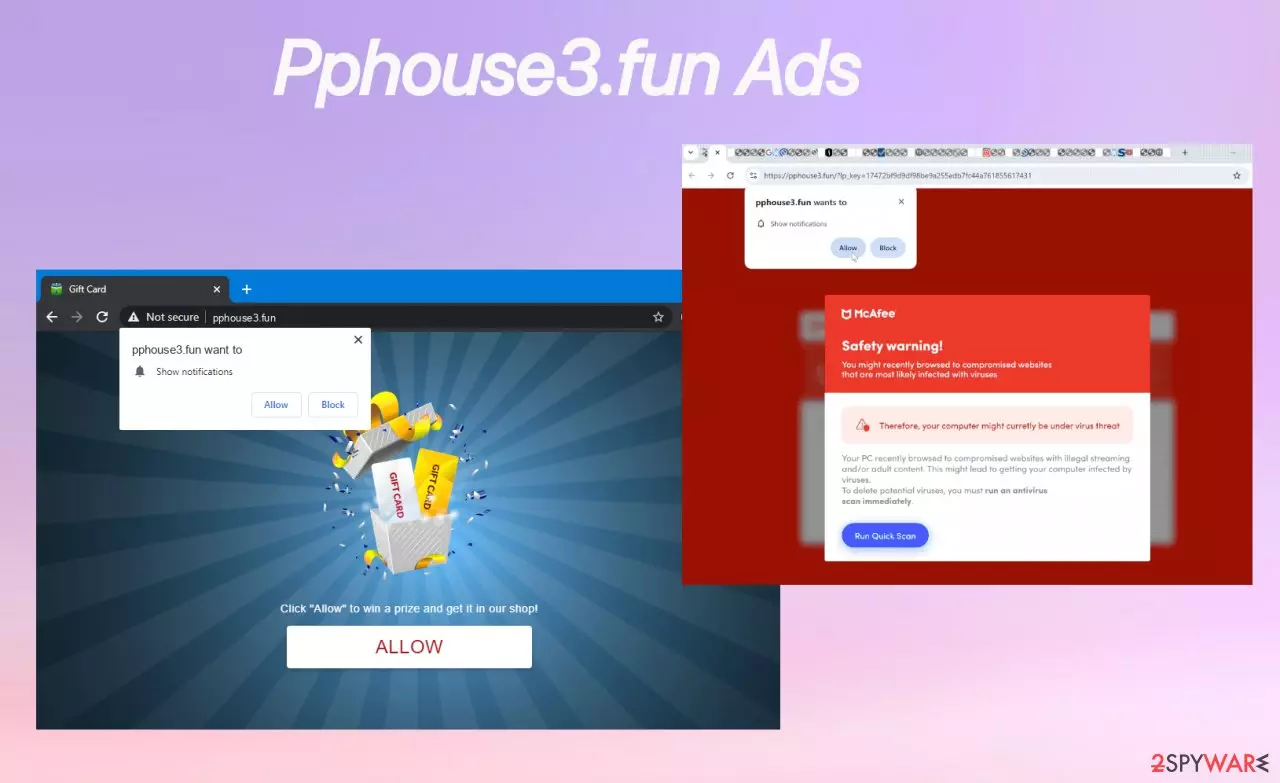
Pphouse3.fun is the site related to the adware-type intruder that triggers additional processes on your system. You must ignore those claims, alerts, and messages because once you click on the pop-up ad or notification, a website window, other threats might get installed on your computer. This is how adware manages to infiltrate deeper and trigger background processes.
Pphouse3.fun virus employs a range of deceptive messages to lure users into its trap, each crafted to exploit curiosity or urgency. It may warn that your system is riddled with 15 viruses, urging you to contact tech support or run an immediate scan.
Alternatively, it might claim you’ve received a new message on platforms like Facebook, Twitter, or WhatsApp, cautioning you about phishing links while subtly encouraging clicks. Other tactics include promoting a “totally legitimate” shopping site with a tempting 95% discount coupon, enticing you to sign up for a dubious crypto exchange for a substantial bonus, or promising connections with 5, 10, 20, or even 50 women nearby who are eager to chat.
Pphouse3.fun push notifications and alerts may also pitch an “incredibly effective” system cleaner to speed up your computer, all designed to deceive and compromise your security. All those tactics are dangerous, and you, as a user, should ignore any of them and those calls to action. Remove the threat instead.
| Name | Pphouse3.fun |
|---|---|
| Type | Adware, technical support scam, push notifications virus |
| Category | Potentially unwanted program |
| Issues | Creates tons of pop-up ads not originating from the site, decreases speed of the device |
| Distribution | Via similar deceptive ads, malicious sites, get bundled with other similar threats or dubious applications |
| Damage | Infection can decrease the performance, affect the machine directly by installing browser-based threats or other PUAs |
| Removal | Terminating the infection requires knowledge, or AV tools like SpyHunterCombo Cleaner, MalwarebytesMalwarebytes |
| Repair | System gets affected overtime, so you should run FortectIntego to properly repair damaged files or processes |
Pphouse3.fun is not just another annoying pop-up — it's a symptom of a deeper problem. If you see repeated advertisements from this domain while browsing, your browser has likely been compromised by adware or a potentially unwanted program (PUP). These ads don’t appear accidentally. In most cases, they’re deliberately pushed by rogue scripts or malware embedded in your system.
At its core, Pphouse3.fun notification virus is designed to hijack your attention. Once it gains access, it floods your screen with pop-ups, often unrelated to your interests, in an attempt to lure clicks. These ads often promote fake giveaways, deceptive security alerts, or questionable downloads.
And while they may look like legitimate browser notifications, they're anything but safe. The real danger lies in what happens after you engage with Pphouse3.fun technical scam messages:
- You might be redirected to phishing sites or malicious landing pages.
- You could be tricked into downloading fake antivirus tools, browser hijackers, or worse — trojans and ransomware.
- You risk exposing personal data, leading to identity theft, financial fraud, or system corruption.
Adware creators rely on exploiting advertising networks
Pphouse3.fun adware doesn't rely on traditional infection methods. Instead, it piggybacks on shady ad networks and compromised websites. These redirect you automatically to malicious domains like this site itself or other pages without your consent.
The content you see may even be tailored to your location via IP-based filtering, making the deception more convincing. In our investigation, Pphouse3.fun was caught running a fake “Safety Warning” scam, a common scare tactic used to manipulate users into installing harmful software.
One of the sneakiest aspects of this campaign is its abuse of browser notification permissions. Users are prompted to click “Allow” on a fake prompt, often under the guise of verifying they’re not a robot or to access content. Once that permission is granted, Pphouse3.fun ads gains the ability to send spam notifications straight to your desktop, even when the browser is closed.
These notifications become a gateway to:
- Fake software offers
- Scam investment schemes
- Malicious file downloads
- Subscription traps and phishing pages.

Long-term risks of adware infections have not been considered by users enough
Allowing Pphouse3.fun adware to operate unchecked can lead to:
- System performance issues due to persistent scripts and adware
- Data privacy violations as browsing behavior is tracked
- Financial loss through scam purchases or data leaks
- Increased vulnerability to more serious malware infections.
Pphouse3.fun pop-up ads isn't a harmless annoyance — it’s part of a wider ecosystem of digital deception, where scammers profit from tricking users into engaging with dangerous content. The best defense is awareness and proactive system hygiene.
If you’re seeing signs of infection, act quickly. What starts as a simple pop-up could be a doorway to much bigger security issues. You must remove Pphouse3.fun as soon as those annoying messages and redirects start.
Remove the virus and stop the annoying symptoms
Of course, not everyone realizes the threat is running in the background when those fake technical issues or virus detection alert pop-ups greet us. This is where automatic virus removal tools come in handy. With applications like SpyHunterCombo Cleaner or MalwarebytesMalwarebytes, you can run a system scan and determine what PUPs or even more dangerous threats run on the machine.
However, do not forget about the additional damage such infections can cause to your computer, mobile device, or any other piece they infect. So, after Pphouse3.fun removal, you should run the app like FortectIntego, capable of repairing issues with the system and additionally installed processes or potentially unwanted applications.
After these processes, disabling the origin of the notifications is a good thing to do. This can be done by accessing your browser's settings and searching for the area that controls site permissions. There, locate the annoying page in the list and block it from sending any more notifications.
Google Chrome
- Open the Google Chrome browser and go to Menu > Settings.
- Scroll down and click on Advanced.
- Locate the Privacy and security section and pick Site Settings > Notifications.
- Look at the Allow section and look for a suspicious URL.
- Click the three vertical dots next to it and pick Block. This should remove unwanted notifications from Google Chrome.


Mozilla Firefox
- Open Mozilla Firefox and go to Menu > Options.
- Click on Privacy & Security section.
- Under Permissions, you should be able to see Notifications. Click the Settings button next to it.
- In the Settings – Notification Permissions window, click on the drop-down menu by the URL in question.
- Select Block and then click on Save Changes. This should remove unwanted notifications from Mozilla Firefox.


Safari
- Click on Safari > Preferences…
- Go to the Websites tab and, under General, select Notifications.
- Select the web address in question, click the drop-down menu and select Deny.


MS Edge (Chromium)
- Open Microsoft Edge, and go to Settings.
- Select Site permissions.
- Go to Notifications on the right.
- Under Allow, you will find the unwanted entry.
- Click on More actions and select Block.


Internet Explorer
- Open Internet Explorer, and click on the Gear icon at the top-right of the window.
- Select Internet options and go to the Privacy tab.
- In the Pop-up Blocker section, click on Settings.
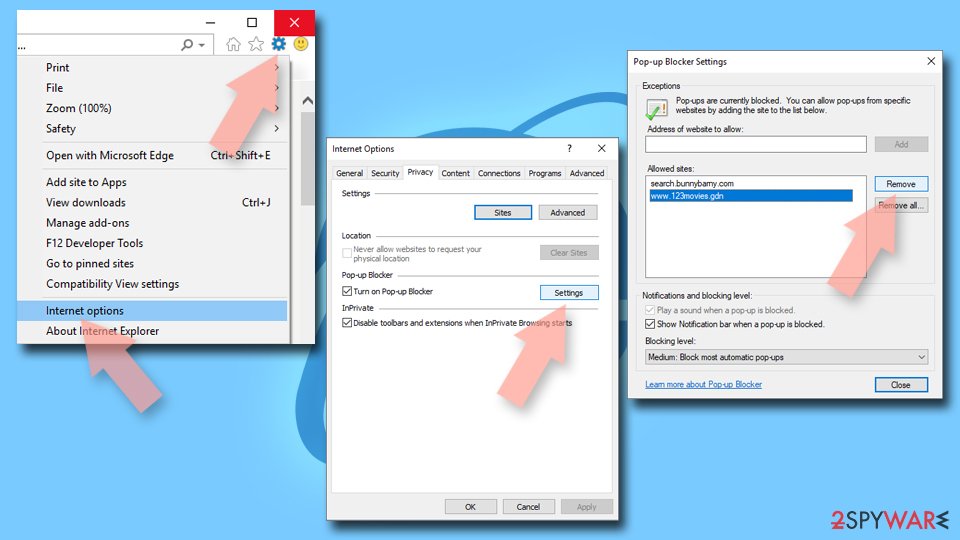
- Locate the web address in question under Allowed sites and pick Remove.

Did this guide help?
Be the first to comment