

“Account Validation Request” is a scam email that could steal your account information within just a few clicks
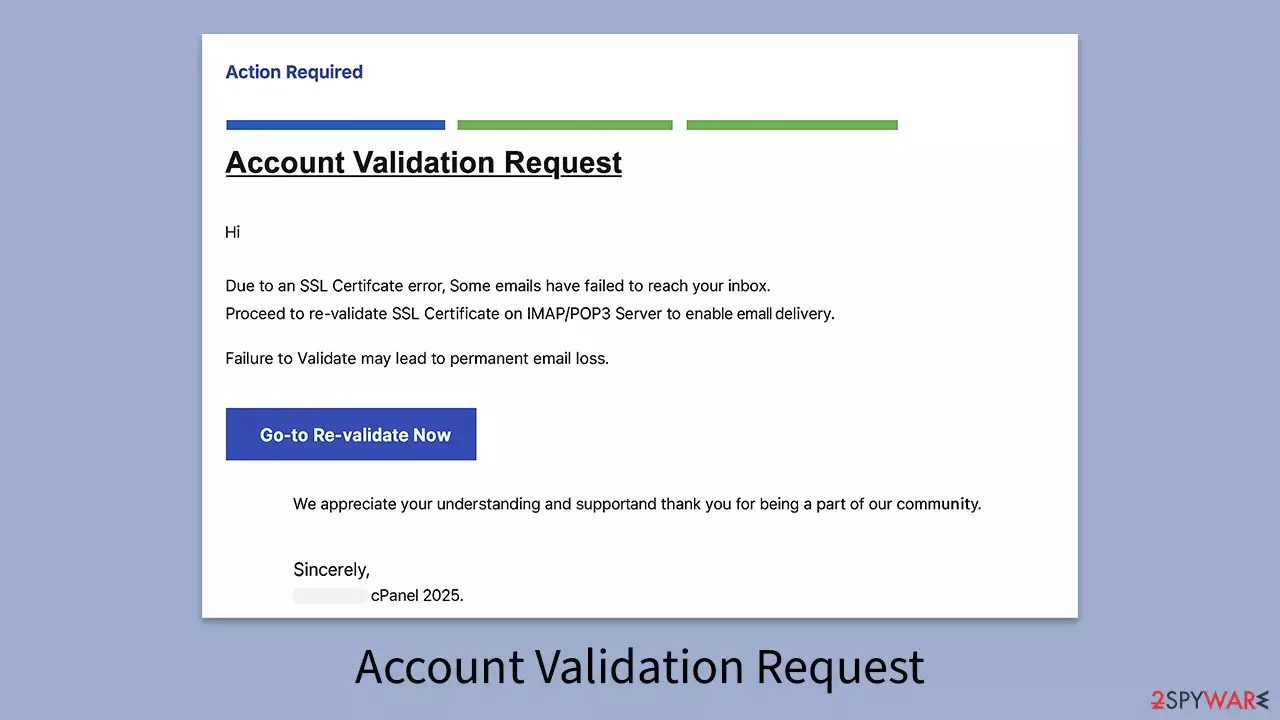
A new phishing campaign is making the rounds under the guise of an “Account Validation Request” notice. The email claims there’s an issue with your email account’s SSL certificate and urges you to “re-validate” it to prevent permanent email loss. It’s designed to sound urgent and technical so recipients act without thinking.
In reality, there’s nothing wrong with your email account. “Account Validation Request” is just a phishing scam – a trick to get you to hand over your email login details to cybercriminals. Once they have those credentials, they can access your account, steal sensitive information, and potentially use your address to scam other people.
| Name | “Account Validation Request” |
| Type | Scam, fake email, phishing |
| Scam content | Claims there's been an SSL error when trying to send out an email, asks to verify account login credentials on a spoofed website |
| Distribution | Malspam |
| Risks | Personal information disclosure to unknown parties, account compromise and loss, and financial losses |
| Removal | Do not click any links or download software from the scam site. If you did, immediately scan your system with SpyHunterCombo Cleaner, MalwarebytesMalwarebytes security software |
| Other tips | To prevent third parties from tracking your online activities, we recommend clearing browser caches and other leftover files with FortectIntego |
Why this email is a scam and how it spreads
The “Account Validation Request” scam is pure social engineering. It spreads exclusively through email, usually landing in your spam or junk folder, but not always. This means you need to stay cautious with messages in your main inbox as well. Just because it avoided the spam filter doesn’t mean it’s safe.
Scammers acquire email addresses in several ways: data breaches, purchased mailing lists on the dark web, automated “email harvesting” tools that scrape addresses from public websites, or even through infected devices that leak contacts. Once they have a pool of addresses, they send out thousands of phishing messages at once, hoping a fraction of recipients will fall for the ruse.
The goal is to trick you into thinking the message came from your email hosting provider, using official-sounding language and branding. This creates a sense of legitimacy, enough for some recipients to click the link without questioning it.
These campaigns are usually automated, meaning scammers don’t personally target you. Instead, they rely on sheer volume: the more emails they send, the higher the chance someone will bite.
Inside the “Account Validation Request” scam email
Here’s what the scam email typically looks like:
Subject: Action Required : Document BGU0396 – via [REDACTED] SmartVerify
Action Required
RE-VALIDATE SSL CERTIFICATEAccount Validation Request
Hi [REDACTED],
Due to an SSL Certificate error, Some emails have failed to reach your inbox.
Proceed to re-validate SSL Certificate on IMAP/POP3 Server to enable email delivery.
Failure to Validate may lead to permanent email loss.
Go-to Re-validate Now
We appreciate your understanding and support and thank you for being a part of our community.
Sincerely,
[REDACTED] cPanel 2025.
There are multiple red flags here. First, legitimate providers don’t ask users to “re-validate” SSL certificates via an email link – these certificates are managed on the server, not through end-user action. Second, the tone is overly urgent, warning about “permanent email loss” to pressure you into acting quickly. This is a common phishing tactic.

The “Go-to Re-validate Now” link is the real danger. Clicking it takes you to a fake login page designed to look like your email provider’s portal. Anything you enter there – your email address, password, or other credentials – is sent straight to the attackers.
Another telltale sign is the generic greeting (“Hi”) and vague branding (“cPanel 2025”). Scammers often use placeholders or generic terms so they can mass-send the same email to thousands of recipients without tailoring it.
Finally, poor grammar and awkward phrasing (“Go-to Re-validate Now,” random capitalization) are giveaways. While some legitimate companies make typos, reputable email providers almost never send messages this sloppy.
What to do if you clicked the link or entered your details
If you clicked the link and entered your login credentials, treat your account as compromised. Cybercriminals can now access your email, read private messages, reset passwords for linked accounts, and impersonate you in scams targeting your contacts.
The first step is to change your email password immediately and enable two-factor authentication (2FA) if your provider supports it. This adds a layer of security, even if the attackers still have your password.
Next, for broader system security, run a full scan with SpyHunterCombo Cleaner or MalwarebytesMalwarebytes to check for any malware that may have been delivered alongside the phishing attempt. If malicious software is found, use FortectIntego to repair the damage and restore your system to a safe state.
Did this guide help?
Be the first to comment