

Back Orifice – remote administration software created by a member of Cult of the Dead Cow hacking organization
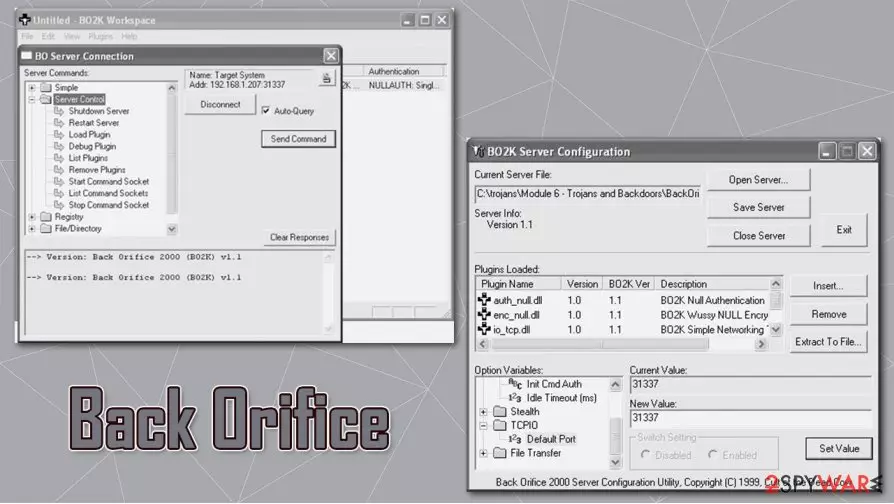
Back Orifice, later known as BackOrifice2K, is a remote administration application that was first introduced in 1998 by a hacking organization “Cult of the Dead Cow” member known as Sir Dystic. The developer named the software after Microsoft BlackOffice Server, which is meant to mock the tech giant and point out the flaws in then active MS Windows 9x operating systems. A year later, its next version was presented at the DEF CON 7 hacking convention in Las Vegas.
| Name | Back Orifice, BackOrifice2K |
| Type | Remote Administration Tool / Remote Access Trojan |
| Developer | Sir Dystic |
| Programming language | C++ |
| Infiltration | Insecure websites such as torrents, drive-by-download, malicious websites, fake updates, email spam, etc. |
| Capabilities | Since the RAT has backdoor and rootkit capacities, it would allow the attackers to take over the machine, send spam, proliferate other malware, steal sensitive information, etc. |
| Dangers | Personal data compromise, other malware infection, identity theft, monetary losses |
| Elimination | Download and install anti-malware software and perform a full system scan. Ensure that security tool is running the latest version. If needed, access Safe Mode with Networking to bypass persistence mechanisms – we explain how below |
| Further steps | To remediate your Windows machine after the infection is eliminated, we recommend using FortectIntego |
Written in C++ programming language,[1] its first versions emerged for Windows 95 and Windows 98, while the 2K version has expanded functionality and was also compatible with then-current versions of the OS – NT, Vista, and XP. Several different versions were released by the developers over the years, although each possesses a wide array of features we describe below.
While initially Back Orifice can be used for remote administration legitimately, there has been plenty of abuse by cybercriminals. If installed without permission, it can serve as a Remote Access Trojan with backdoor and rootkit[2] capabilities. Malware would allow the attacker to take over the operating system with ease or monitor every action of the computer user.
Since the app would allow remote control, attackers could also use the infected computer as a bot[3] to spread spam or infect it with numerous other viruses, such as the treacherous ransomware. As a result, users could suffer from severe consequences, including monetary losses, credential leak, or even identity theft.
In other words, you should remove Back Orifice from your system as soon as possible if it arrived without permission, and security software, such as SpyHunterCombo Cleaner or MalwarebytesMalwarebytes, is preferred for it. Since malware has rootkit capabilities, it might be difficult to delete its remnants. Therefore, we recommend performing an additional scan with FortectIntego that could bring Windows back to a normal state after the elimination.
Back Orifice removal should not be delayed, although it is best not to get infected in the first place. Remember to stay away from high-risk websites, never open suspicious email attachments, patch all the software on the system on time, and ensure that a reputable anti-malware with real-time protection feature is running on the system at all times.

RAT capabilities
Back Orifice Remote Administration Tool is programmed to access computers remotely and then perform various diverse functions. To illustrate what abilities this application has, we will list some of its traits. Back Orifice Trojan can:
- Spawn a text-based application on a TCP port.
- Stop an application from listening for connections.
- List the applications currently listening for connections.
- Create a directory. Lists files and directory. You must specify a wildcard if you want more than one file to be listed. Removes a directory.
- Create an export on the server. Deletes an exports.
- List currently shared resources (name, drive, access, password).
- Log keystrokes on the server machine to a text file. Ends keyboard logging. To end keyboard logging from the text client, use “keylog stop.”
- Disconnect the server machine from a network resource. Connects the server machine to a network resource.
- View all network interfaces, domains, servers, and exports visible from the server machine.
- Ping the host machine.
- Return the machine name and the BO version number.
- Execute a Back Orifice plugin. Tell a specific plugin to shut down. List active plugins or the return value of a plugin that has existed.
- Redirect incoming TCP connections or UDP packets to another IP address. Stop a port redirection.
- Create a key in the registry. Delete a key from the registry. Delete a value from the registry, etc.
Back Orifice elimination steps
According to security experts,[2] it's not possible to know when Back Orifice virus attack is taking place, so it's very important to ensure a full system protection. Typically, cyber criminals who monitor this infection is spread via spam e-mails. Once a computer user clicks on the attachment, the virus is executed and roots deep into the system. Consequently, the machine can start working abnormally because hacked may start viewing and modifying the files and registries on your computer.
The Trojan can log your keystrokes, log files, take screen shots and send them to hackers or can simply crash the computer, so Back Orifice removal should not be delayed. It goes without saying that such a malicious application cannot be removed manually. Thus, if you suspect it to be hiding in your computer, our recommendation would be to check the system with SpyHunterCombo Cleaner, MalwarebytesMalwarebytes, or another reputable security software. After that,
Did this guide help?
Be the first to comment