

Fake Windows Activation virus
Fake Windows Activation virus is a Trojan horse that locks up the computer and insists that you are using a pirated version of Windows operating system which needs to be re-activated for anti-piracy reasons. The virus initiates a lockscreen on which it displays a system message, encouraging the user to activate Windows in the next 24 hours. Otherwise, you will be banned from using most of the Windows OS features. Do not panic or overturn your drawers looking for the Windows license key. This notification you have just received is fake and designed by the online scammers to generate illegal profit. Even if you find and submit a legitimate activation key, it will not be accepted, and you will receive another delusive message saying that:
Windows Helper is unable To Activate Windows
Contact Support To Activate.
You will also hear a spoken record of the same message every time you click on your computer screen. It is obvious – you are dealing with tech support scam here, and you need to remove Fake Windows Activation virus from your computer as soon as possible. But first, you have to solve the lockscreen problem. With your screen locked, you won’t be able to initiate the system scan which means that the virus will remain on your computer. Luckily, it has been found that entering “closecloseclosecloseclose” into the activation box can help eliminate the screen lock. The first thing you should do after regaining access to your browser is scan your computer for Fake Windows Activation malware using FortectIntego or other virus-fighting utilities.
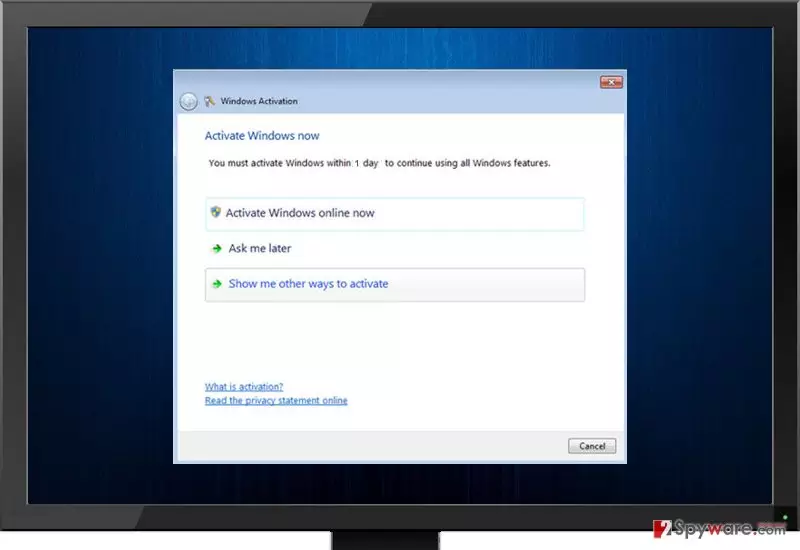
Apart from the spoken message, this virus also displays a fraudulent phone number (1-888-479-3649) by which you can contact the supposed tech support and receive the instructions for Windows activation. You should know that this number will not connect you with the real Windows support. You are simply going to call the cyber-criminals, who will try to convince you that your old license key is expired and that you must purchase a new one for a considerable sum of $99.99 USD. In reality, there is no problem with your Windows and the key the scammers are trying to sell you is most likely non-existent. Be a security-minded person and if they ask you to reveal any personal details, banking information, or other sensitive information, don’t! To fix this problem, you must scan your computer with a reputable malware removal program and delete this virus from your system. We recommend using professional anti-malware software acknowledged by users worldwide.
How can you avoid becoming a victim of a tech-support scam?
Deceptive programs can be installed in various ways. Most of the time it happens due to negligence and failure to comply with the safe browsing rules. To avoid installing malicious programs, you should:
- Never browse through high-risk websites. Do not try to access websites that your anti-virus program or the Google SafeSearch filter blocks;
- Avoid clicking on suspicious banners or pop-up ads that intrusively show up on your screen;
- Do not accept to install programs from websites that you accidentally end up on. If you notice that sometimes you are forced to visit websites that you did not intend to open, you should check your system with a reliable anti-spyware to see whether you do not have any suspicious apps installed on your system (e.g., browser redirect viruses).
- Install ANY software ONLY using Advanced or Custom installation mode. You must perform this security check because the program that you wish to install MIGHT be corrupted and have suspicious optional apps attached to it. You can always refuse to install such additions by deselecting agreements to install “recommended downloads” or “suggested software.”
- Never open e-mails from unknown senders, ever! Malware is mostly distributed via malicious emails, so that is the reason you should never open such letters AND files that might be attached to them!
To find out how to remove this malware from your computer, continue reading the article.
How can you escape the Fake Windows Activation screen?
In order to eliminate this malware from your computer, you will have to shut your computer down and restart it in the Safe Mode with Networking and download an automatic tool to remove Fake Windows Activation virus from the system. If you have one already, you can skip straight to the virus elimination by running a system scan with it. It will detect and delete all malicious files on your PC. Just make sure it is updated to the newest version. Below you will find some recommendations how to eliminate the lockscreen before continuing to the Fake Windows Activation removal. If you encounter any problems while dealing with this Trojan, do not hesitate and contact us.
Did this guide help?
5 comments
Guest
thank u for the info
noe
freakiing virus app i am so glad i didnt call tha number
B055y
its so easy to confuse this with real system alert! whats the difference between them??
8251
I CALLED IT. A suspicious person asked me to pay money to a particular bank account. FAKE! Do not call the number. ITs a scam! Contact real windows support via their website if u have any probz
mozammel anowar
just download Windows 7 loader from 4shared.com
there is an option install click it
restart your computer and it will automatically active it