

ScorecardResearch is a suspicious service that tracks your TV watching habits, and more personally identifiable data
ScorecardResearch is offered as a market research service that helps online advertising companies collect specific information.[1] Specifically, this marketing platform compiles certain data about targeted users and transfers it to the respective recipients. It does by asking users to fill surveys and questionnaires. However, the malware is known to disturb users with intrusive advertisements that appear whenever they use Google Chrome, Internet Explorer, Mozilla Firefox or Safari, as well as collect a variety of information about them.
| SUMMARY | |
| Name | ScorecardResearch.com |
| Type | Adware |
| Developer | Full Circle Studies, Inc. |
| Danger Level | Medium. Collects a variety of information and shares it with third-parties |
| Distribution | Software bundling |
| Symptoms | Increased amount of ads on all websites, redirects, additional components installed without permission, etc. |
| Detection and elimination | You can use FortectIntego for a quick solution to affected files; alternatively, you can check our manual instructions below for direct PUP removal tips |
According to the front page ad of ScorecardResearch.com, this utility helps companies identify particular users' interests and meet their expectations. Unfortunately, the reality is a bit different. After analysis, IT experts revealed that this application and related website have the elements of adware. Therefore, if you install it on the system, you might suffer from an excessive amount of ads on the browser.
Mostly, marketing platforms are misused for showing people misleading ads about sales, discounts, surveys, competitions or missing updates. After clicking them, people are either tricked into visiting unknown, suspicious or dangerous websites that are actively trying to increase their page rank or sales. Few users ignore the fact that some unknown utility, such as Sb.ScorecardResearch.com virus, compiles information about their browsing habits.

If you suspect that this tool has settled down on your PC, you should perform the malware removal. SpyHunterCombo Cleaner or MalwarebytesMalwarebytes is one of the programs ensuring that the elimination is appropriately completed, as some applications that might have been installed can be difficult to determine.
This website belongs to Full Circle Studies, Inc. and comprises a part of a bigger comScores Inc marketing community. Its clientele is comprised of online advertising companies. The latter do not have to go through all the trouble to question users on specific topics. ScorecardResearch.com adware does this job for them.
However, taking into account that this site belongs to PUP[2] category, such activity might profoundly irritate users. In other words, the adware might “encourage” users to fill in the surveys by displaying them on every visited website.
Redirects to unfamiliar websites might have the negative impact on the operation of your device as you may get misguided to domains which contain malignant elements. What is more, Scorecard Research app may easily alter your computer's DNS[3] settings. It means that your browsing traffic will be controlled by the PUP.
It is worth mentioning that adware may collect the wanted information via cookies and other tracking technologies. The collected data includes the following:
- Operating system information;
- Browser type;
- Website preferences;
- Usage of websites and applications;
- Web browsing activities, etc.
Unfortunately, this is not the only information that is being collected by ScorecardResearch. The Privacy Policy discloses that personal data is being excessively collected and shared with third parties:
We may use third party service providers to obtain personal information and combine that data with other data that we collect from or about you. This process may involve a third party setting a cookie on your computer or device when you visit a participating website, use a participating application, or view an advertisement on participating websites or in participating applications. <…>
We may also share any personal information that you provide to us as described below:
- With our vendors, consultants, agents, contractors, and other service providers that we use to support our business;
It goes without saying that personal data should not be shared around the web that easily. Remember that any shared data might end in cybercrooks hands and can be easily misused, i.e., might lead to identity fraud.[4]

Therefore, it might be transferred to client companies. Do not get surprised if your Inbox becomes flooded with ads. Note that the majority of ransomware viruses spread via spam messages as well. As a result, you might fail to distinguish which spam is harmless and which contains a menace within. Make b.ScorecardResearch.com removal your current priority.
Distribution methods of potentially unwanted programs
Browser hijackers, adware apps, and other PUPs are usually spread in the disguise of freeware. After downloading a free image editor or media player, few realize that such tools have additional components included By quickly hopping through the settings, the additional programs remain unnoticed.
Therefore, you have been tricked into letting this PUP hijack your system. To protect yourself from these unwanted programs, start monitoring the installation processes of any application or its update. Select “Custom” or “Advanced” method and then carefully go through each step to see what components come along with the primary program.
Additionally, we recommend you do not click on suspicious pop-up ads when browsing the internet. Quite often these advertisements recommend installing bogus software that tries to trick users into purchasing the licensed version or infuse victims' browsers with even more banners, offers, deals, coupons, in-text links, video ads, etc.
Getting rid of potentially unwanted programs
You can eliminate ScorecardResearch with the assistance of a malware removal utility. If you have installed any applications related to the website, you might want to uninstall it as well. Speaking of automatic elimination, a cybersecurity program finishes the removal within a couple of minutes. It also comes in handy dealing with more serious virtual threats.

You can remove ScorecardResearch.com virus manually as well. Keep in mind that precision and attention are required if you want to eliminate the adware completely. Remember that such PUPs often disguise themselves under free applications. Thus, there is a risk to download one along with Skype or Flash Player. Note that this utility might be promoted more for UK netizens.[5]
Uninstall from Windows
Uninstall from Windows 10/8:
- Type Control Panel into the Windows search box and open the result.
- Under Programs, select Uninstall a program.


Uninstall from Windows 7/XP:
- Click on Windows Start > Control Panel (Windows XP users should click on Add/Remove Programs).
- In Control Panel, select Programs > Uninstall a program.


Remove the unwanted program:
- In the Programs and Features window, look for any recently installed suspicious entries, select them, and click Uninstall.
- If User Account Control appears, click Yes to confirm, then complete the removal.


Delete from macOS
Remove the unwanted application:
- From the menu bar, select Go > Applications.
- In the Applications folder, look for any suspicious entries, then drag them to Trash (or right-click and pick Move to Trash).


Delete leftover files and folders:
- Select Go > Go to Folder.
- Enter /Library/Application Support and remove any suspicious folders related to the unwanted program.
- Repeat the same check in the /Library/LaunchAgents and /Library/LaunchDaemons folders, deleting any suspicious entries.

- Finally, empty the Trash to permanently remove the leftovers.

Remove from Microsoft Edge
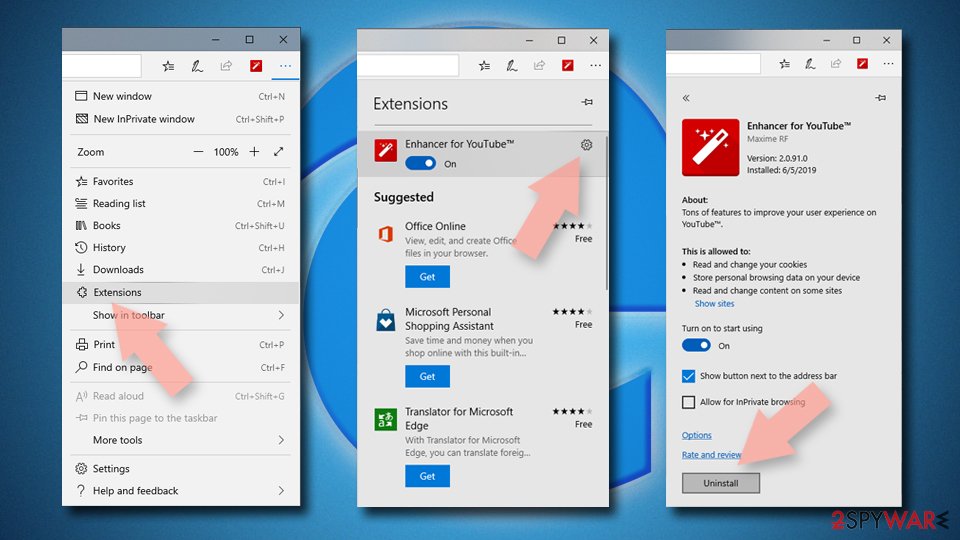
Delete unwanted extensions from MS Edge:
- Select Menu (three horizontal dots at the top-right of the browser window) and pick Extensions.
- From the list, pick the extension and click on the Gear icon.
- Click Remove.

Clear cookies and other browser data:
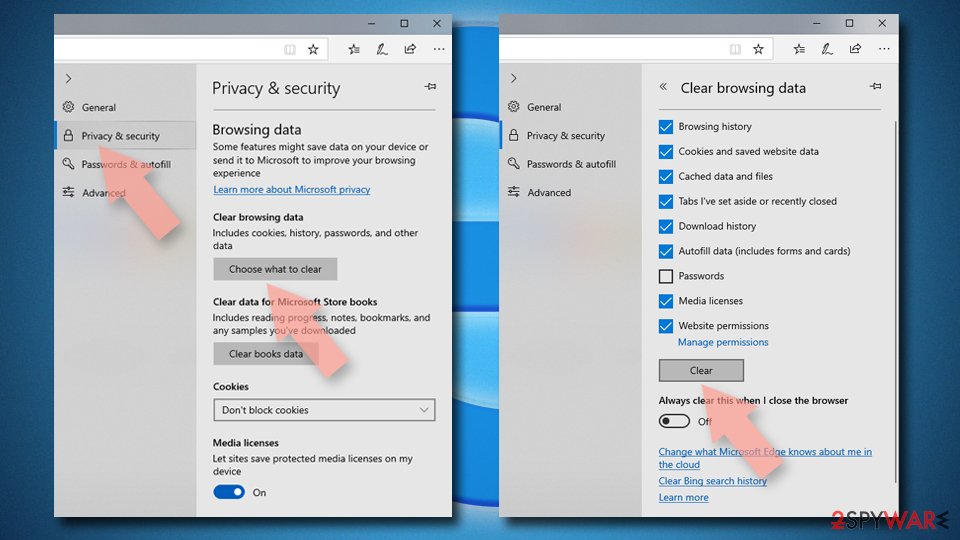
- Click on the Menu (three horizontal dots at the top-right of the browser window) and select Settings > Privacy, search, and services..
- Under Clear browsing data, pick Choose what to clear.
- Select Cookies and other site data and Cached images and files. (apart from passwords, although you might want to include Media licenses as well, if applicable) and click on Clear.

Restore new tab and homepage settings:
- Click the menu icon and choose Settings.
- Then find On startup section.
- Click Remove next to any suspicious startup page.
Reset MS Edge if the above steps did not work:
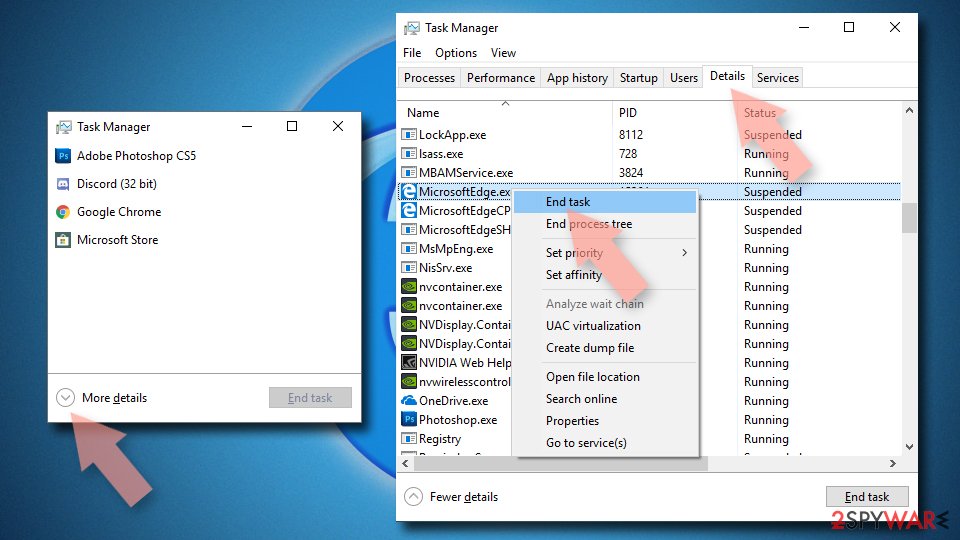
- Press on Ctrl + Shift + Esc to open Task Manager.
- Click on More details arrow at the bottom of the window.
- Select Details tab.
- Now scroll down and locate every entry with Microsoft Edge name in it. Right-click on each of them and select End Task to stop MS Edge from running.

Instructions for Chromium-based Edge
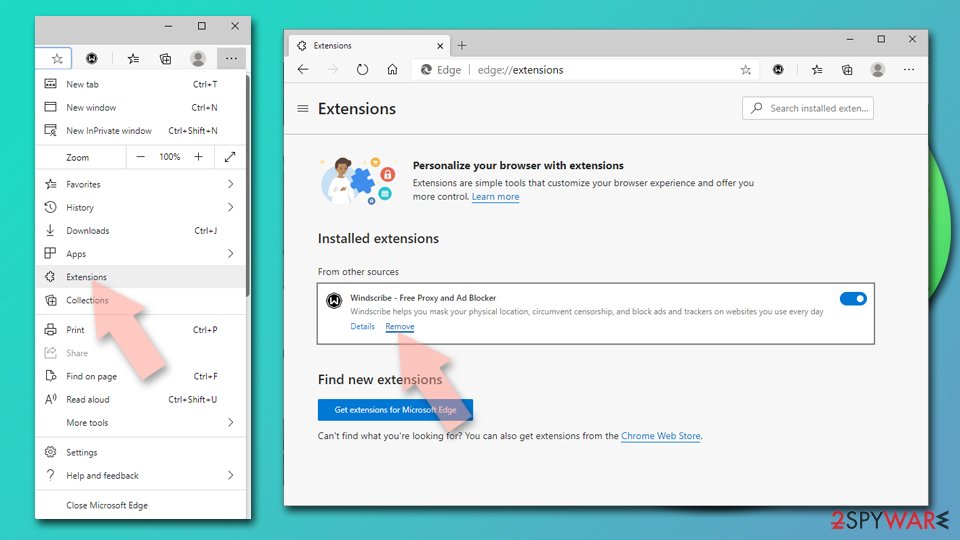
Delete extensions from MS Edge (Chromium):
- Open Edge and click select Settings > Extensions.
- Delete unwanted extensions by clicking Remove.

Clear cache and site data:
- Click on Menu and go to Settings.
- Select Privacy, search and services.
- Under Clear browsing data, pick Choose what to clear.
- Under Time range, pick All time.
- Select Clear now.


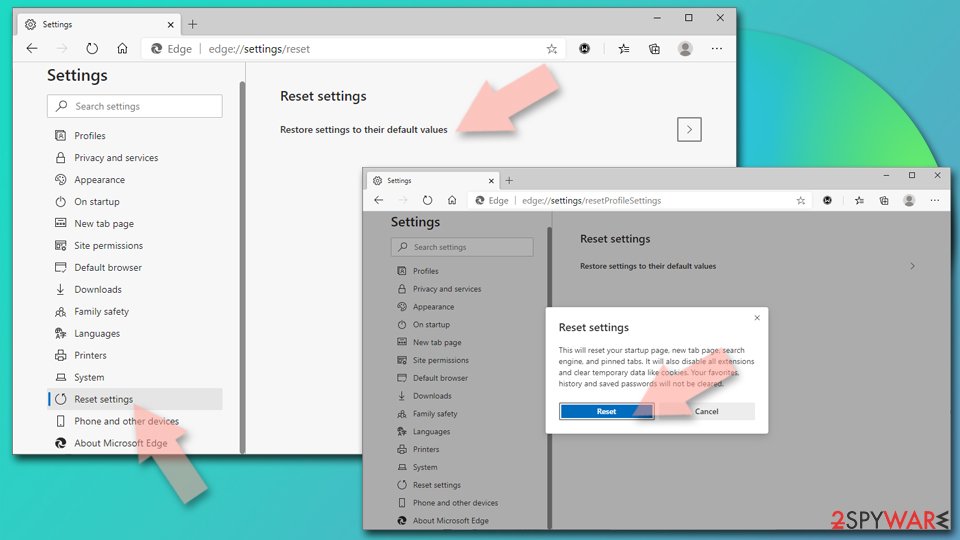
Reset Chromium-based MS Edge:
- Click on Menu and select Settings.
- On the left side, pick Reset settings.
- Select Restore settings to their default values.
- Confirm with Reset.
- This will disable extensions and reset startup pages but will not delete bookmarks, saved passwords, or browsing history.

Remove from Mozilla Firefox (FF)
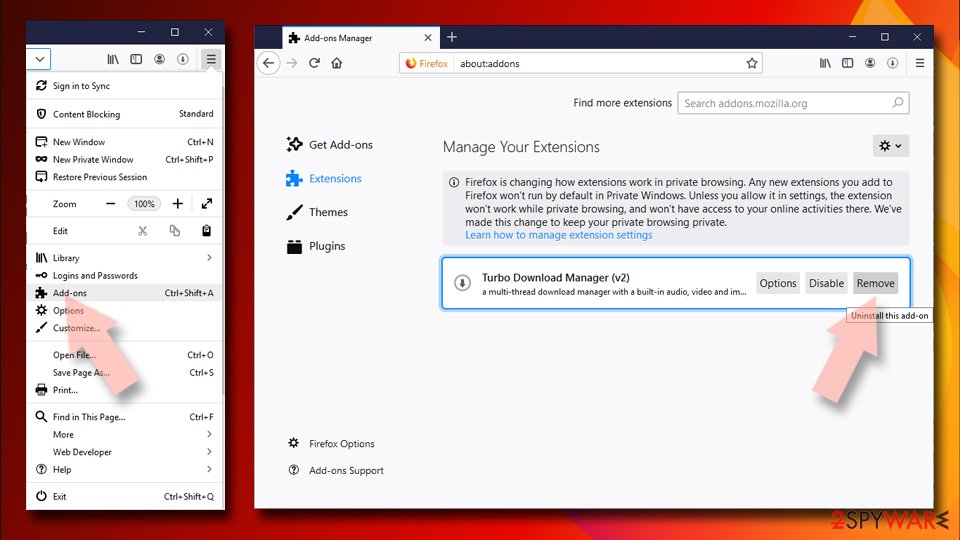
Remove dangerous extensions:
- Open Mozilla Firefox browser and click on the Menu (three horizontal lines at the top-right of the window).
- Select Add-ons.
- In here, select the unwanted extension and click Remove.

Reset the homepage:
- Click three horizontal lines at the top right corner to open the menu.
- Choose Settings.
- Under Home, set your preferred homepage and new tab settings.
Clear cookies and site data:
- Click Menu and pick Settings.
- Go to Privacy & Security section.
- Scroll down to locate Cookies and Site Data.
- Click on Clear Data...
- Select Cookies and Site Data and Temporary cached files and pages, then click Clear.


Reset Mozilla Firefox
If clearing the browser as explained above did not help, reset Mozilla Firefox:
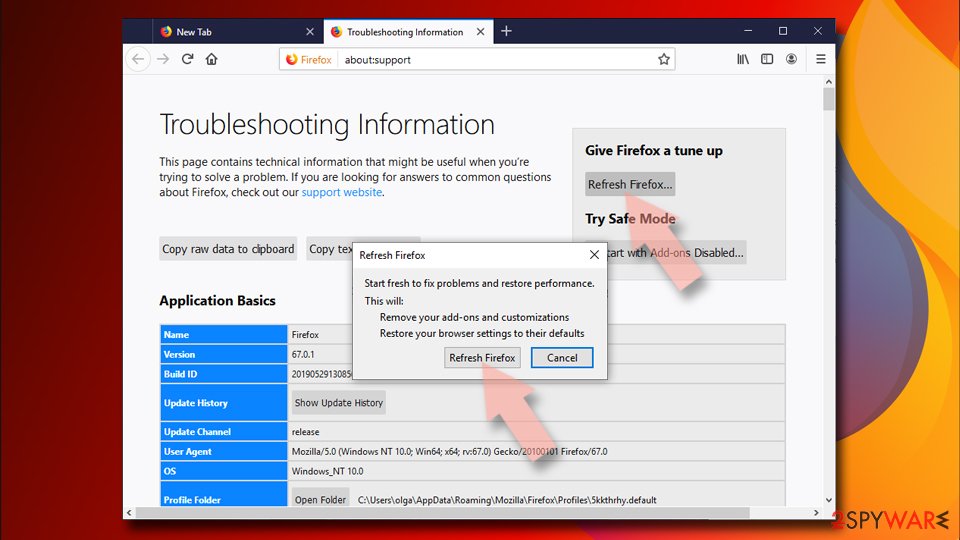
- Open Mozilla Firefox browser and click the Menu.
- Go to Help and then choose Troubleshooting Information.
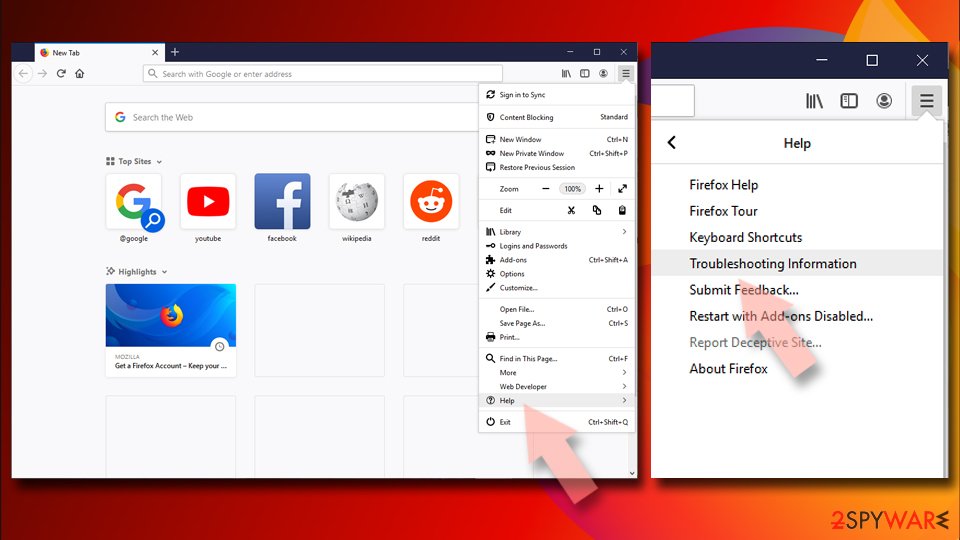
- Under Give Firefox a tune up section, click on Refresh Firefox...
- Once the pop-up shows up, confirm the action by pressing on Refresh Firefox.


Remove from Google Chrome
Delete malicious extensions from Google Chrome:
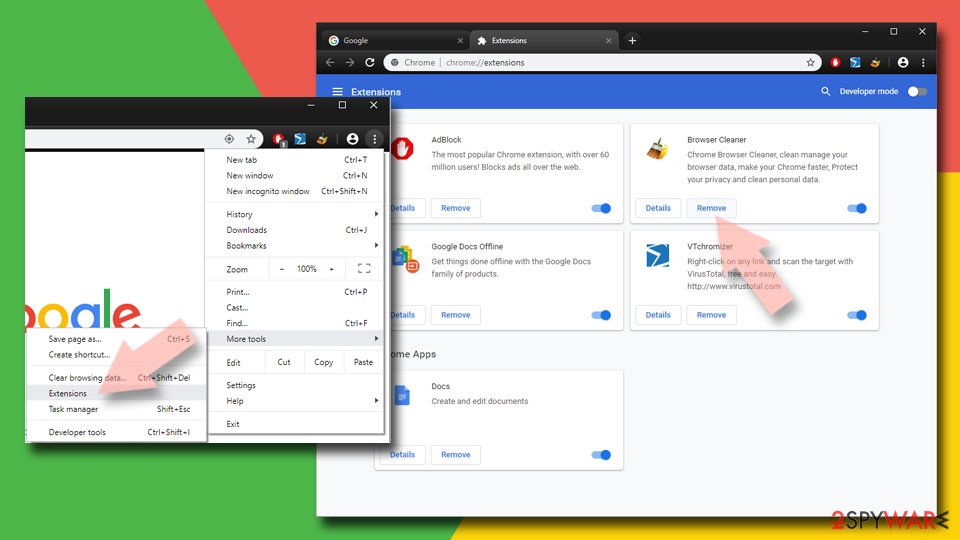
- Open Google Chrome, click on the Menu (three vertical dots at the top-right corner) and select More tools > Extensions.
- In the newly opened window, you will see all the installed extensions. Uninstall all suspicious extensions related to the unwanted program by clicking Remove.

Clear cache and web data from Chrome:
- Click on Menu and pick Settings.
- Under Privacy and security, select Clear browsing data.
- Select Browsing history, Cookies and other site data, as well as Cached images and files.
- Click Clear data.


Change your homepage:
- Click menu and choose Settings.
- Look for a suspicious site in the On startup section.
- Click on Open a specific or set of pages and click on three dots to find the Remove option.
Reset Google Chrome:
If the previous methods did not help you, reset Google Chrome to eliminate all the unwanted components:
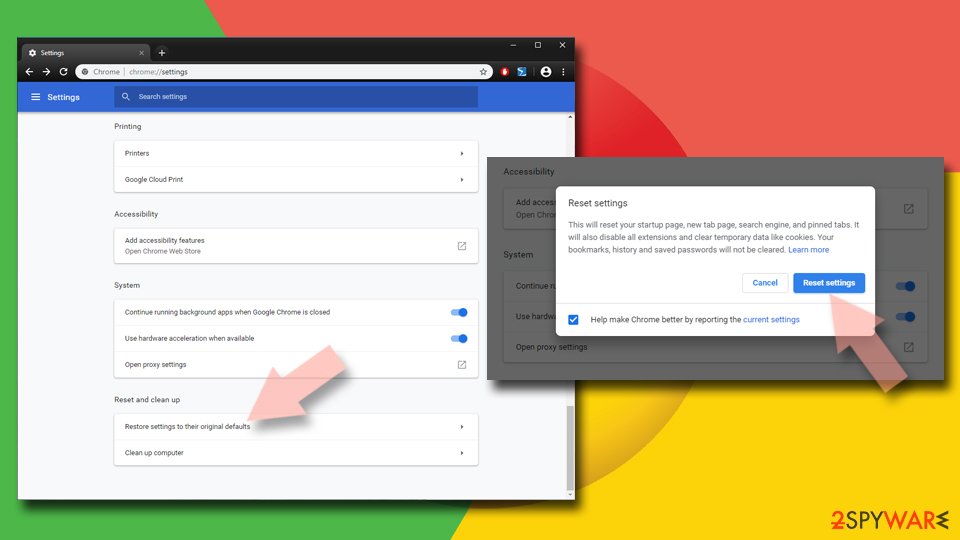
- Click on Menu and select Settings.
- In the Settings, scroll down and click Advanced.
- Scroll down and locate Reset and clean up section.
- Now click Restore settings to their original defaults.
- Confirm with Reset settings.

Delete from Safari
Remove dangerous extensions:
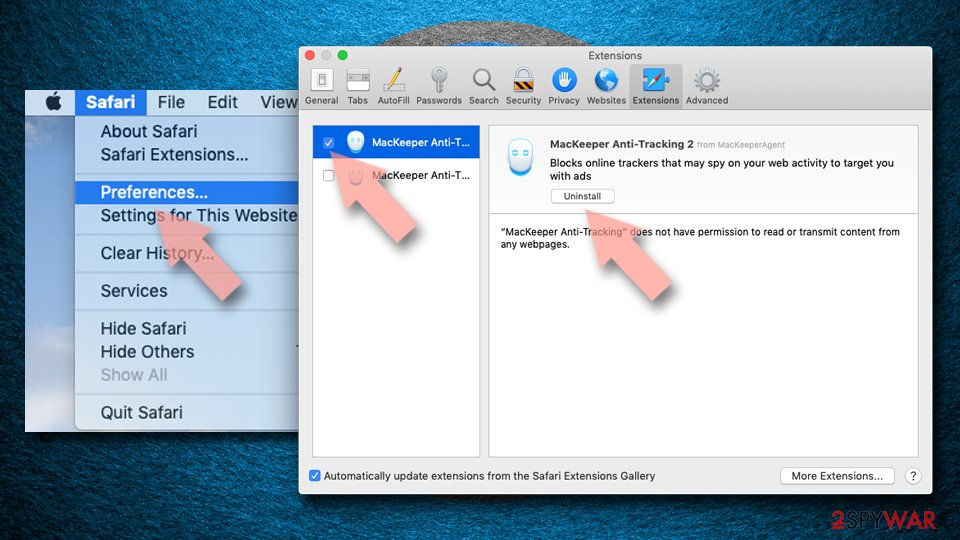
- Open Safari, click Safari in the menu at the top-left of the screen, and select Preferences.
- Go to the Extensions tab, look for any suspicious entries, and click Uninstall to remove them.

Clear history and website data:
- Click Safari in the menu and pick Clear History.
- Set Clear to all history and confirm with Clear History.


Reset Safari:
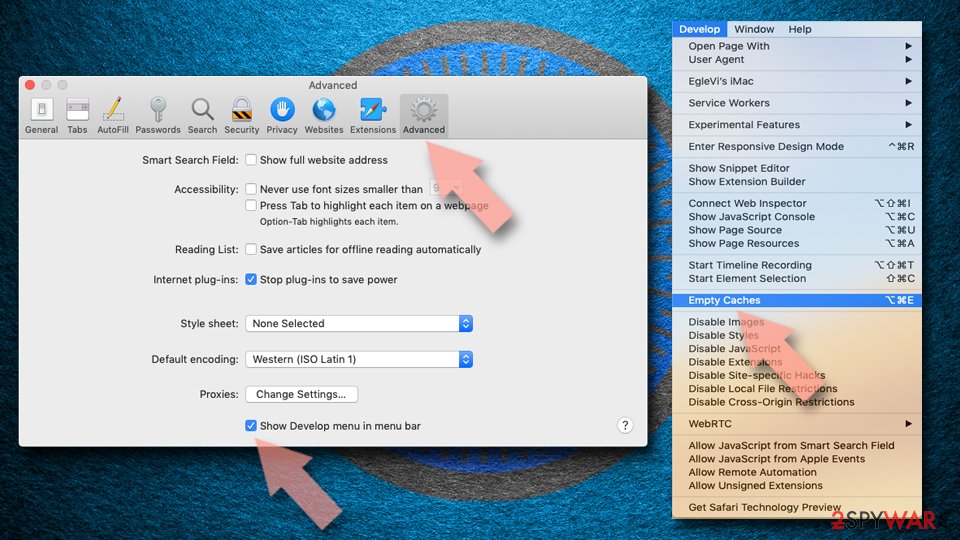
- Click Safari in the menu and select Preferences > Advanced.
- Enable Show Develop menu in menu bar.
- From the menu bar, click Develop and select Empty Caches.

Did this guide help?
3 comments
EDWARD
that is not spyware or malware its a script on the website its not on your machine its not a hijacker its part of a script which runs off the website
Jerre
As a webmaster, I was disappointed to see my privacy policy being violated by an extremely common script I was using ("AddThis") for sharing pages to various social sites. The code was being executed remotely so I couldnt just remove the function call without removing the script all together. Sorry, the only way to avoid them and akamai is to block them by hacking your own computer (Google/Bing editing the hosts file for your OS.)
Jerre
Just have to point out: this page which claims to remove scorecardresearch.com uses the very same AddThis script to share to page to social sites, which calls scorecardresearch.com to report your usage.