

AdChoices – a legitimate advertisement platform used by industry giants such as Google

AdChoices is an advertisement service[1] used by multiple organizations in Canada, the United States and various parts of Europe. Companies that are participating in the self-regulatory campaign include Google, Microsoft, AT&T, Bloomberg and more than 200 others. Since companies like Google earn more than 85% of their revenue[2] through advertisements, targeted ads are what they are interested in.
When done right, personalized advertisement[3] is a great way of benefiting the end user and the third-party. However, this activity might raise some concerns when ads intentionally install adware or other PUPs on the user's computer. Besides, several industry experts are quite critical about how the gathered personal and non-personal information might be used.
Before you proceed with our removal guide, we would like to inform you that some of these ads cannot be eliminated, as they are embedded within the websites themselves (you can block some of the ads thanks to ad-blocking extensions, however). An abnormal amount of ads can indicate adware infection – and that is what we are here to talk about.
| Summary | |
| Name | AdChoices |
| Type (if misused) | Adware |
| Description | Self-regulating advertisement service |
| Participants | Google, Microsoft, AOL, etc. |
| Distribution | Malicious ads, software bundling |
| Symptoms | An increased amount of ads, installed add-ons, changed browser settings, redirects, etc. |
| Detection and elimination | In case you noticed anything suspicious on your PC, scan it with FortectIntego to fix corrupted files as a consequence of the virus |
Various types of ads are following on every website and web page, but complaints start only when the browsing experience is diminished. Users claim that browsing the Internet becomes unbearable because of pop-ups, banners, and in-text ads appeared on their browsers. Frustrated users even call it “AdChoices virus”; however, we have to stress out it’s not a virus because the campaign is heavily regulated. However, it does not stop bad actors to deliver annoying PUP while abusing this service.
It’s a legitimate online advertising method that normally does not bother Internet users at all. An excessive amount of ads starts appearing when users accidentally install a particular add-on or adware[4] program. These applications are responsible for delivering commercial content and spread bundled with free software. Therefore, inattentive computer users usually install some program that floods their Google Chrome, Internet Explorer, Mozilla browsers with ads, including:
- Pop-ups
- Pop-unders
- Audio-ads
- Video-ads
- Hyperlinks
- Etc.
These programs might sneak into both Mac and Windows operating systems, so they can affect all popular web browsers. Once you notice an increased amount of ads, scan your computer with a reputable anti-malware program, such as SpyHunterCombo Cleaner, and remove AdChoices pop-ups. FortectIntego will help you fix the outcomes caused by the virus, e.g. corrupted files.

Personalized advertisements are delivered based on users’ preferences and needs. Tracking cookies[5] help to learn more about users by monitoring their browsing and search history. According to Ad Choices Privacy Policy, they may collect various information and even share it with third-party companies:
Personal information you knowingly choose to disclose to us such as your name, mailing address, and email address. You may provide this information when you make requests for information or assistance; Non-personal information including but not limited to browser type, IP address, operating system, the date and time of a visit, the pages visited on this Site, the time spent viewing the Site, and return visits to the Site; We may also collect aggregated information as you and others browse our Site.
AdChoices ads might offer useful and reliable products or services; however, they might be dangerous as well. Some ads may redirect you to malicious websites that are created for spreading malware, viruses or install tracking cookies and try to steal your information[6]. Keep in mind that Ad Choices doesn't take any responsibility for the trustworthiness of these sites. Here is a sentence from its Terms of Use:
ALL SUCH INFORMATION, PROGRAMS, PRODUCTS, SERVICES, AND MATERIALS ARE PROVIDED “AS IS” WITHOUT WARRANTY OF ANY KIND, INCLUDING, WITHOUT LIMITATION, ALL IMPLIED WARRANTIES AND CONDITIONS OF MERCHANTABILITY, FITNESS FOR A PARTICULAR PURPOSE, TITLE, AND NON-INFRINGEMENT. CERTAIN AREAS OF THIS SITE INCLUDE CONTENT PROVIDED OR POSTED BY THIRD PARTIES. DAA (“DIGITAL ADVERTISING ALLIANCE”) IS NOT RESPONSIBLE FOR THIS CONTENT OR THE STATEMENTS OR REPRESENTATIVES CONTAINED THEREIN.


You can block these ads if so desired
As mentioned above, not much can be done about these ads, unless a powerful ad-blocking extension is installed on the web browser. Targeted ads, while a threat to online privacy, do have some benefits – women are less likely to see men's shaving products, for example. Besides, targeted ads help publishers to monetize and provide their services and content for free – if such ads are blocked, they do not have a way to monetize.
Having that said, you can block these ads as they work based on website cookies that are placed on your web browser. You either set cookies to be deleted each time you close down Google Chrome or another web browser. Additionally, you can visit the opt-out site that would allow you to get rid of interest-based advertisements.
Nonetheless, after you do so, keep in mind that you will continue seeing ads, but they might be much less relevant to you.
Ways to block excessive advertising
If you have been coming across suspicious ads while visiting your favorite websites (YouTube, Facebook, Google, etc.), you should think about what free application have you recently installed on your computer. It may be that you have been using the wrong way to install freeware and shareware on your computer what means that you have been allowing installation of commercial components (browser add-ons, extensions, plugins, toolbars, etc.) on it.
To get the ability to see all optional components that are hiding in the freeware, you should select a Custom or Advanced installation option. Also, make sure you uncheck all checkmarks that claim that you want to install browser add-ons, extensions, plugins, toolbars and similar components. However, if you have rushed software installation, now you have to solve this issue. Follow a simple removal guide presented at the end of the article. French-speaking users are advised to head to LesVirus.fr for instructions in their native language[7].
Speaking of the Ad Choices, some users have expressed complaints that they cannot get rid of these ads even when using AdBlock Plus. This software has a whitelist feature that allows certain ads to reach users. In case you came here to find a solution to “adblock not blocking adchoices” problem, you should do the following:
- Find the AdBlock product in your browser's Extensions/Add-ons list.
- Click on Options/Preferences next to the extension and deselect the Allow non-intrusive advertising option.
Frequently asked questions
Question. Surprisingly this morning I've found all my web browsers full of AdChoices ads. I assume I've run into some PC infection somehow and now need help since those ads are driving my crazy. Searching for help, I got nothing very helpful, except several YouTube videos on how to remove these ads, but none of them has helped. Could you please help?
Answer. Yes, apparently, if you have found ads labeled something like 'Ads by AdChoices' while browsing, then you have installed the related component on your machine. To remove Ad Choices, you should use a guide that is given down below. After doing so, we recommend scanning the computer with FortectIntego because this way you will ensure your computer is totally safe and free of potentially unwanted programs, malware, file leftovers, and so on. Good luck!
Question. I also have these Ad Choices ads on my Firefox web browser. I updated everything possible, installed several Malware Removal programs, and they did not find any of these. What else can I do to get rid of this irritating app?
Answer. These advertisements are not related to a virus, so security tools will not help you with that. You can always employ ad-blocking software for that, although make sure it is legitimate first.
Question. Hello. I have one question related to online ads. Sometimes I get confused by them. Recently I've noticed that when browsing with Chrome, Opera, and Firefox some words are highlighted and bring up an ad when I hover the mouse over them. Most of them are marked as 'Ads by AdChoices'. Could you please tell me whether they indicate some infection or is that just normal?
Answer. Hello. The answer is simple – seeing these advertisements is certainly not a dangerous thing but if they have been bothering you then you should think about what commercial program have you recently installed on your computer. The easiest and most reliable way to get rid of it is to follow manual removal guidelines that are given below.
Question. I've recently downloaded Java and Flash Player updates. It seems that by doing so I've installed something suspicious because each of my web browsers has started generating tons of ads powered by AdChoices. What should I do to stop this from happening?
Answer. Technically, it is not a virus. It's rather an advertising tool, which displays different kinds of ads. In this case, we recommend you follow the manual removal guide that is given down below and fix your computer.
Question. I don't understand what's the matter with my computer or with me since ads constantly show up on my computer. This time, I'm dealing with AdChoices but cannot get rid of it no matter what I try. Please help!
Answer. It's interesting which actions did you take to remove these ads. Technically, this program is not a virus, so that you can use a guide below.
Eliminate unwanted ads
If you have been looking for AdChoices removal tool, you should understand that you need to find and uninstall related browser add-ons and extensions from each of your browsers. Carefully follow our step-by-step guide below. Make sure that you eliminate all suspicious components.
After doing so, we think that you should run a full system scan with updated anti-spyware to make sure that your computer is totally safe, and there are no programs that are considered unsafe. If you have difficulties in locating and eliminating these entries, you should launch automatic removal.
To remove ads automatically, you have to employ a professional malware removal program.
Uninstall from Windows
Uninstall from Windows 10/8:
- Type Control Panel into the Windows search box and open the result.
- Under Programs, select Uninstall a program.


Uninstall from Windows 7/XP:
- Click on Windows Start > Control Panel (Windows XP users should click on Add/Remove Programs).
- In Control Panel, select Programs > Uninstall a program.


Remove the unwanted program:
- In the Programs and Features window, look for any recently installed suspicious entries, select them, and click Uninstall.
- If User Account Control appears, click Yes to confirm, then complete the removal.


Delete from macOS
Remove the unwanted application:
- From the menu bar, select Go > Applications.
- In the Applications folder, look for any suspicious entries, then drag them to Trash (or right-click and pick Move to Trash).


Delete leftover files and folders:
- Select Go > Go to Folder.
- Enter /Library/Application Support and remove any suspicious folders related to the unwanted program.
- Repeat the same check in the /Library/LaunchAgents and /Library/LaunchDaemons folders, deleting any suspicious entries.

- Finally, empty the Trash to permanently remove the leftovers.

Remove from Microsoft Edge
Delete unwanted extensions from MS Edge:
- Select Menu (three horizontal dots at the top-right of the browser window) and pick Extensions.
- From the list, pick the extension and click on the Gear icon.
- Click Remove.
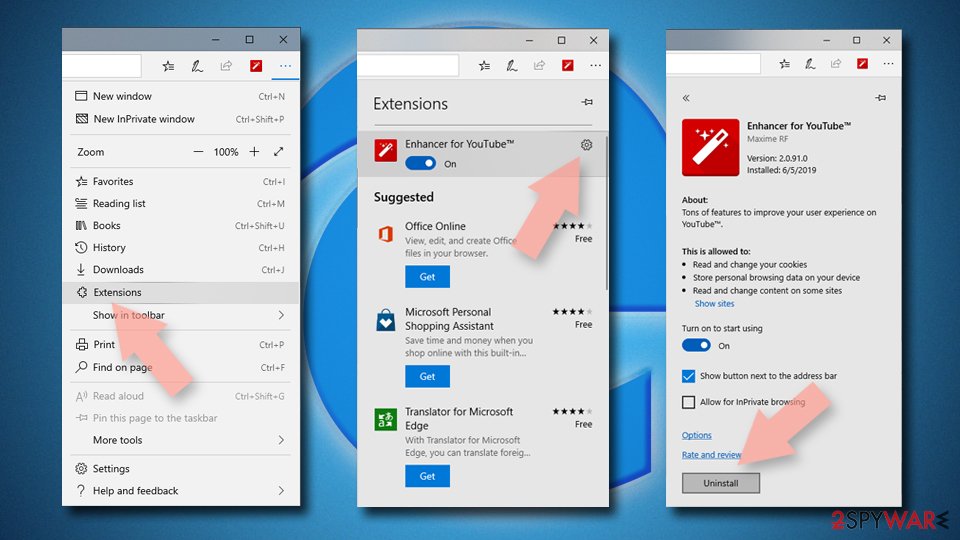

Clear cookies and other browser data:
- Click on the Menu (three horizontal dots at the top-right of the browser window) and select Settings > Privacy, search, and services..
- Under Clear browsing data, pick Choose what to clear.
- Select Cookies and other site data and Cached images and files. (apart from passwords, although you might want to include Media licenses as well, if applicable) and click on Clear.
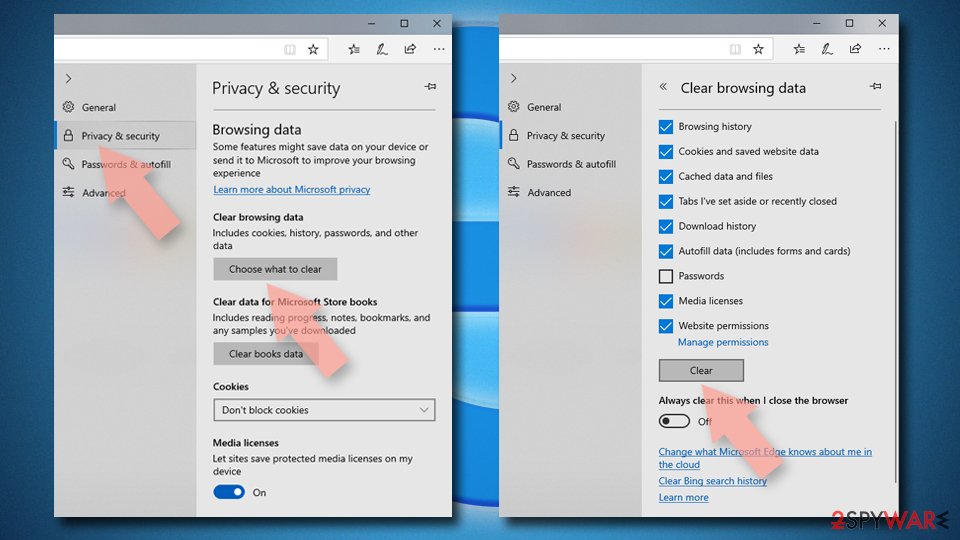

Restore new tab and homepage settings:
- Click the menu icon and choose Settings.
- Then find On startup section.
- Click Remove next to any suspicious startup page.
Reset MS Edge if the above steps did not work:
- Press on Ctrl + Shift + Esc to open Task Manager.
- Click on More details arrow at the bottom of the window.
- Select Details tab.
- Now scroll down and locate every entry with Microsoft Edge name in it. Right-click on each of them and select End Task to stop MS Edge from running.
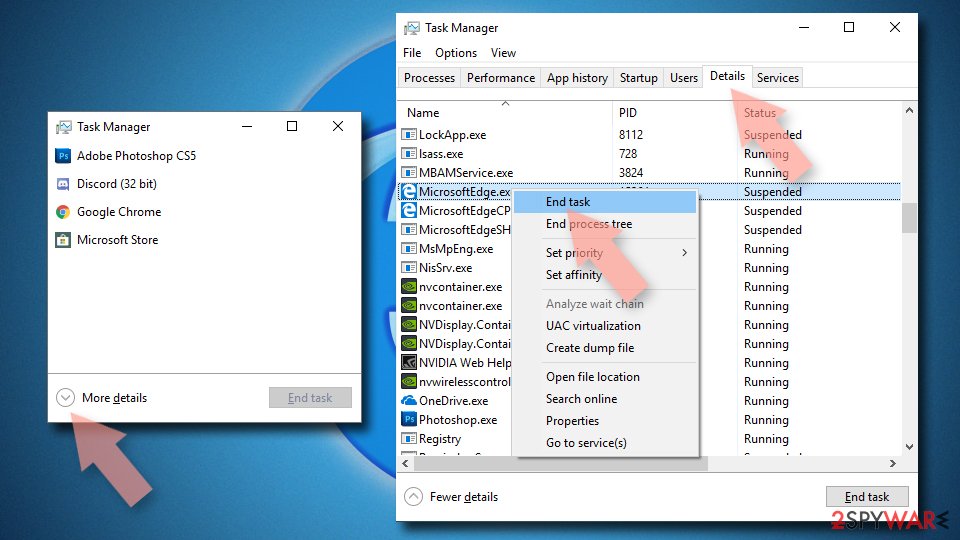

Instructions for Chromium-based Edge
Delete extensions from MS Edge (Chromium):
- Open Edge and click select Settings > Extensions.
- Delete unwanted extensions by clicking Remove.
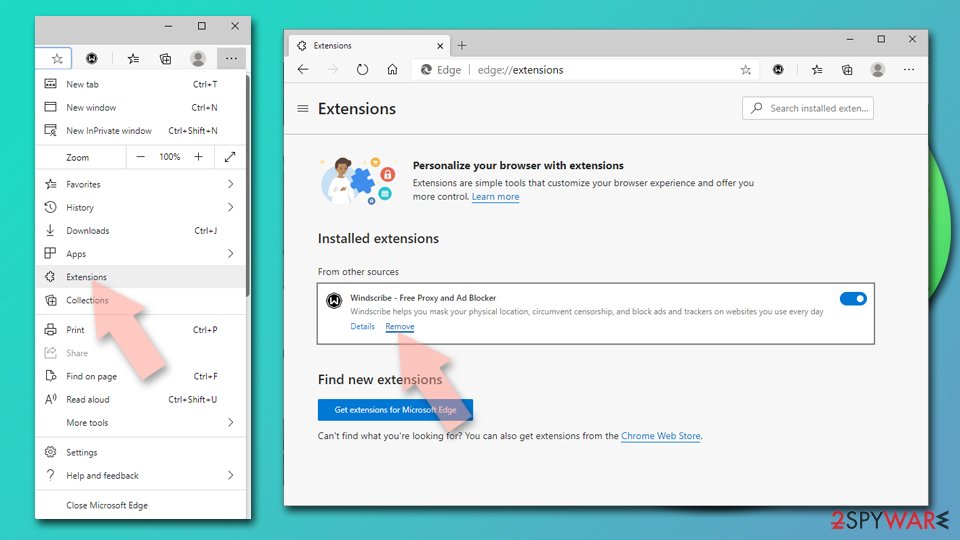

Clear cache and site data:
- Click on Menu and go to Settings.
- Select Privacy, search and services.
- Under Clear browsing data, pick Choose what to clear.
- Under Time range, pick All time.
- Select Clear now.


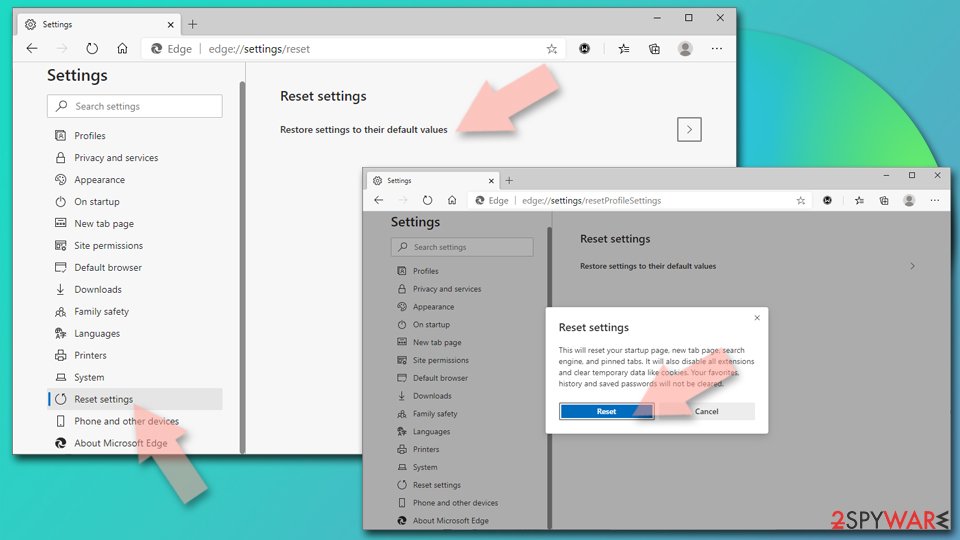
Reset Chromium-based MS Edge:
- Click on Menu and select Settings.
- On the left side, pick Reset settings.
- Select Restore settings to their default values.
- Confirm with Reset.
- This will disable extensions and reset startup pages but will not delete bookmarks, saved passwords, or browsing history.

Remove from Mozilla Firefox (FF)
Remove dangerous extensions:
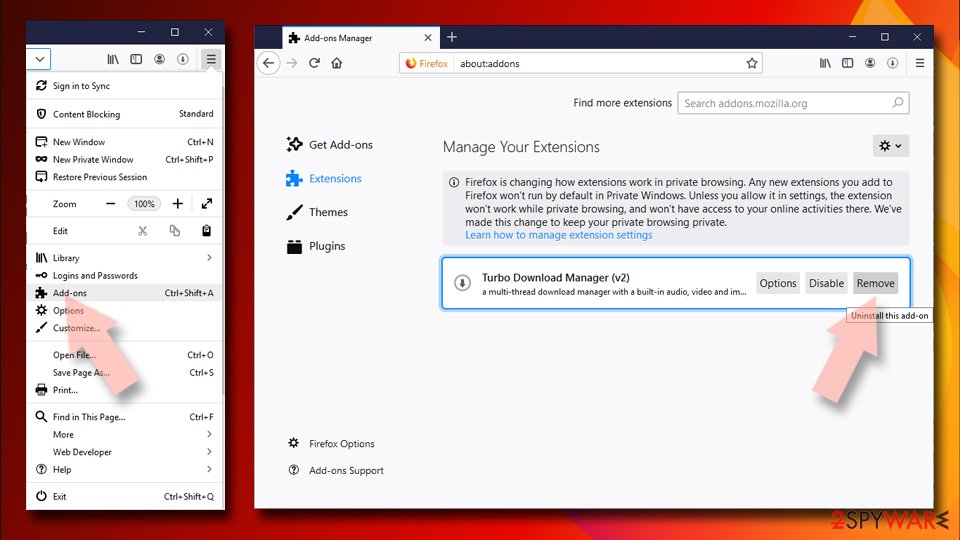
- Open Mozilla Firefox browser and click on the Menu (three horizontal lines at the top-right of the window).
- Select Add-ons.
- In here, select the unwanted extension and click Remove.

Reset the homepage:
- Click three horizontal lines at the top right corner to open the menu.
- Choose Settings.
- Under Home, set your preferred homepage and new tab settings.
Clear cookies and site data:
- Click Menu and pick Settings.
- Go to Privacy & Security section.
- Scroll down to locate Cookies and Site Data.
- Click on Clear Data...
- Select Cookies and Site Data and Temporary cached files and pages, then click Clear.


Reset Mozilla Firefox
If clearing the browser as explained above did not help, reset Mozilla Firefox:
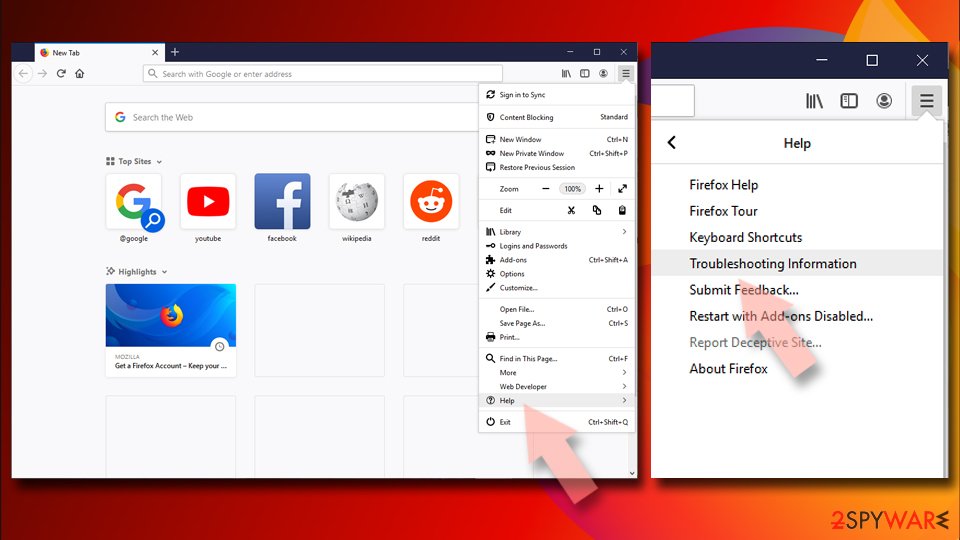
- Open Mozilla Firefox browser and click the Menu.
- Go to Help and then choose Troubleshooting Information.
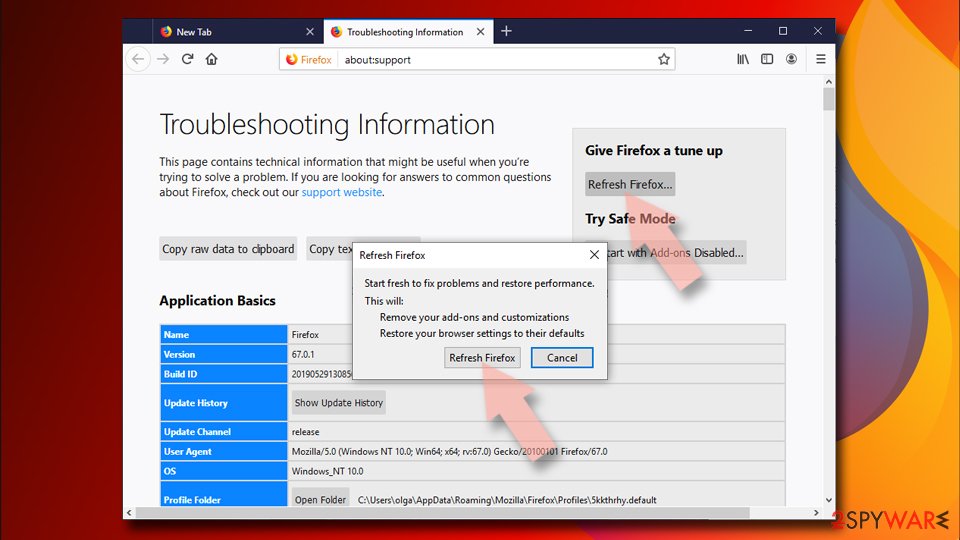
- Under Give Firefox a tune up section, click on Refresh Firefox...
- Once the pop-up shows up, confirm the action by pressing on Refresh Firefox.


Remove from Google Chrome
Delete malicious extensions from Google Chrome:
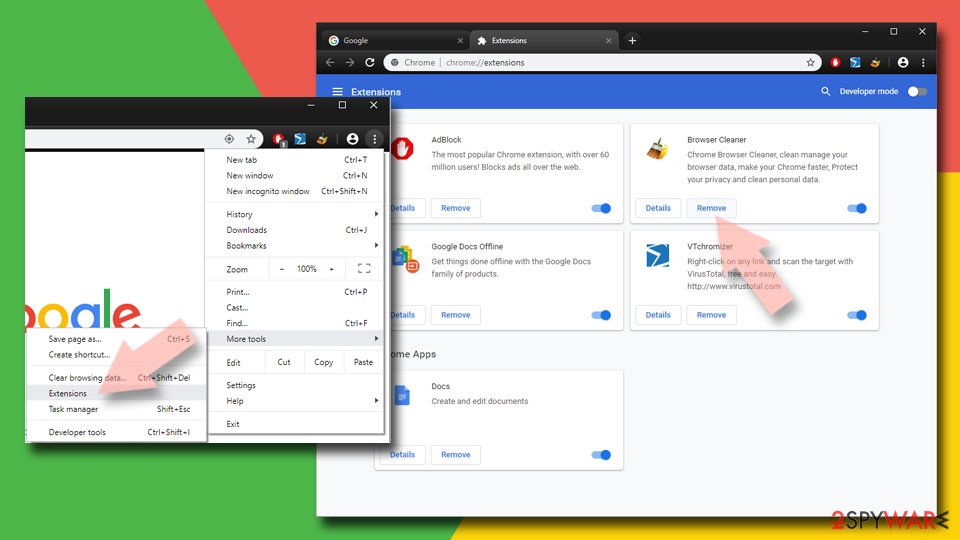
- Open Google Chrome, click on the Menu (three vertical dots at the top-right corner) and select More tools > Extensions.
- In the newly opened window, you will see all the installed extensions. Uninstall all suspicious extensions related to the unwanted program by clicking Remove.

Clear cache and web data from Chrome:
- Click on Menu and pick Settings.
- Under Privacy and security, select Clear browsing data.
- Select Browsing history, Cookies and other site data, as well as Cached images and files.
- Click Clear data.


Change your homepage:
- Click menu and choose Settings.
- Look for a suspicious site in the On startup section.
- Click on Open a specific or set of pages and click on three dots to find the Remove option.
Reset Google Chrome:
If the previous methods did not help you, reset Google Chrome to eliminate all the unwanted components:
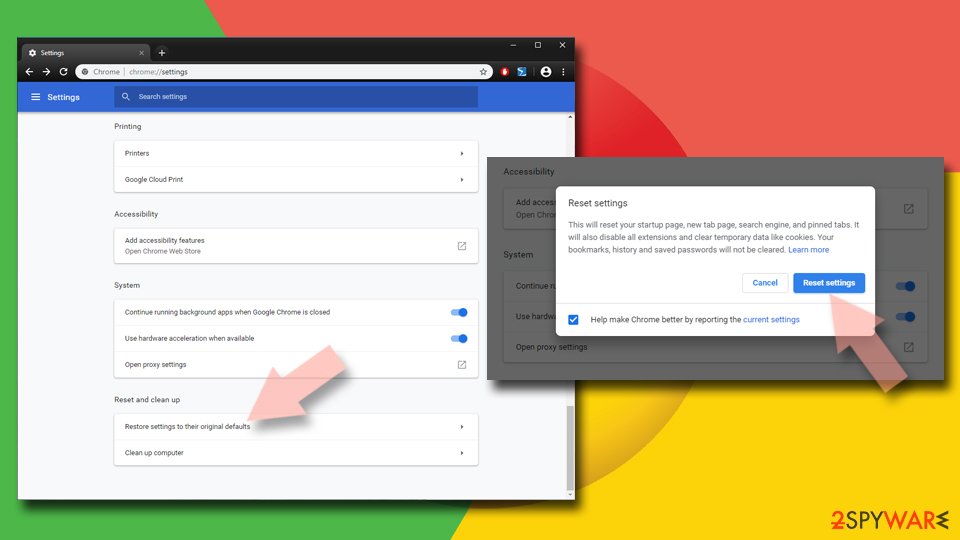
- Click on Menu and select Settings.
- In the Settings, scroll down and click Advanced.
- Scroll down and locate Reset and clean up section.
- Now click Restore settings to their original defaults.
- Confirm with Reset settings.

Delete from Safari
Remove dangerous extensions:
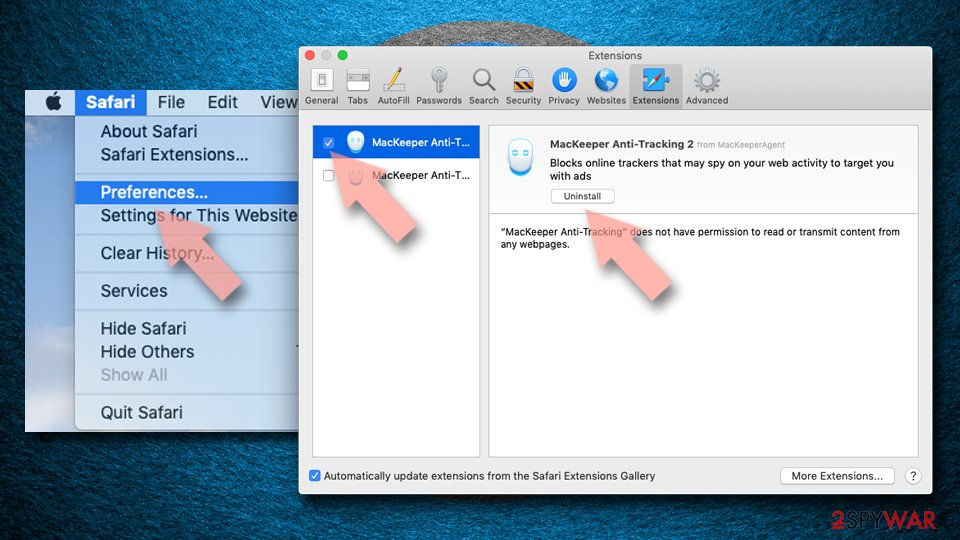
- Open Safari, click Safari in the menu at the top-left of the screen, and select Preferences.
- Go to the Extensions tab, look for any suspicious entries, and click Uninstall to remove them.

Clear history and website data:
- Click Safari in the menu and pick Clear History.
- Set Clear to all history and confirm with Clear History.


Reset Safari:
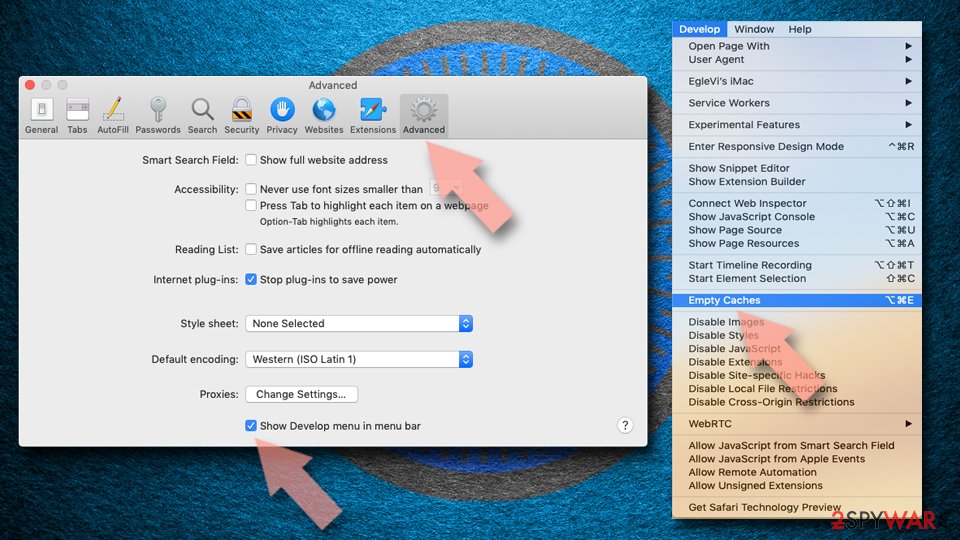
- Click Safari in the menu and select Preferences > Advanced.
- Enable Show Develop menu in menu bar.
- From the menu bar, click Develop and select Empty Caches.

Did this guide help?
22 comments
Confused
I downloaded Defender Pro Ultimate Security Suite which Nortons said was safe. As soon as I tried to run it, Nortons blocked it and said that it contained a Trojan. So, obviously, I quit the application. What is going on??
xyz
how do i remove this? It serves no use to my family and is unwated.
KS
Its mostly likely a "false-positive". Therefore, youll need to turn off Norton in order to successfully install DPUSS.
Donna
When I ran the scan adchoices nevr came up. But I promise you I have it. It is very annoying.
csr_sa
Thanks. It works for Google Chrom ;)
uk
BIG CON KEEP AWAY
Jay
I have followed these instructions for Google Chrome. I do not have ADCHOICES in the list of search engines, even then my browser is continuously showing AdChoices. Assuming that adchoices is a software sitting in my computer I have re-installed fresh windows. Even then I see adchoices in Chrome. I am very disappointed. I think I should stop using Chrome.
Cybersmile
I think you do not have a "virus", thats just regular advertisement provided. See info at
https://support.google.com/adsense/troubleshooter/1631343?url=http://www.wikihow.com/Get-Rid-of-Adchoices&gl=NL&hl=en&client=ca-pub-5462137703643346&ai0=CRdTvdcPjU4aHKvKnigae7oDQCP251uoDvdvS2p4B5eT31NIBEAEg_NiCH1CH8_nSBmCR9JiFhBigAavRk-QDyAEE4AIAqAMBqgSmAU_QHwfYA_StPZRohlKRDH28Uh095fRsoYyzHqNNgOjjEdF-AFaBu4fSS5L_3BBbDfoZdfi3E39PKggTyu0D0upmQLw4k-uc3ihTh5XcpwNKfYcoBnriB_GVKMp5PBG_rqk1yQ5tJUsJFz0Ota8Yg9OAd8YCXOgkMtURCdMo0qgzybQ6KoPirouHVXVW3x37Ad-_7RmGOJFAk-wPqF3kwAQff-n22zXgBAGIBgGgBhmAB72u7Bs&rd=1
I have come across several of the aggressive virusadware variants (i do ICT workplace support). I find It is still hard to distinguish them from regular annoying advertisements! However when ads start to appear on places you never had them, (especially when even within enclosed intranet !), or even new windows popup spontaneously with ads, then you have got it bad.
My experience with adware hunters is not a very positive one. Somehow i get the feeling they cleanup one thing and bringon another after time!
A well, we expect to much. Remember, Internet was build out of anarchysm !
emmet brickowski
it is probably that this is a SCAM AND YOU SHOULD STAY AS FAR AS POSSIBLE FROM THIS PROGRAM
Rogue1009
I reset my settings in ie and it seems that this has done this for me. Did not see the software and malware bytes did not see anything though???
chris
yup, the links provided here allowed me to opt out of such adds, thank you
A guy
I cant disable the virus :(
jay
i did manually what you said but i still can see adchoice.the free anti adware software just do the basic and then you have to purchase the full version in order to do a complete cleanup.
Julie
I wanted to write here to make sure there was clear information about the difference between the Ad Choices program and spyware.
The Ad Choices program is an effort by the digital marketing industry to show internet users that cookie data based on your browsing behavior is being collected in order to show more relevant ads (e.g. if you visit lots of tech sites, tech ads will find you more often). Advertisers use that blue triangular icon on the top right corner of ads to inform you this is happening. If you click on the icon it should allow you to opt-out of behavioural advertising from that company.
I have no doubt that the removal of the toolbar in this thread is probably a good idea. But I wanted to at least flag that there is a difference between what the Ad Choices program is and what the spyware/adware is being removed from this thread. This thread should probably be renamed to "Babylon toolbar/Conduit search removal".
Hope this helps!
JunkYardDawg
Yep I have the annoying "AdChoices" and I tried EVERYTHING....even the BS OPT OUT instructions which I think only verify your address and continue running!
Ive opted out of 32 ad services and forsome reason...everytime I log on to the computer....they just seem to continue like they were never asked to stop!
I only get the adchoice ads when using the MSN login for email! But i do pay for the MSN services and I believe if One is paying for a service...One should have the rights to NOT HAVE TO DEAL WITH ANNOYING ADS! Sorta like paying for DISH TV and no matter what package you chose....you ALWAYS have hispanic channels that you neither watch or are interested in but yet you are forced to have them in channel lineup! Whats up with that!?
I do not care about the viewing of ads on products I WILL NEVER....EVER BUY!
So why do I have to deal with them?
SAL
I searched Applications and Safari Extensions and see absolutely nothing on my new computer . . . still, AdChoices pops up more and more on my links. Theyre more annoying than regular ads because (1) they mimic an "X" in the upper right corner which implies you can disappear them, but clicking on it actually does the opposite; and (2) just moving your cursor over them shows that theyre loading something onto your system. That ought to be illegal.
davie
Jay I see your mention stopping using chrome but I would like to say that thst might not help. I have adchoice pop ups appearing on all three of my p.c.s but only only on one particular site. I have asked the site provider to stop them and have been told that it is my fault that they are there. All the 3 p.c.s have different o.ss and I use different browsers so that wont help. My newest p.c. is only a few weeks old and apart from my normal site use I havent added anything or downloaded anything into my p.c. yet adchoices are still there and as stated before, only with one particular website. www.xscores.com. Adchoices have always been present on this site since I started using it years ago and they havent been an issue until recently when full page ads appeared and prevented me seeing the details on screen. The only option was to shut down and re open the website. Since complaining to the website, these full page ads have stopped so I fully believe that they have some control over them even though they deny it.
Peter
I took the advice of someone who suggested I had a look at any recently installed programs and I found malwareprotectionlive. I used Control Panel to remove it, then I deleted its folder and finally I deleted everything in the registry that referred to it. That seems to have worked.
Amy
This crap is all over my iPhone. !!!! Yeah, now what? None of the above helps to get rid of it off my computer, cant get it off my Mac OR my new iPhone, either. :(
Michael
Not true, you do not have to install anything to get it. You can simply get it from being on Facebook using a browser Im guessing. I have ad choice on my iPad everywhere and I havent installed a thing.
Jerry
I have it on my stepsons Android phone it pops up when apps open and YouTube please help for removal
Jim
Calling Ad Choices a legit co. is like calling North Korea a democracy.