

RaaS virus is the file-encrypting virus
Security experts wart about a newly released ransomware called RaaS, which seems to be the offspring of Tox. To be more precise, RaaS is an encryption tool or ransomware creation tool, which allows to design ransomwares in just a few steps.
For that, cyber criminals have to enter their BitCoin address and the payment that they want the ransomware to demand from the victims. Furthermore, developers of RaaS virus employ their encryption model, create an encryption window, and spread the ransomware using their own methods (exploit kits usually). At the meanwhile, the affiliate has to trust RaaS developers and agree to give away 20% of successful scam income.
In comparison to other ransomwares, RaaS is considered to be the first one written in Java. Its references to libgcj-16.dll (a part of The GNU Compiler for the Java Programming Language) has been detected. Thus, it seems that users have the possibility of encountering with an exclusive type of ransomware.
Unfortunately, just like the others, it leads to the same consequences – data or money loss. Once it gets installed, its target is files with the following extensions:
abw,accdb,ai,aif,arc,as,asc,asf,ashdisc,asm,asp,aspx,asx,aup,avi,bbb,bdb,bibtex,bkf,bmp,bpn,btd,bz2,c,cdi,cer,cert,cfm,cgi,cpio,cpp,crt,csr,cue,c++,dds,dem,dmg,doc,docm,docx,dsb,dwg,dxf,eddx,edoc,eml,emlx,eps,epub,fdf,ffu,flv,gam,gcode,gho,gif,gpx,gz,h,hbk,hdd,hds,hpp,h++,ics,idml,iff,img,indd,ipd,iso,isz,iwa,j2k,jp2,jpf,jpeg,jpg,jpm,jpx,jsp,jspa,jspx,jst,key,keynote,kml,kmz,lic,lwp,lzma,m3u,m4a,m4v,max,mbox,md2,mdb,mdbackup,mddata,mdf,mdinfo,mds,mid,mov,mp3,mp4,mpa,mpb,mpeg,mpg,mpj,mpp,msg,mso,nba,nbf,nbi,nbu,nbz,nco,nes,note,nrg,nri,ods,odt,ogg,ova,ovf,oxps,p2i,p65,p7,pages,pct,pdf,pem,phtm,phtml,php,php3,php4,php5,phps,phpx,phpxx,pl,plist,pmd,pmx,png,ppdf,pps,ppsm,ppsx,ppt,pptm,pptx,ps,psd,pspimage,pst,pub,pvm,qcn,qcow,qcow2,qt,ra,rar,raw,rm,rtf,s,sbf,set,skb,slf,sme,smm,spb,sql,srt,ssc,ssi,stg,stl,svg,swf,sxw,syncdb,tar,tc,tex,tga,thm,tif,tiff,toast,torrent,tpl,ts,txt,vbk,vcard,vcd,vcf,vdi,vfs4,vhd,vhdx,vmdk,vob,wbverify,wav,webm,wmb,wpb,wps,xdw,xlr,xls,xlsx,xz,yuv,zip,zipx.
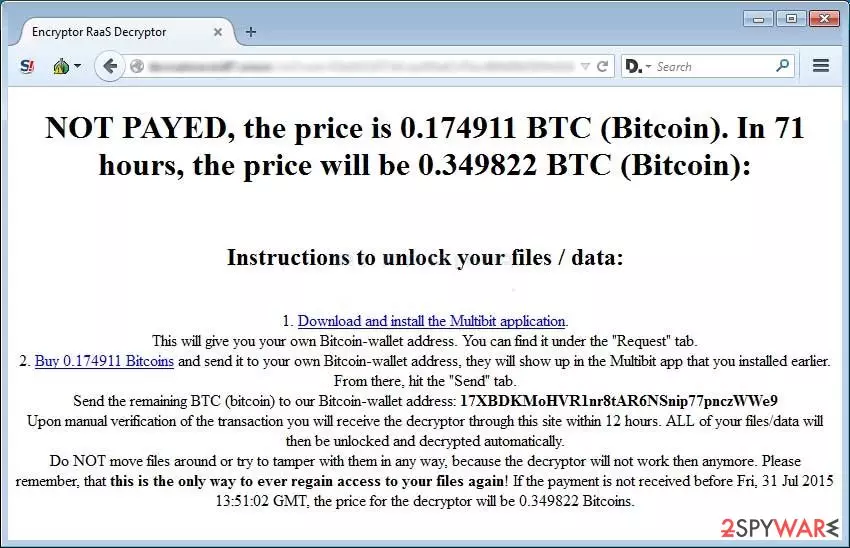
Once it detects all files that it is compatible with, it encrypted them using an advanced encryption method, which, unfortunately, hasn't yet been recognized. Finally, when the RaaS virus encrypts all data stored in a victim's computer, the encryptor_raas_readme_liesmich.txt file is created and the ransom window shows up on the desktop.
It usually contains instructions how to dencrypt data and the link where the victim can transfer the payment. The message typically looks like that:
ATTENTION!
The files on your computer have been securely encrypted by Encryptor RaaS.
To get access to your files again, follow the instructions at:
https://decryptoraveidf7.onion.to/vict?cust=&guid=ACHTUNG!
Die Dateien auf Ihrem Computer wurden von Encryptor RaaS sicher verschluesselt.
Um den Zugriff auf Ihre Dateien wiederzuerlangen, folgen Sie der Anleitung auf:
https://decryptoraveidf7.onion.to/vict?cust=&guid=
The payment has to be done in BitCoins via TOR system. Nevertheless, keep in mind that in this case paying the ransom is equivalent to disclosing your credit card details to online scammers. Moreover, there is no guarantee that data will be successfully restored.
Thus, if RaaS has already encrypted data stored on your computer, try to restore it with the help of FortectIntego or a similar file repair tool. In addition, remove RaaS virus from the system ASAP using SpyHunterCombo Cleaner or MalwarebytesMalwarebytes or another reputable anti-spyware. You can also find a few helpful methods below.
Malware infections rely on deceiving techniques
Just like CryptoWall, CTB locker, CryptoLocker, and other serious computer threats, RaaS spreads via exploit kits, spam email, illegal websites, and other suspicious means. Once installed, it encrypts documents, photos, videos, music, and other important files.
Therefore, in order to stay safe, it's very important to develop secure browsing habits. For that, first of all, try to bypass suspicious and unknown websites since cyber criminals may easily fill them with malicious codes. Besides, NEVER open doubtful emails that inform about pre-paid purchases, taxes, missing payments and similar things because that's a tricky strategy to arouse victim's interest.
If you are not familiar with the sender, if the email contains grammar or typo mistakes or other suspicious details attract your attention, then DO NOT open the letter. Instead of that, delete it. In case you've been tricked and downloaded RaaS ransomware, then read the next section.
Get a proper anti-malware tool and remove RaaS virus
As we have already mentioned, you should not even consider paying the ransom. Why? Because your files may not be decrypted. Moreover, you may experience further thefts from your bank account. The best solution for RaaS is a full system scan with SpyHunterCombo Cleaner, or MalwarebytesMalwarebytes.
Of course, your biggest headache is not how to remove the ransomware, but probably how to restore corrupted data. In order to do that, try using file recovery tools like a few listed below. Besides, stop thinking that your PC is a safe storage for important data. Do not forget to remove RaaS ransomware before any of that.
People encounter ransomware infections on a daily basis, so you can never know when it will be your turn. Thus, in order to prevent losing documents, photos, music, etc., you should backup your files constantly. This is what the RaaS virus and other encrypters do. malware can also damage the machine, so run FortectIntego to repair any issues.
Backups are the ones that can help restore encoded files. For that, you can use USB external hard drives, CDs, DVDs, or simply rely on online backups, such as Google Drive, Dropbox, Flickr and other solutions.
Did this guide help?
3 comments
Ted
Affiliated to Java? Thats interesting...
Caleb
Not another ransomware..Im sick of them already!
Josephine
Does security software protect against this threat?