

Radamant ransomware is a serious infection that locks important files and demands to pay ransom for the decryption key
Radamant virus is the ransomware from the same family as TeslaCrypt, .VVV file extension virus and other cyber threats. It showed up in the middle of December 2015. Just like its previous versions, this virus spreads around with the help of spam.
According to PC security experts, you can get infected with this ransomware after opening an email message having Microsoft Word or PDF file attached to it. Most of such email messages claim that they need to be opened because they are filled with financial, personal, or similar information. Unfortunately, but there is only one thing that you can get after downloading such an attachment to your computer. It is a trojan horse, which infects the system with a Radamant ransomware kit and saves it in the %Temp% folder as a .tmp file.
As soon as this threat infects the computer, it checks the drive for specific characters and encrypts needed files. It does that with the help of an advanced encryption algorithm called AES-256 encryption. Also, it changes all extensions of encrypted files to .RDM extensions and starts showing a huge warning message that declares that the only way to get these files back is to pay a ransom.
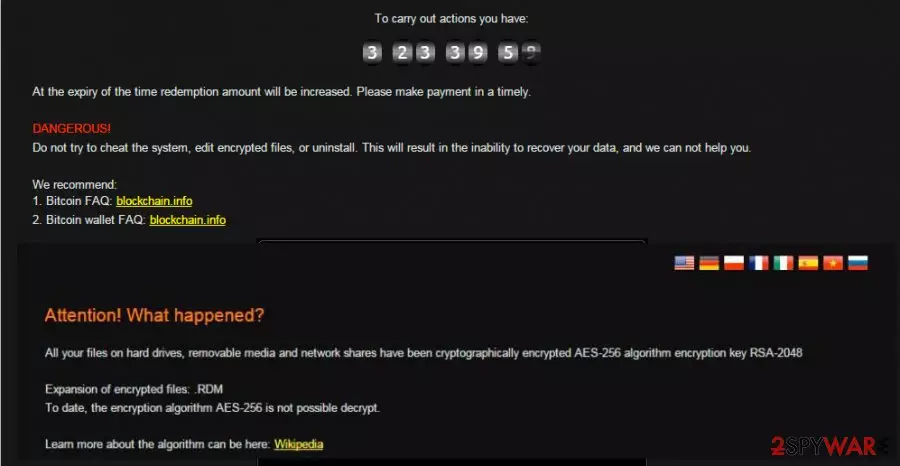
If that is the case you are dealing with, we have to disappoint you that you are in big trouble. First of all, files that were encrypted by Radamant ransomware cannot be decrypted without a special decryption key. To get it, you have to pay a ransom of almost $300. According to cyber criminals, this payment should be made in a form of bitcoins within several days. Otherwise, the virus damages this key and buries affected files. Besides, you can be scammed and lose your files AND money.
.RDM File Extension virus overview:
- Spreads with the help of spam;
- Scans the drive for specific files and encrypts them;
- The decryption key of the Radamant virus can be received only after paying 0.5 bitcoin;
- Runs in the background and waits for commands of its owner;
- Complicates its removal by hiding its files.
What can you do in such a situation? First of all, you have to disconnect your computer from the Internet to prevent the additional loss of your important data. Also, run a full system scan with SpyHunterCombo Cleaner or MalwarebytesMalwarebytes and remove Radamant ransomware together with other malicious files.
If your photos, business documents, or art files have already been encrypted, you should try to restore them from their backups. However, if you do not have copies of your data, there are other options that may help you. We listed these options below so try them after the successful Radamant removal.
You will avoid such infections in the future if you know how they spread
This particular ransomware kit is still active right now and you can easily get infected while browsing on the Internet. That's why we highly recommend installing a reliable anti-spyware and keeping it up-to-date. Also, make sure that you stay away from illegal websites seeking to trick PC users by showing fake ads and pop-up notifications.
Of course, you should also don't forget to be careful with spam. As we have already mentioned at the beginning of this post, the main method used for ransomware-type viruses relies on misleading email messages presenting themselves as financial notifications and other important documents.
If this threat enters the system, it starts its unstoppable work and continues running in the system's background waiting for the payment. Once it receives a signal that the payment was made, it starts the decryption of the files. However, there is no guarantee that this process will be started. That's why security experts do not recommend paying a ransom for the developers of this malware. More information about the removal of this virus you can find below.
It is necessary to remove Radamant ransomware from the system as soon as possible
You need to remove Radamant virus from your computer before attempting to recover data from backups, as the virus can lock new files too. You should select a reliable anti-spyware, update it, and run a full system scan. We recommend using SpyHunterCombo Cleaner or MalwarebytesMalwarebytes.
You should remove all malicious files and other components of this ransomware that are hiding in your computer. Unfortunately, but it is almost impossible to get rid of Radamant ransomware manually because it tries to hide its files deep inside the system as soon as it infiltrates it. Security experts recommend using only automatic removal.
Also, do not forget to fix your system files. You can easily repair your system using FortectIntego or another reliable repair tool. After the computer is clean, try to recover the files. If you do not have backups, you can try other options listed below.
Did this guide help?
3 comments
TerryTerry
OMG! I am infected with this! Need to decode my files!
aVictim
I cant believe this how silly I am.. I have just downloaded an attachment claiming that I was approved for special prices and now my files are infected..
Jenson
It seems like a notorious virus.. I wouldnt be very happy after discovering it on my computer.