

Computer security experts continuously warn computer users about the rise of ransomware viruses nowadays. They advise taking particular actions BEFORE being infected with ransomware. Speaking of ransomware, it is one of these virus types when it is hard to do something against it once it infiltrates the computer system. Prevention is the key; however, if your PC has been infected by this virus, or if you simply want to obtain knowledge about such viruses, we recommend reading this report on 7ev3n ransomware.
7ev3n virus – how does it work?
It is quite easy to recognize ransomware virus. If computer gets attacked by it, you will simply won’t be able to open your personal files, and you will also find notes from cyber criminals dropped on folders that hold the infected records. Anyone can get infected with this virus, and that is why security experts advise to create copies of the most important personal files and store them on an external backup drive. When 7ev3n ransomware hits the system, it assigns its executable file to the startup programs list and and runs its malicious processes the next time you turn your PC on. Then this malicious virus goes through the whole computer system checking all folders and looking for particular file types. This virus targets to affect these file types:
.txt, .docx, .doc, .pdf, .pptx, .ppt, .odt, .mp3, .avi, .mp4, .flv, .jpg, .png, .sql, .mdb, .sln, .csv, .php, .asp, .aspx, .html, .xml, .xls, .xlsx, .psd, .jpeg, .pptm, .pptx, .xlsb, .xlsm, .db, .docm, .sql, .java and much more.
When it finds such files, it encrypts them. This malicious virus uses a harmful encryption algorithm, which deletes the original copies of the files and leaves only the altered copy behind. You can recognize that the files were encrypted by the 7ev3n malware by the extension it adds to the infected filenames. This virus adds .R5A extension to the filenames. When it encrypts files, it leaves a ransom note on several computer locations. Usually, it drops this note (which can be .html or .txt file) on every folder that holds the encrypted data, and also on the desktop.
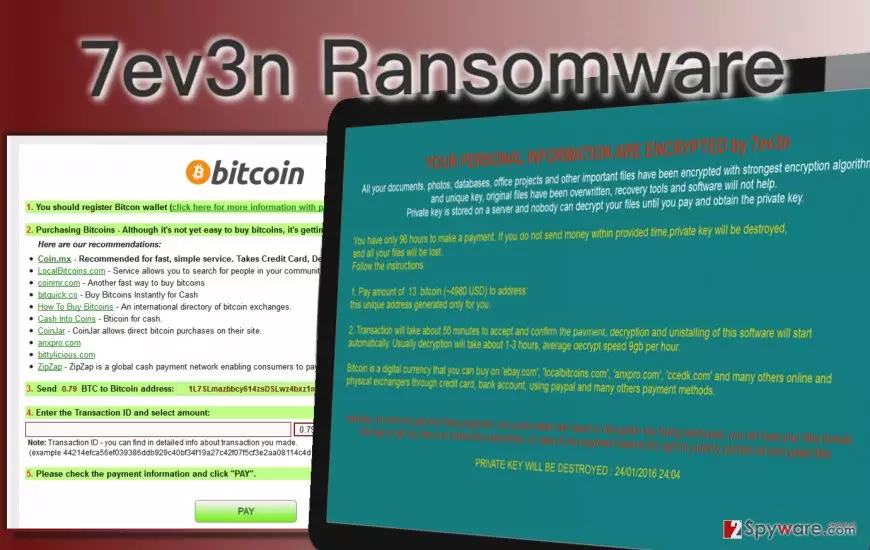
This particular ransomware virus differs from other viruses because it asks for an incredibly huge amount of cash in exchange for a decryption key. This key is supposed to help you to recover the lost records. While other viruses demand approximately 0,5 – 3 Bitcoins (∿198-1187 US dollars), this ransomware asks for 13 Bitcoins, which is around 5142 dollars. Computer experts firmly agree that you should not pay such a huge ransom not only because the amount of money this virus demands is enormous, but also because it is very unlikely that this is going to help you to recover the lost files. We recommend removing this virus as soon as possible, using a professional malware removal program – FortectIntego (Windows) or FortectIntego (Mac). If you wish to get rid of this virus manually, look for a manual 7ev3n removal guide on page 2.
How this virus finds the entrance to the target computers?
To avoid ransomware infection, you have to understand one, but a very important thing – be careful when you browse the Internet. AVOID suspicious websites, refuse to install free apps from unreliable web sources; defeat your curiosity and do not take the risk of infecting your computer with unreliable programs. Moreover, avoid opening e-mails from unknown senders; do not explore the ‘Spam’ category. Ransomware viruses are usually spread as innocent-looking attachments to e-mails; however, they can also be distributed via malicious websites online, or attached to other unreliable software. Make sure you download software only from safe web sources. Besides, avoid clicking on insecurely looking links on social media websites. For example, if your friend posts a suspicious looking hyperlink or sends it to you via private message, do not click on it before asking your friend if he/she DID post it. Clicking on such unreliable link can result in an automatic download of some malicious file; we bet you do not want this to happen.
7ev3n removal techniques
Keep in mind that you are dealing with a malicious and severe virus; you have to be sure that you entirely wipe its components from the system to ensure that your computer is secured. To be 100% sure that the virus is destroyed, you should use an automatic ransomware removal program. You can use one of the anti-malware programs that we recommend using. However, if you are brave enough to try to remove this virus manually, you can use the manual 7ev3n removal instructions that are provided below.
Before you do anything in order to recover the files, remove the virus first. Then, you have two options. If you have a backup drive with copies of your personal records, import them to your computer. If you do not have such backup, the situation is way worse. We are afraid to say that you may not be possible to recover your files; however, you can still try one of the following tools to decrypt at least some of them:
Did this guide help?
4 comments
Wilma
nasty ransomware, attacked my dads company! unfortunately, he had to pay the ransom because the expenses of recovering the files would be even bigger than the ransom. how sad is that!
Simon Howkins
7ev3n deletes shadow copies, they do not help you to get the files back. UGH! I have lost all my data because of this virus, can you guys believe? Do not be naive and do not open damn malicious e-mails coming from idiots that you do not know!
Francesco489
Prevention is the key. Ill backup my files now, thanks god I have accidentally came across this article, I have never heard about ransomware before. I didnt know you can actually do something to avoid virus attacks!
Plein.qsz
Hope these criminals will be caught one day! How much time it takes to track them? I cannot believe they still do their nasty activities nowadays.