

General information about RankSonic.net referral spam:
RankSonic.net referral spam is yet another unfair method that is used to promote particular third-party websites. This referral spam is meant to mess up your Google Analytics statistics and make an impression that there is a huge web traffic coming to your website from this URL, which, of course, arouses your curiosity and makes you click on the link. Unfortunately, RankSonic.net referral spam seeks to advertise various untrustworthy websites, including the ones that promote questionable software. Therefore, clicking on RankSonic.net URL might trigger a redirect to a suspicious website that may be harmful. Be careful, because this deceptive URL might lead you to safe-looking websites that might attempt to talk you into downloading some free programs. Stay clear of such offers – these programs can be malicious and mess up your computer!
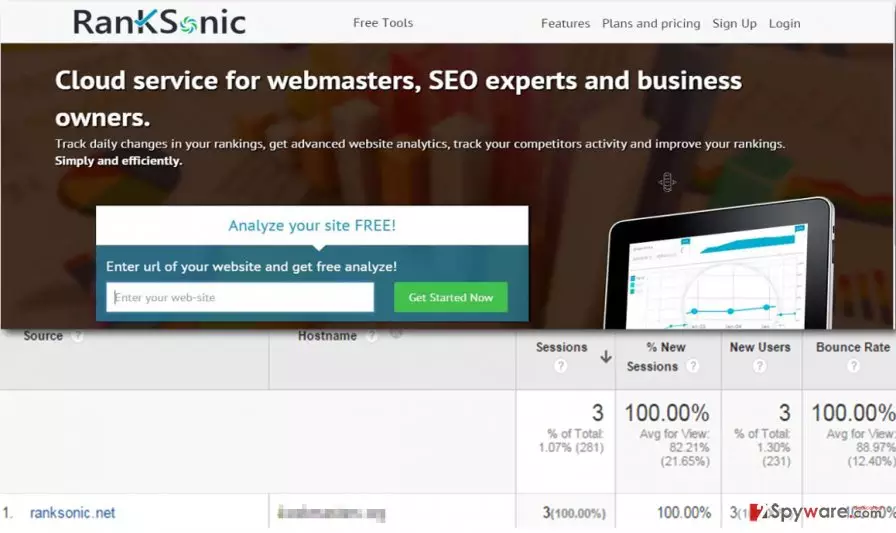
At the first sight, it seems that RankSonic.net referrer spam boosts your website’s popularity; however, it does not affect your website in a good way neither in a bad way. It only uses your Google Analytics code, which lets them register fake website visits and appear in your Google Analytics traffic source table. Although such fake data cannot mess up your website, it DOES mess up information provided in Google Analytics, and that is why you should take precautions and block RankSonic.net referral spam as soon as possible.
Why do spammers are causing such havoc in my Google Analytics stats?
RankSonic.net referrer spam attempts to make an impression that user’s website has attracted traffic from a new website; therefore, some computer users might try to explore such website. Unfortunately, RankSonic.net is a corrupted program. It pollutes the real data of Google Analytics, and it does not provide any REAL traffic to your site. You can recognize a variant of a referral spam by these indicators – the bounce rate from such source will be 100%, and the average session duration will be 0. We recommend stopping RankSonic.net referral spam with no delay if you want to see real, and accurate Google Analytics stats.
Please proceed to page 2 to find out how you can stop RankSonic.net referral spam.
How to block RankSonic.net referral spam?
Keep in mind that the high number of visits from RankSonic.net is fake and that you should not take it seriously. If you want to see decent Google Analytics stats, please follow the instructions provided below to get rid of RankSonic.net referral spam for good. You need to set an exclude filter in order to block RankSonic.net referral spam and to stop RankSonic.net URL from appearing in the traffic source table.
Step 1: Stop RankSonic.net referrer spam by creating an exclude filter.
- Open your Google Analytics account. Go to Admin → All Filters.
- Click Add Filter button and add RankSonic.net to the Filter Name.
- Now select Custom in the Filter Type section and set Campaign Source in the Filter Field. Finally, add RankSonic.net to the Filter Pattern.
- Click Save to apply these changes.
Step 2: Block RankSonic.net referral spam by using a .htaccess file.
- Access your .htaccess file.
- Add the code, which is provided below:
## SITE REFERRER BANNING
RewriteCond %{HTTP_REFERER} RankSonic\.net [NC,OR]
RewriteCond %{HTTP_REFERER} RankSonic\.net
RewriteRule .* – [F]
If you do not know how to access the .htaccess file, follow these steps:
- Log into cPanel and go to Files section. Here, click the File Manager icon.
- Now check the box with Document Root for, select your domain name and click Go. Warning! Make sure you check Show Hidden Files.
- Wait for a new tab or window and find the .htaccess file. Right click it and select Code Edit.
- Now copy and paste the code that is given above and click Save Changes.
Did this guide help?
4 comments
Joelle
finally this stupid fake traffic source is gone. I was surprised to see this URL - I have never advertised my site via it.
tyga1092
thank you for providing this easy guide! i fixed my google analytics:)
Tomboy
Totally messed up Google Analytics... filthy spammers! thats not the right way to promote some products or services online!
fendeld
delivers fake traffic and thats it, it cannot do anything bad for your website anyway