

TeslaCrypt 4.0 virus is yet another version of well-known file locking ransomware
TeslaCrypt 4.0 virus is another version of TeslaCrypt ransomware. Like most threats of this kind, this ransomware encrypts confidential information and delivers a note requiring to pay the ransom in exchange for the encrypted data. It has been reported that the malware came with some updated features and fixes. Therefore, we are here to inform you about them and the options that you have after being infected with this threat.
As we have already mentioned, TeslaCrypt 4.0 ransomware is a renewed version of TeslaCrypt, which was noticed more than a few years ago. However, it seems that the creators of this virus decided to make things worse by fixing a bug that was noticed in previous versions.
TeslaCrypt 4.0 no longer attaches an extension to the encrypted files, so you can not even know that your files are locked. Moreover, earlier the virus had a bug that corrupted files bigger than 4 GB, however, now this bug is fixed and the virus is able to encrypt all files without corrupting them. When it finishes the encryption process, it leaves these files on your system:
- Desktop: RECOVER[5_chars].html
- Desktop: RECOVER[5_chars].png
- Desktop: RECOVER[5_chars].txt
- Documents: recover_file.txt
- Documents: [random].exe
Additionally, it seems that the latest version of TeslaCrypt uses a different encryption algorithm – RSA 4096, contrary to widely used RSA 2048 code.
If this virus has already affected your files and you are looking for the decryption software, do not rush to search for your credit card. It is possible to decrypt TeslaCrypt without paying the ransom. Look for decryption software at the bottom of this article.
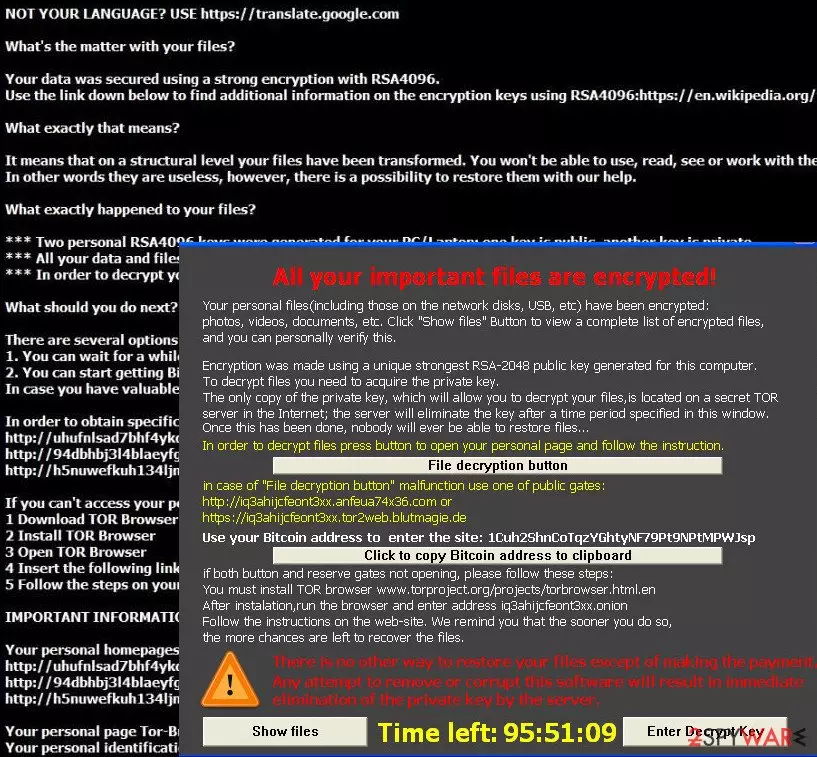
Also, we will try to explain to you how can you remove TeslaCrypt 4.0 virus from your computer. Please note that one of the most effective ways to terminate this threat is to run a full system scan using SpyHunterCombo Cleaner or MalwarebytesMalwarebytes.
If you have already managed to delete TeslaCrypt 4.0 virus from your system, you may also need a reliable repair tool to fix system files and other problems. We recommend relying on FortectIntego.
Ransomware spreads in different ways
Though it is known that there are new features added to this ransomware, the main principle remains the same. You can get infected with this ransomware via spam containing a malicious attachment. Once you open it, the virus starts encrypting your files. Further on, it generates two keys for the encrypted data – a private and public key. The public key enables anyone to decrypt the files in other systems, but, in order to access it again, a unique private key is created. Thus, you need to acquire two different keys to retrieve your valuable information.
What is more, cybercriminals try to make a victim lose his or her temper by providing seemingly simple solutions. Certainly, all of them are seeking the same goal – trick users into thinking that paying the ransom is the only choice to retrieve the data. Nonetheless, do not behave according to their expectations and think about virus removal instead.
If you have too much money, you might try to make a transaction and hope that cybercriminals will have mercy on you. However, it is unlikely. Furthermore, beware that the virus targets computers via exploit kits, alternatively known as trojans. These files have the ability to pass themselves off as ordinary system files. Thus, when they infiltrate a system, they set free ominous ransomware.
As you can see, the consequences are significantly damaging. If you are one of the unlucky ones who have been affected by ransomware, check below to know more about its removal.
Remove TeslaCrypt 4.0 virus as soon as possible
If you are infected, we would like to introduce you elimination options that you have. First of all, we have to warn you that you should skip the idea of manual removal at once unless you specialize in IT programming. We highly discourage you from this option because manual TeslaCrypt 4.0 virus removal can lead you to additional problems. According to PC security experts, only automatic elimination should be considered the right choice in this situation, so make sure you install SpyHunterCombo Cleaner or MalwarebytesMalwarebytes.
Note that when dealing with this version of ransomware you may notice that these anti-spyware programs are blocked by your virus. Thus, the only efficient solution to remove TeslaCrypt 4.0 virus might be to follow a guide given below and disable the ransomware first.
After removing the virus, be sure to fix system files with FortectIntego. Also, you CAN decrypt files locked by TeslaCrypt 4 with a help of this TeslaCrypt decryption tool. It seems that crooks have shut down the TeslaCrypt project; they have also released the master decryption key, so now it is possible to recover your data for free.
Did this guide help?
6 comments
Linda
Woah! Already 4.0 version!
Emily
Before I noticed, the virus already roamed around my system. :( Needed to destroy it automatically.
Val
Be cautious and no virus will hijack your computer! :)
Ernest
Curse those viruses...
Brian
Did anyone try to pay the ransom? :)
Harry
Once I accidentally downloaded TeslaCrypt into my computer. But it was a long time ago. Luckily, I recovered my files from back-up.