

Smart Driver Updater is a dubious app that should be a useful tool
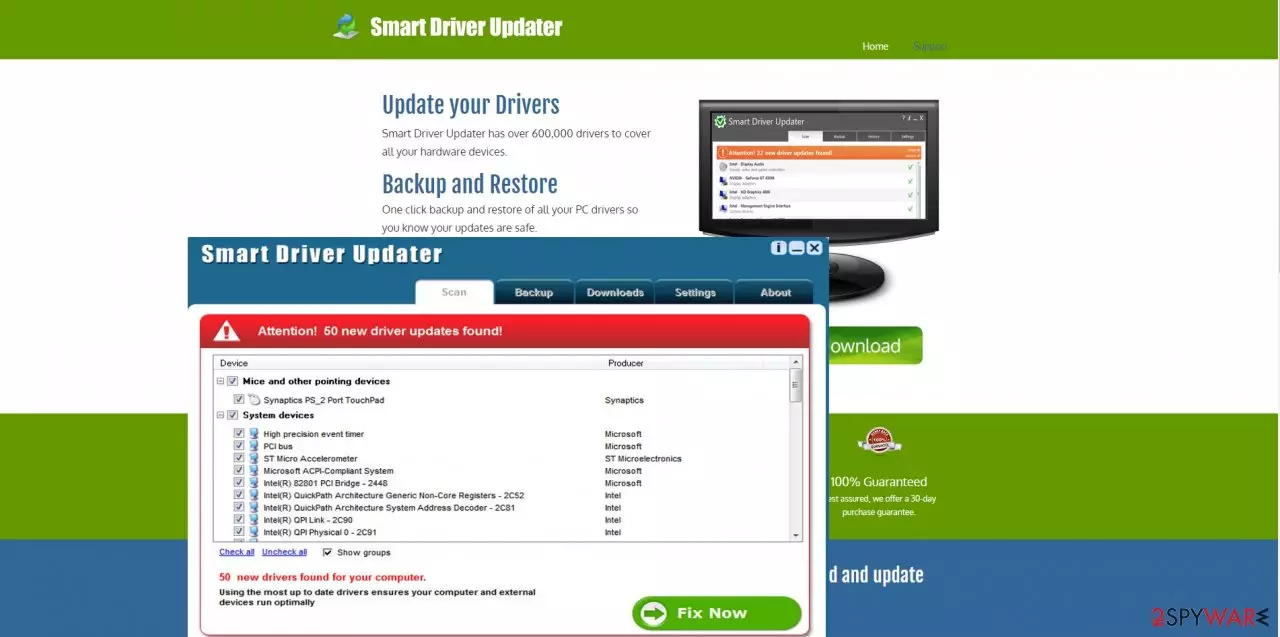
Smart Driver Updater is the potentially unwanted program that should keep the machine up to date by installing needed driver updates. However, this tool is not performing as it supposed to when users install the program themselves. To add to that, this is the PUP that spreads around as a cyber threat because it comes in bundles with other applications.
If you do not have enough time to monitor the efficiency of your operating system, you might think Smart Driver Updater is a suitable application to do such work for you. However, we are sorry to inform you that this software is regarded as a potentially unwanted program.
It aims to convince users into downloading it by informing users about outdated drivers. Once alarmed, some users might fall into its trap and download the application only to find out that they need to purchase the full version of the program in order to experience all benefits.
Additionally, this software might also be supplemented with unnecessary “improvements”, such as malware. Therefore, if you happened to install this software, remove Smart Driver Updater immediately. FortectIntego is one of the programs which can help fix affected files after you remove the PUP in a blink of an eye.
| name | Smart Driver Updater |
|---|---|
| type | Fake system tool, PUP |
| Symptoms | Slower internet connection, slower overall device performance, notifications popping up at the bottom right corner |
| Aim | To sell the full version of the app and promote other online content |
| Distribution | This fake updater is offered through its official websites, but can also come as a piece during the bundling installs |
| Removal | The best way to get rid of any suspicious programs is with reliable anti-malware software |
| repair | System repair tools such as the FortectIntego app should be used to restore any damage |
At first glance, you might not have even the slightest idea that Smart Driver Updater is useless until you start using it. Users are not to be blamed for installing this software since it offers highly beneficial functions: updating current drivers and providing back-up and restore functions.
If your time is scheduled minute by minute, you might lack the time to spend with your family, leave alone taking care of your computer. Thus, Smart Driver Updater might seem like the solution to the problems. Unfortunately, this is not the best tool that people should rely on. It is called a PUA for a reason.
Moreover, as a result of a recent boom in ransomware attacks, you might find the latter app highly useful. Thus, it doesn’t take long since you install the program only to realize that you won’t experience the supposed benefits of this program. After the Smart Driver Updater scans your system for outdated drivers, a notification appears that you need to purchase the full version in order to experience the benefits of the program.
However, we should warn you not to fall into the trap set by the developers of the Smart Driver Updater virus. It might be the case that they have managed to collect stunning amounts of money by convincing countless, of users to purchase the full version while the program still displays alerts of the drivers that need to be updated.
Additionally, the program might be “enhanced” with malevolent files which are responsible for showing fake alerts. Thus, you should perform Smart Driver Updater removal. We recommend getting a tool like SpyHunterCombo Cleaner or MalwarebytesMalwarebytes for the best results of the system cleaning.
PUP distribution includes shady ads
Mainly, the majority of users who happen to encounter fraud of this program install the program directly from this official website. Alternatively, it might also be spotted traveling as an attachment to freeware and shareware. Since few users pay attention to the installation process, Smart Driver Updater finds it quite easy to settle on the system.
If you are interested in how you can install new software without installing irrelevant applications, then, take note of the advice we are about to give you. Firstly, you should develop a habit of selecting “Custom” installation settings rather than “Recommended.” Afterward, watch for any irrelevant add-ons and unmark them one by one.
Smart Driver Updater removal tips
You can get rid of this program automatically by installing an anti-spyware program that eliminates the software within a moment. The security program is also an invaluable guardian of your operating system from malware like Smart Driver Updater virus attacks.
Alternatively, you can remove Smart Driver Updater manually by uninstalling it from the system. We would like to warn you to check the websites you download new software and spend several minutes choosing legitimate and effective driver updater. Reading reviews might help you decide. Here is the removal guide:
Uninstall from Windows
Uninstall from Windows 10/8:
- Type Control Panel into the Windows search box and open the result.
- Under Programs, select Uninstall a program.


Uninstall from Windows 7/XP:
- Click on Windows Start > Control Panel (Windows XP users should click on Add/Remove Programs).
- In Control Panel, select Programs > Uninstall a program.


Remove the unwanted program:
- In the Programs and Features window, look for any recently installed suspicious entries, select them, and click Uninstall.
- If User Account Control appears, click Yes to confirm, then complete the removal.


Delete from macOS
Remove the unwanted application:
- From the menu bar, select Go > Applications.
- In the Applications folder, look for any suspicious entries, then drag them to Trash (or right-click and pick Move to Trash).


Delete leftover files and folders:
- Select Go > Go to Folder.
- Enter /Library/Application Support and remove any suspicious folders related to the unwanted program.
- Repeat the same check in the /Library/LaunchAgents and /Library/LaunchDaemons folders, deleting any suspicious entries.

- Finally, empty the Trash to permanently remove the leftovers.

Did this guide help?
2 comments
Nicholas
Apparently, Ive read this article too late. At least, it is easy to get rid of it.
Jacob
Everything has its price .:)