

What do you need to know about BadBlock virus?
The number of ransomware threats rises every day, and today we have discovered yet another one. This one is called BadBlock ransomware, and it uses RSA-2048 crypto-system to encrypt victims files, which means that the encryption key is public while the decryption key is kept secret. When this malicious computer infection gets inside victim’s computer, it encrypts practically all files on it, including documents, images, videos, and music. This virus is programmed to find certain file types and encode them, and the list of target file extensions is very long.
Take note that once the file is encrypted, it becomes inaccessible. For example, if it is a picture, you cannot open and view it. If it is a document, you cannot open, edit, or do anything with it at all. In other words, BadBlock malware corrupts all important files so that the victim would not be able to access them. It goes without saying that such unexpected data encryption scares the computer user, and prompt him/her to desperately look for a way to recover the data. Sadly, ransomware is one of the most dangerous computer threats and in the majority of cases the encrypted data cannot be recovered anyhow except by paying the ransom for the cyber criminals.
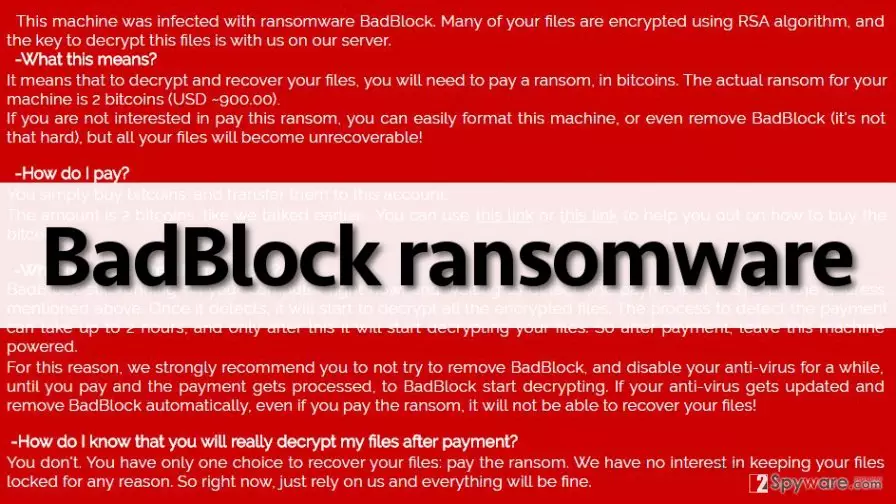
As you probably have understood, the developers of Bad Block virus seek to convince the victim to pay up in order to recover the data. When the virus finishes with the encryption, it drops several ransom notes on the computer, entitled as Help_Decrypt.txt, and it also sets Help_Decrypt.png file as desktop wallpaper. These ransom notes inform the computer user that the computer got hit by a ransomware virus, and the only possible way to recover data is to pay up. The cyber criminals also state that you can “even remove BadBlock (it’s not that hard), but all your files will become unrecoverable.” They offer to decrypt all files for 2 BTC, which is equal to 900 USD. However, this line in the ransom note should be the main factor to hold you back from paying the ransom:
How do I know that you will really decrypt my files after payment?
You don’t. You have only one choice to recover your files: pay the ransom. We have no interest in keeping your data locked for any reason. So right now, just rely on us […]
Although criminals claim that they have no interest in keeping your files, they might also have no interest in decrypting them for you. Therefore, we warn you to think twice before paying the ransom. We do not recommend you to do that, as you might just lose a considerable amount of money and still have all encrypted data. Therefore, we recommend you to implement BadBlock removal instead of paying up. You can do that with FortectIntego anti-malware program. You can recover your files from a backup if you have such one; we encourage computer users to keep creating data backups because it is the only way to recover your data in case the computer gets infected with ransomware. You might also want to read this post: How to back up your files?
UPDATE: BadBlock virus corrupts essential system files
While commonly ransomware threats are programmed to encrypt all data on the computer except system files, this one is not. The authors of this virus have terribly failed and made this virus capable of encrypting files that are required for the operating system to start. It encrypts Windows executable files, which means the system is not going to start due to “missing or corrupt files” in case the victim decides to reboot the compromised computer. Sadly, victims are not warned that this is going to happen. The ransom note only informs the victim to leave the machine powered after paying the ransom.
What is more, BadBlock virus shows the ransom note immediately after it starts the encryption process. At the bottom of the message, the virus displays what file has been just encrypted. If this message appears on the screen, the user should not panic and should not rush to shut down the computer, because it is not going to help at all. The user needs to open Windows Task Manager and end badransom.exe process immediately. This will stop the process that encrypts files. Then the user needs to remove the virus without a delay. Good news is that victims can now decrypt their files with a help of this BadBlock decryption tool. The most important thing is to keep the computer running and not shut it down.
How did BadBlock infect my computer and when did it happen?
Ransomware can be downloaded to your computer by a Trojan horse, but in most cases, computer users download these viruses by themselves. It happens because many computer users do not know how malware spreads. The most effective way to secure your PC from malware is to install a reliable anti-malware software with a real-time protection feature. Also, you should not wander through suspicious Internet sites and click on pushy web advertisements that pop up on the computer screen when you browse the web. Be aware that malware spreads along fake Java or Adobe Flash player updates, so make sure you do not agree to install these updates from untrustworthy websites. Ransomware can be sent to you via email, so make sure you do not open emails from unknown senders, and especially files attached to them.
How to remove BadBlock virus?
BadBlock ransomware is a very dangerous computer virus, and you should not try to remove it manually if you are not an advanced computer user. You can accidentally delete important system files since ransomware tends to hide its processes under legitimate-sounding filenames. Therefore, we recommend you to use BadBlock removal instructions given below and disable this virus so that you would be able to start an anti-malware program. Again, we do not recommend you to pay ransom for the authors of BadBlock malware, because cyber criminals might not be willing to reveal the decryption key to you.
Did this guide help?
4 comments
Jetta
This one seems dangerous...
screwbadblock
This crappy ransomware infected my aunts pc. I have already removed it, but now she is crying over files she lost. I hate cyber criminals!
Montesori
cannot decrypt my files!!!!
Brian
I will do everything it takes to recover my files EXCEPT of paying ransoms for some filthy criminals. hell no!