

Windows заблокирован virus – what does it do?
Today we are going to introduce you to yet another computer virus – Windows заблокирова ransomware, which is also known as Windows Blocked ransomware. This threat is not a crypto-ransomware, and it does not encrypt victim’s files. However, it locks them a computer and asks the victim to pay up if he/she wants to access the computer again. By blocking the computer, it restricts the user from using programs or files that are stored on the compromised computer. It also displays a full-screen message which states that the computer user has to pay a ransom in order to use the computer again.
Windows заблокирова virus asks to buy top-up cards worth 400-600 rubles and enter their codes into a provided box. Cyber criminals promise to unlock the computer immediately after the victim pays the ransom. The virus says that the payment must be completed within 10 hours, otherwise the computer system will be corrupted. However, do not even start looking for your wallet because it is possible to access your computer without paying the ransom. All you need to do is to remove Windows заблокирова virus from your PC system.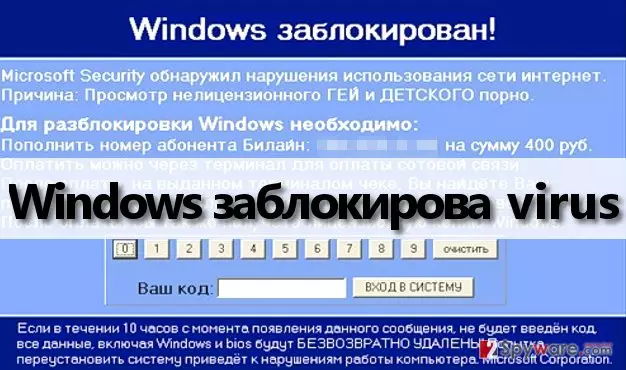
It is recommended to eliminate this virus with a malware removal software because detecting and removing this virus manually is a hard thing to do. This virus tends to name its files differently so that computer users would not be able to identify and delete it so quickly. All we know is where this virus drops its files. It saves them into Downloads or Temp folder, but in order to reach these folders, you need to restart your computer and run it in a Safe Mode. You can find detailed instructions on how to remove Windows заблокирован ransomware on page 2.
How can Windows заблокирован malware enter your PC?
Windows заблокирова virus can be downloaded from phishing and malicious websites. Cyber criminals tend to use clickjacking attacks and place malicious links behind the clickable content, so if you have even the slightest suspicion that an ad, link, or a button that you are about to click on might lead you to dangerous websites, do not click it. To protect your computer from accidentally installing malware, you should protect it with an anti-malware software like FortectIntego.
Malicious files are spread via email, too. The 2-Spyware team strongly advises computer users to watch out for emails that come from unknown individuals, especially if they suggest to open attachments. Crooks also tend to send intrusive emails, and if you would like to block them, create an email filter rather than click “Unsubscribe” button provided in the message. Criminals tend to inject malicious links behind this button!
If Windows заблокирова Trojan has already compromised your PC, please follow Windows заблокирован removal instructions, which are given on page 2 and eliminate it from your computer as soon as possible.
How to remove Windows заблокирова virus?
You should not be afraid of Windows заблокирова ransomware threats and not rush to pay up because this virus can be inactivated in a rather easy way. Since this virus does not encrypt files, it is not as dangerous, because it just does not allow the victim to access them. Therefore, you can access these files just by removing this virus. Please use Windows заблокирова removal instructions given below and remove this threat from your computer. To prevent computer threats from infecting your computer again, we recommend you to get a powerful anti-malware software that has a real-time virus protection feature. For this reason, we advise you to install SpyHunter anti-malware software. Do not forget to update your computer security software regularly, because only this way it will be capable of identifying and removing the latest malware.
Did this guide help?
4 comments
maxim
thanks - I can use my computer again!!
Lea28
Oh my God, this can be fixed just like that?? I hope everything will work out, such a shame! I havent watched videos like that but how can I tell any computer technician that I didnt? Windows заблокирован is just a nasty, nasty virus!
Foxy
cyber criminals are disgusting. they really are. they have no morals...
Matt
I hope one day someone catches these criminals and puts them behind bars! Thats what they deserve...