

Facts about the Saraswati virus:
Saraswati virus emerged soon after the release of Mahasaraswati ransomware, so the cyber security experts are still figuring out, whether it is a version of the same virus or a new creation, inspired and based on Mahasaraswati. The virus is named after the Hindu goddess Saraswati, who is known to represent knowledge, music, arts, wisdom and learning. Based on this information, we can presume that this virus originates from India. Nevertheless, it might be that such title was purposefully selected to conceal the true origin of the virus. Despite its unusual title, Saraswati is no different than the other ransomware viruses. It uses deceptive means to enter the computer, and once it does, it encrypts all the predetermined files on the device. The virus uses saraswati.exe as an executable file for the file encryption, but it has been noticed that the name of this file can vary. If you decide to get rid of the virus manually, this may significantly burden the process. To avoid deleting the wrong files or other important system data, it is better to use professional antivirus software which will detect and remove Saraswati automatically. We recommend using FortectIntego which is an already acknowledged tool among the users worldwide.
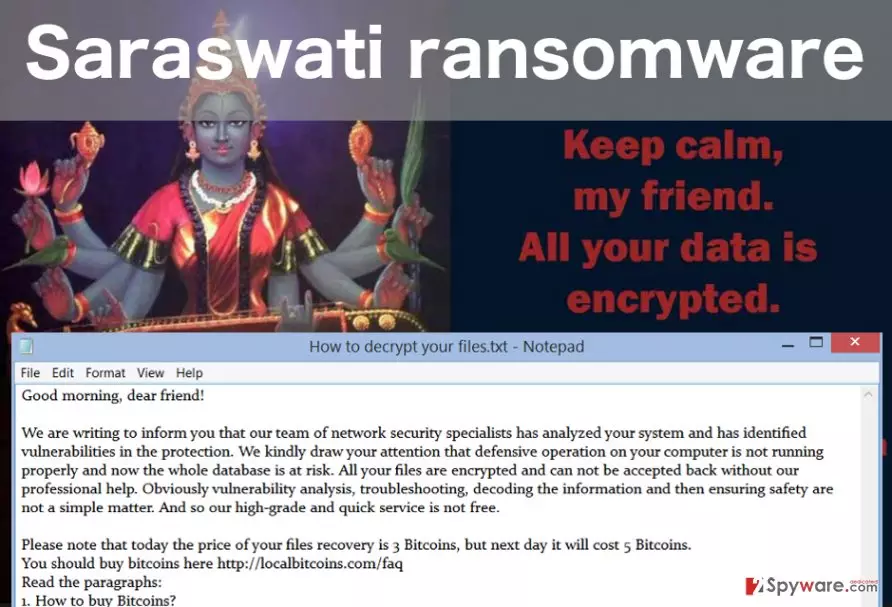
When the virus is installed on the computer and is done encrypting your files, it will change your desktop picture with an image of Saraswati goddess, featuring a brief note in which the victim is informed that the computer’s files are encrypted. Not much of the detailed information is provided in the How to decrypt your files.txt document either. The text document only features an email through which the victim can contact the virus creators. Only then the full details about the encryption will be received. The cyber criminals will try to convince the victims that their systems are in a major risk, and only the “professional” help can save their precious files. Of course, this assistance is not free and the cyber criminals demand to transfer 3 BitCoins to their account. What is more, if the payment is not issued in time, the criminals threaten to increase the sum to the considerable 5 BitCoins per computer. We do not recommend making any transactions. There is no guarantee that the criminals will keep their word and provide you with the file decryption key. So it is much wiser to take care of the Saraswati removal rather than support the cyber criminals by paying.
Protecting the computer from ransomware viruses:
Saraswati is a typical example of the numerous ransomware viruses that are infecting thousands of unsuspecting users’ computers every day. Unlike the majority of the ransomware viruses, Saraswati is more often distributed through the exploit kits rather than infected email attachments. Most likely, it will enter your computer with the help of fake Adobe Flash or Java update. Such malicious exploit kits are usually distributed on obscure sites, so to avoid ransomware infiltration, you should choose very wisely, what websites are worth staying on and which ones should be avoided. Also, the in-built protection feature on Google Chrome should warn about such site before visiting them. But there are a lot of threats which may roam the Internet unidentified. So there is always a risk of being infected. Therefore, the best option to prevent data loss is making backups, which should be stored on some external drive.
Recommendations on the easy Saraswati removal:
The easiest way to remove any potentially unwanted program or a virus from the infected computer is by using professional antivirus tools for this purpose. However, sometimes even the most reliable antivirus utilities may encounter difficulties when dealing with more serious viruses like Saraswati. The virus may begin blocking the antivirus scanning process, making the virus removal impossible. To save you from such Saraswati removal difficulties we have prepared virus decontamination instructions which you will find below. After you follow the indicated steps, try initiating the scan again. When you remove Saraswati from your computer successfully, you can proceed with the data recovery from a backup if you have one. Or, you can also try recovering some of the information using data recovery utilities, such as Photorec, Kaspersky virus-fighting utilities or R-Studio.
Did this guide help?
1 comment
schmitd34r
Yeah, I think its exactly the same as Mahasarwati . They even use the same address to contact the criminals. it must be it