

ZCryptor virus replicates itself and infects removable drives
Cyber security researchers have recently detected a new type of ransomware, which acts as a worm. In the past, ransomware-type viruses were able to infect only one computer and ask its owners to pay a ransom. However, it seems that ZCryptor ransomware virus steps up the cybercrime game to a whole new level because this malware can replicate itself and infect all removable drives by placing autorun.inf and System.exe files onto them and sets them to Hidden mode. As a result, if an infected drive gets plugged to another computer, that computer is going to be infected again, as the malware executes itself immediately.
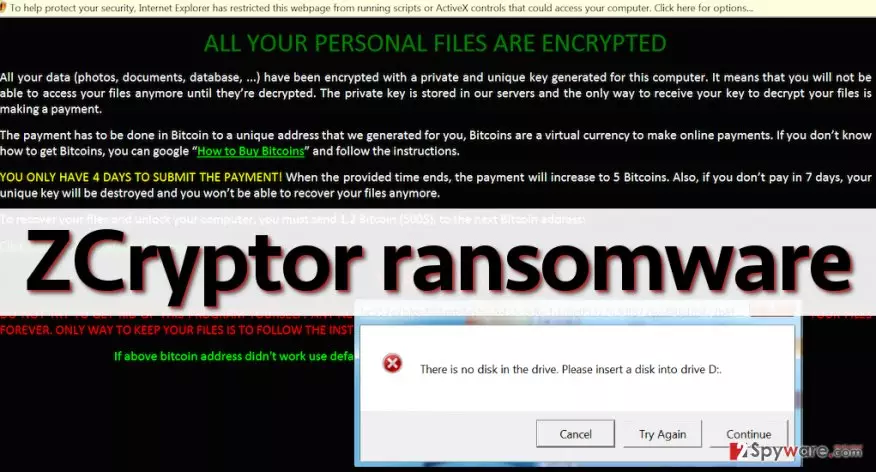
When ZCryptor cryptoworm sneaks inside the computer system, it shows an error message saying, “There is no disk in the drive. Please insert a disk into drive D:”. In the meantime, it runs malicious executive file that encrypts all personal victim’s files and then opens a message that tells the victim that the ransom payment must be made within 4 days; otherwise, the price of the decryption key will increase. The initial ransom price is 1.2 Bitcoins, which is equal to 700 USD. When the given time passes, the ransom cost increases to 5 Bitcoins, which is approximately 3000 USD! The victim is also warned not to remove ZCryptor, or the decryption key will be destroyed, and personal data will be lost forever.
The message from cyber criminals warns that if the victim doesn’t pay in 7 days, the decryption key will be destroyed. All this information is also left in ransom notes (called How to decrypt files.html), which can be found in every folder that contains at least a few encrypted files. ZCryptor ransomworm, just like most other ransom-demanding virus adds file extensions to encrypted data. This particular threat appends .zcrypt file extension.
Distribution methods
Reportedly, this ransomware does not spread via spam or exploit kits, but it can get inside victim’s computer while pretending to be a safe file, for example, Word file or a well-known program or an update of it (for example, Adobe Flash Player). It can also be downloaded to your PC by a Trojan horse. Therefore, we suggest you to stay away from untrustworthy Internet sites, not to click on pushy pop-up ads and banners, and never agree to install software from questionable websites. To protect your computer from viruses, we strongly recommend you to install a trustworthy anti-malware software, for example, FortectIntego. This program also can be used to complete ZCryptor removal. If you do not have such security software, and if you want to install it, we suggest you to follow instructions given on page 2.
How to remove ZCryptor ransomware and restore your files?
It is recommended not to pay the ransom and remove ZCryptor virus from the computer system immediately and clean infected drives as well. The easiest way to eliminate the virus from removable drives is to format them. We do not recommend you to try to implement ZCryptor removal by yourself unless you are an IT expert. This virus is extremely dangerous, and it tends to hide its components busing various techniques, so if you can easily confuse virus files with safe system files and corrupt your computer system by deleting necessary records. To remove this malware in a right way and avoid losing relevant files, we suggest you to follow instructions provided below this post.
To recover your files, you can try to restore previous file versions or use Shadow Copies. However, if this virus has removed them from your computer, the only possible way to retrieve your files is to import them from a backup. Make sure you do it only after removing the malware from the compromised PC.
Did this guide help?
3 comments
2-Spyware team
Dear visitor,
We do not recommend you to try to remove ransomware manually. Each ransomware acts in a different way, and they tend to hide their components deeply into the computer system. By trying to remove ZCryptor manually, you can accidentally delete essential system files. Therefore, we recommend you to use an anti-malware software to detect and remove this threat.
Paris
Is it possible to recover files?
739
I want to remove it manually please provide instructions thank you