

What can you expect from a new ransomware – CryptoShocker virus?
It seems that hackers do not take summer breaks. The last week has been an “ordinary” week with a few emerging major threats: one of them is – CryptoShocker virus. Unfortunately, it is yet another ransomware threat which is capable of encrypting personal files and then demanding ransom in exchange for them. Before the idea of paying the money occupies your mind, get acquainted with the virus and CryptoShocker removal options. One of them is to install FortectIntego.
The recent threats have been a fresh wave after the series of @india.com viruses terrorized the Internet community. The current virus seems to be the creation of different hacker group. Though the virus works the same as the rest of ransomware, there are a few differences. The main distinctive feature is that after CryptoShocker manages to lock out the data, it automatically opens up your browser and then redirects you to TOR site – ATTENTION.url. In the new tab, you see a message that all your files have been encrypted and instructs you how to make the payment of $200.
Another novelty is that it offers you a choice. You can select from multiple several exchange programs to make the transaction. Some of them: coinbase, liberytX, LocalBitcoins.com, etc. We would like to discourage you from wasting the money. Hackers are not obliged to return the data to you. Thus, purely relying on their conscience is a waste of time and energy. Speaking of the decryption techniques, while lT specialists have been searching for a free way to decode the files, you can try using data recovery programs, such as PhotoRec or R-studio.
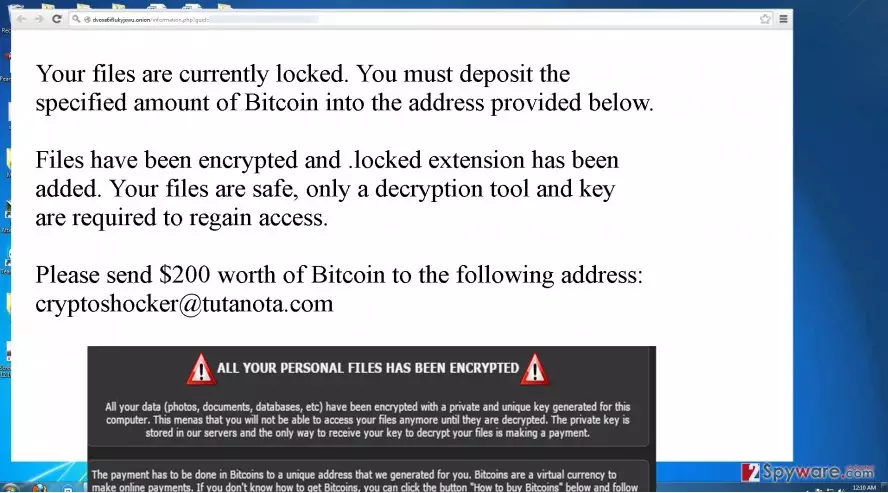
Another peculiar characteristic of CryptoShocker malware reflects in its ability to attach a .locked extension to the encoded information. There have been a few viruses which also possess this feature. One of them is .Locked virus. It is still unknown if the viruses are somehow interrelated. The primary suspicion reflects the idea that the hackers of both viruses might be the same. Furthermore, CryptoShocker ransomware does not stand out much. It also employs AES encryption techniques, specifically mathematically interrelated public and private keys. Lastly, when you get redirected to their website, it indicates cryptoshocker@tutanota.com address for victims to contact the hackers.
The distribution technique of the ransomware
It is necessary to know how this menace spreads in order to increase the chances of stopping it. It is still brand new virus, so IT experts can only guess of its capabilities. Currently, the virus prefers to infect computers via infected spam emails. Unfortunately, cyber criminals have greatly improved in developing persuasion techniques. Do not rush to open an email which is seemingly sent from Microsoft or tax institution. Usual fake emails containing CryptoShocker or any other ransomware within encourage you to review the details indicated in an attachment. Since the primary goal of this emails is to convince you into opening the attachment, the content of these emails may be highly persuasive. All in all, in the case of doubt, you can always contact the company directly before opening the attachment with the menace. Finally, let sus proceed to the section where we will tell you how to remove CryptoShocker.
How should I properly perform CryptoShocker removal?
We do not recommend you to get rid of this threat manually. Since any ransomware is usually a mix of complicated programming codes, trying to detect the source files of CryptoShocker virus on the registry might become too troublesome. Install an anti-spyware program to deal with this virus. The malware removal application will not only remove CryptoShocker, but it will ensure that there are no related files left. If you encounter difficulties launching the security program or opening necessary system applications, feel free to employ the recovery guidelines below.
Did this guide help?
4 comments
Jeremy
I wonder, if it is another version of Locky...
Katherine
Not again ransomware!
Georgee
My anti-virus failed to stop the virus!
Sally
Time to improve security apps!