

How can CryptoRoger damage your computer?
CryptoRoger virus originates from a branch of ransomware viruses which are currently very popular among the virus developers. This infection is relatively new, but the security experts have found that it works similarly to other ransomware viruses. The virus secretly infiltrates the system and then scans the computer for important Office documents and other files. It then encrypts the files using the AES-256 algorithm, which is regarded as one of the most complex ciphers and is even applied for the military purposes. Unfortunately, it is impossible to decrypt the files locked with this cipher without a special decryption key. And, sadly, this key is in the hands of hackers. They will offer you to purchase it, but we highly recommend not to. Any collaboration with the cyber criminals can lead you to being scammed and lose money. Therefore, it is preferable to remove CryptoRoger from the infected computer. As soon as you notice your files are inaccessible, run a scan of your system with some reputable anti-malware utility, for instance, FortectIntego and allow it to fix this issue.
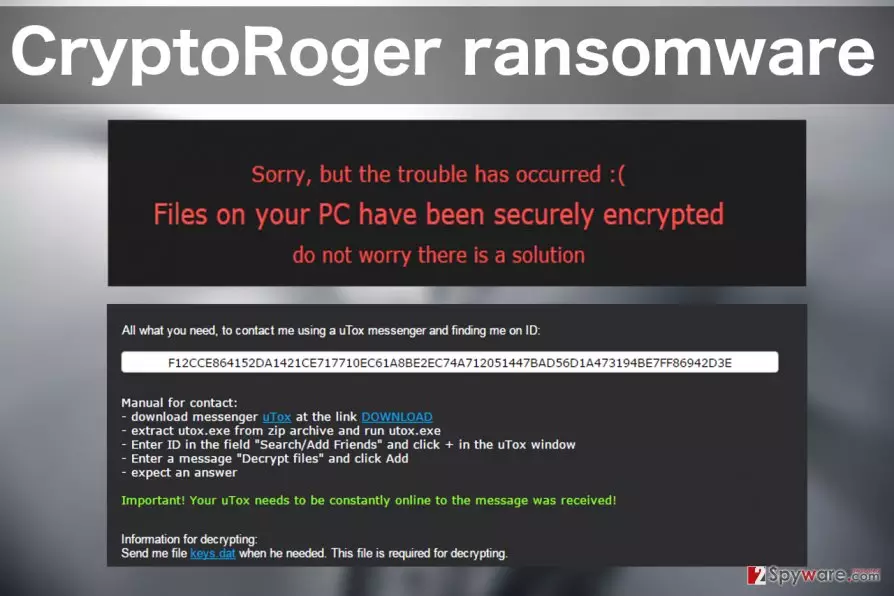
You may be wondering how do you tell if CryptoRoger has hijacked your computer. Typically, you will recognize this infection from an unusual extension .crptrgr appended to the files. However, usually, the users will find out about the file encryption from a ransom note that this virus drops on every folder containing infected files. This note is labeled !Where_are_my_files!.html and contains instructions for the file recovery. To retrieve the locked data, the victim is demanded to pay 0.5 BitCoins, or ~$334 USD. The ransom must be transferred through an anonymous TOR network which helps the hackers to keep their identity secret. What has also been noticed that besides the .html document, the virus also creates .VBS file which allows the ransomware to initiate the encryption again every time the computer is rebooted. This means that any new files you have created since the last login will be at risk of being encrypted. Needless to say, such device is not safe to use. Therefore the virus will have to be eliminated if you want to be able to use it normally again. We have to remind you, though, that CryptoRoger removal will not decrypt your data, but simply remove the malicious virus components from your device.
How can you protect your computer from this infection?
The only way to truly ensure the safety of your data is by keeping backups. It is recommended to update the backups regularly and keep them stored on some external drive. You can use USB keys, external hard drives, CDs or DVDs for this purpose. However, you should always unplug your storage device from the computer because if the virus infects it while the external drive is plugged in, it can easily lock the files on it too. Of course, you should also employ virus-fighting utilities such as firewalls or antivirus for the virus prevention, but you should keep in mind that these infections mutate rapidly and exploit your system’s vulnerabilities to get in. So there is no 100% method you can use to protect your data.
CryptoRoger removal recommendations:
If you have never dealt with ransomware viruses before, and you got infected with CryptoRoger, you should keep in mind that trying to delete this virus on your own can have disastrous consequences. The only time you can actually apply manual approach is when the virus is trying to interfere with your antivirus scanner, and you cannot get is started. This virus decontamination guide is prepared professionals, so, if you follow it closely, you will be able to run your antivirus and remove CryptoRoger from your computer without damaging the system. You will find these instructions below.
Did this guide help?
2 comments
richard jozeph
When will these ransomware stop? They are seriously never-ending
Nathaniel Bens
I hope someone invents CryptoRoger decryptor soon...