

The essential information about KratosCrypt virus
KratosCrypt virus was launched a couple of weeks ago so you should know how to protect yourself against it. If you are new to the cyber security, we must inform you that ransomware viruses are especially dangerous cyber threats. They are programmed to invade the operating system stealthily and encode the private data using exquisite, asymmetric algorithm. Afte the encryption is finished, you cannot access the files. Furthermore, the cyber criminals indicate a sum of money that has to be paid to retrieve this data. Of course, a number of users might pay several bucks to retrieve the information, but there is no need to lose your money. The IT specialist Michael Gillepsie gave hope for the victims by publishing free decryption keys – Hidden Tear Decryptor and Hidden Tear Brute Forcer. Before you decrypt your files, scan your computer with a professional anti-malware utility, such as FortectIntego and remove KratosCrypt as soon as possible.
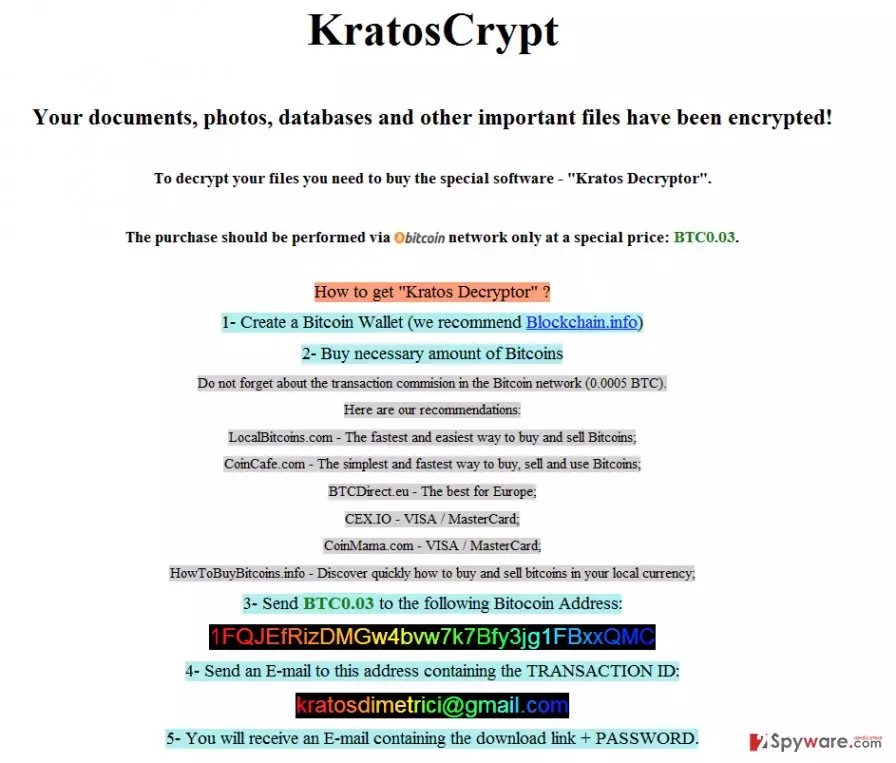
Like other ransomware of the same kind, the virus causes modifications in the system registry. It leaves HKCU\Software\Microsoft\Windows\CurrentVersion\Run [exe name] registry entry on the system. It enables the virus to restart every time you reboot the computer. Moreover, though the virus might not be regarded as especially dangerous since it demands such small ransom, but it is suspected to remove shadow copies of your files. For example, it might eliminate your back-ups. IT specialists speculate that KratosCrypt might be just an experiment launched by the hackers. Since it was quickly hacked by virus researchers, the cyber criminals might strike again with even more powerful version.
How do you tell if your computer has been attacked by a ransomware virus? Before you find out you are unable to access your files anymore, you might also notice that your computer is performing slower, experiences a variety of system errors. The virus also changes the usual file extensions to .kratos. So if this extension appears on your PC and the files marked by it become inaccessible you are most likely infected and should start thinking about the KratosCrypt removal immediately. The virus may also drop a README_ALL.html file to every virus-affected folder on the computer. This file features a ransom note which encourages the victim to pay a considerably small amount of ransom (only 0.03 BitCoin) in order to receive a personalized file decryption key. As we have already mentioned, it is a complete scam and a waste of money. You should decrypt your files using the already mentioned decryptor and clean your computer from the KratosCrypt malware.
Can I escape the virus?
Even though KratosCrypt ransomware is a considerably dangerous virus, there are ways to avoid it. You can protect your system with a professional antivirus utility and firewall to hold out the initial attacks. But there is no 100% guarantee that the virus will not manage to bypass the automatic layers of protection. Essentially there is only one way to protect your data from being locked – data backups. If you regularly backup your data, store it on external storage drive and unplug the drive from your computer when you are not using it, you should be able to keep your files safe.
KratosCrypt removal steps
If KratosCrypt is the reason you cannot access your files or use your computer regularly anymore, you should eliminate this threat right away. This should be done automatically as the manual KratosCrypt removal may damage your computer rather than fix it. You should only use the reputable and professional anti-malware utilities for the job. Run a full scan of your system with these tools and let them take care of the virus for you. If, for some reason, the antivirus software is unable to remove KratosCrypt and the system scan fails do not worry. There are just a few extra steps you will have to take to decontaminate the virus and help your antivirus initiate the scan. You will find these steps indicated below.
Did this guide help?
Be the first to comment