

AnonPop ransomware virus does not encrypt files – it deletes them
A new ransomware has been discovered, and it is called AnonPop virus, alias AnonPop fake ransomware. This interesting variant of such computer virus seems to be poorly programmed since it does not function as a typical crypto-ransomware virus; besides, flaws in its code allow victims to recover their files quite easily. In this report, we are going to discuss how to remove AnonPop, how to restore your files and what to do in order to protect your computer from ransomware attacks.
This virus attempts to look scary by calling itself a ransomware, although it does not function like one. Once installed, it finds files located in predetermined folders and simply deletes them. Luckily, it fails to delete them successfully, as it leaves Volume Shadow Copies, which can be used to restore lost deleted or corrupted files. Once this fake virus “encrypts” data, it launches a ransom note, which looks like this:
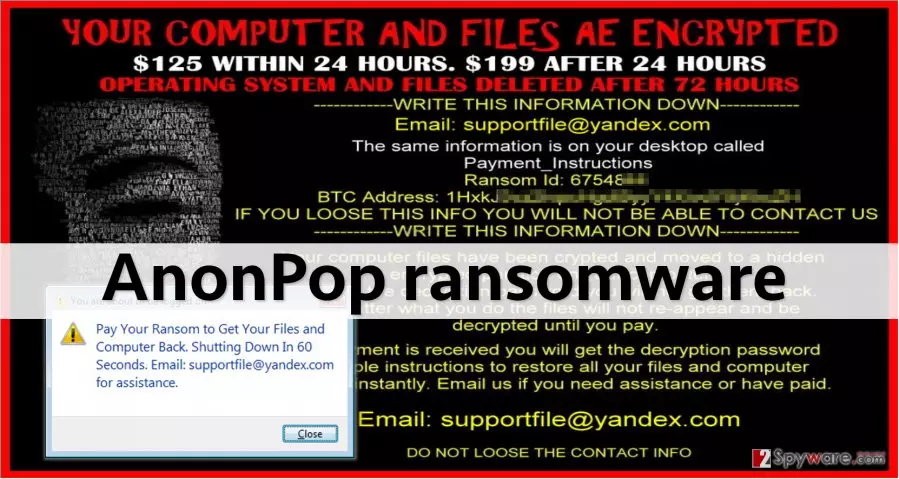
As you can see, cyber criminals ask to pay 125 USD within 24 hours, and 199 USD when 24 hours elapses. The ransom note (Payment_Instructions) tells the victim to write down crooks’ email and bitcoin addresses, and Ransom ID. While the victim is reading this message, AnonPop virus downloads another piece of malware and sets it as a startup program. As a result, this malware triggers a pop-up message saying that the victim has to pay the ransom to get files back and that the computer is going to shut down automatically in 60 seconds, and again reminds what cyber criminals’ email address is (supportfile@yandec.com). We assume that this virus shuts the computer down in 60 seconds in order to prevent the user from restoring files for free. Luckily, there is a way to bypass tricks of this virus and fix your computer without paying the ransom. Use instructions provided below this article to stop this fake virus and then remove AnonPop completely by scanning the entire computer system with an anti-spyware program like FortectIntego.
Why is this malware on your computer?
AnonPop malware spreads via malicious email campaigns and malvertising. The developers of this virus send malicious emails that carry infectious attachments. According to our research, these attachments are called complaint376878.zip, but they can be named differently as well. Do not forget that you do not necessarily have to open this email to get this .zip file – you can also download it alongside other programs or software updates in case you download them from an unreliable web source. This .zip file contains a PDF document, which is the malicious one. If the user opens it, it downloads and launches virus’ executable file.
To protect your computer from ransomware and other malicious viruses, you must stay clear of suspicious emails, and try to avoid visiting questionable Internet websites. Careless Internet surfing can lead you to all sorts of websites, and you can never know where you can end up. For your sake, avoid downloading free programs from unknown Internet sites, as they can be bundled with untrustworthy programs or even malicious files. You should also add another layer of protection by installing a good anti-malware program. Also, don’t forget to update all your programs regularly, because cyber criminals tend to exploit vulnerabilities of outdated software.
How to remove AnonPop ransomware?
AnonPop virus is very dangerous, despite that its developers have left some unpatched flaws in its code. Just like any other ransomware, it masks and spreads its components on the computer system, and it becomes really hard to identify them. Therefore, we recommend you to use an automatic malware removal tool and implement AnonPop removal automatically. However, you will have to stop the virus from rebooting your computer every 60 seconds first; for that, follow instructions that we have prepared:
Did this guide help?
4 comments
pass
What a foolish ransomware. However, I bet that people who get this virus are quite happy about that :)
Beardy
I was infected - not funny situation at all. Especially when you have never heard about ransomware... That was a lesson for me. I have just installed anti-spyware program and backed my files up!
Ciara
I didnt know that it is possible to recover deleted files! Good information, thanks! I thought that when you empty the recycle bin, theyre gone forever!
PizzaLover
Stupid virus. Lucky me, it is poorly programmed...