

What are the real intentions of Ranscam virus developers?
Though the recent ransomware does not differ much from each other, Ranscam virus instantly has caused interest for virus researchers. So what is so peculiar about it? This virtual threat infects computers and demands money for the supposedly encrypted files. However, there is a hidden trick behind it. If your PC has been targeted as well and now you are in rage trying to find the solution, read the following sections to get acquainted with Ranscam removal methods.
There are good news and bad news about the virus. You may sigh with a relief to find out that your files were not encrypted in the first place. Nonetheless, you might become more furious than you are right now because the malware deleted the files before the ransomware note appeared. The message, which says that the information has been moved to a protected folder, is a pure deception. Cyber specialists have revealed that after clicking the button “I made payment,” the new note appears stating that the payment failed to be verified. Perhaps the hackers try to convince vexed victims to pay the ransom several times since it is relatively small 0,2 BTC (130 USD). In general, we do not recommend paying the money even if there is a slight chance of retrieving the files. In the case of Ranscam malware, such action is completely futile because the files have been already eliminated, and the hackers are unlikely to have retained their copies. What you can do right now is to remove Ranscam.
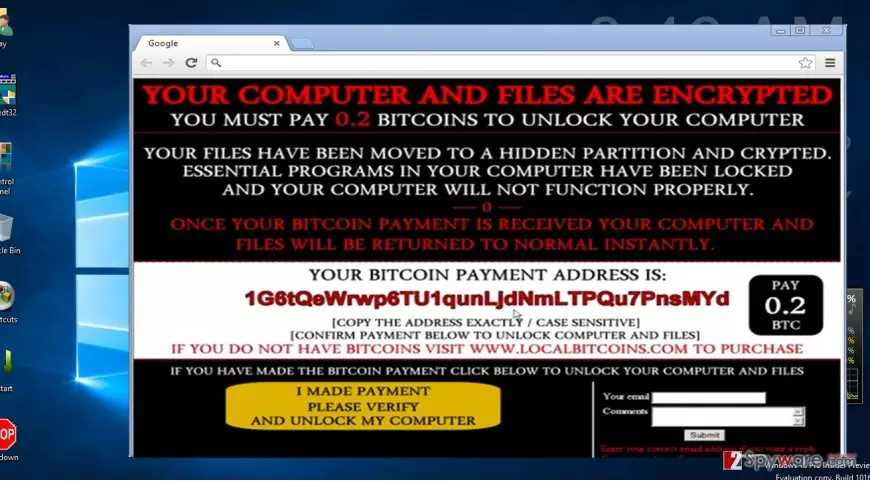
How does the virus function?
Since this virus seems to be quite a naughty one, you might be interested in how the ransomware managed to get into your system and delete the files. The threat is expected to enter the ransomware market fully by running its malicious spam emails campaign in following weeks. Until then, the hackers enjoy infiltrating computers in less effective ways. Ranscam ransomware is likely to be distributed via P2P file sharing domains and other insecure websites. If you are used to frequently downloading new movies using torrents or install cracked games, be aware that these domains often serve as a shelter for a variety of malware, including file-encrypting viruses. Thus, even if you are a passionate gamer, and you still intend to visit similar websites, install an anti-spyware application, for example, FortectIntego. It will watch your back while you surf the Internet and block the attacks of ransomware and other threats.
Furthermore, when the virus succeeds in invading your computer, it employs Powershell to delete the files. Specifically, with the help of a batch script, which is run by .NET executable, it activates the Powershell application to eliminate the personal data. Moreover, this misdeed is performed in secret. Victims do not have any idea that their personal files were deleted until they see the ransom message. Virus researchers managed to identify the server which sent the virus. It is located in Studio city, California. It seems that cyber criminals are a bunch of amateurs, possibly, teenage, hackers who decided to make a fortune as well.
Ranscam removal options
Since paying the ransom and recovering the files are useless activities, you should concentrate on eliminating the virus properly. Install an anti-spyware program (FortectIntego or MalwarebytesMalwarebytes). It will detect the source of the ransomware and remove Ranscam shortly. In general, such program should be obligatory for every Internet users since it significantly supplements the work of anti-virus software. Speaking of the latter, if the virus managed to shut down the application, use the recovery instructions delivered by out IT specialists. Lastly, remember that remaining vigilant and cautious also greatly assists the work of security applications.
Did this guide help?
5 comments
Megan
What nasty brats!
Rick
I guess, its time, folks, to arm up with security programs.
Tracey
Apparently, I saw this article too late. paid the money, no data recovered.
Ewan
Making ransomware seems such a fun activity...:/
Richard
Lets see what they are going to do next.