

Your Windows Licence has Expired virus and everything you should know about it:
Recently, the Internet users started addressing the Your Windows Licence has Expired virus problem which appears to be spreading throughout the computers around the globe. The virus was named after the notification the users saw when this infection had breached their computers. After investigating this issue, the security experts have come to the conclusion that “Your Windows Licence has Expired” is not an individual virus but just a part of a more major infection. Due to the rogue behavior on the infected computer, such viruses are attributed to the category tech support scams and even ransomware. These infections are famous for generating numerous deceptive ads, pushing the users to purchase suspicious software or services. Typically, the expired Windows warnings will be followed by a variety of other ads, banners, pop-ups, hyperlinks, etc. The problem with these ads is that Windows licenses do expire, and similar notifications can be presented to the computer owners. It is not surprising that some users may take such ads for granted. You can test whether you haven’t become a victim of the Your Windows Licence has Expired hijack by closing your browser or disconnecting your computer from the network. If the notifications stop popping up, this means that you are most likely dealing with scammers. In such a case, do not reconnect to the Internet and scan your computer with an antivirus scanner immediately to remove Your Windows Licence has Expired from your computer. In some other cases, you may also boot your computer to a lockscreen, preventing you from accessing your computer and encouraging you to renew your Windows. This is another major indicator that a virus has taken hold of your PC because normally, you would be able to use basic computer functions even with expired OS version. Either way, such infection should be removed from your device immediately. For that, we recommend running a scan with a reputable antivirus software, such as FortectIntego.
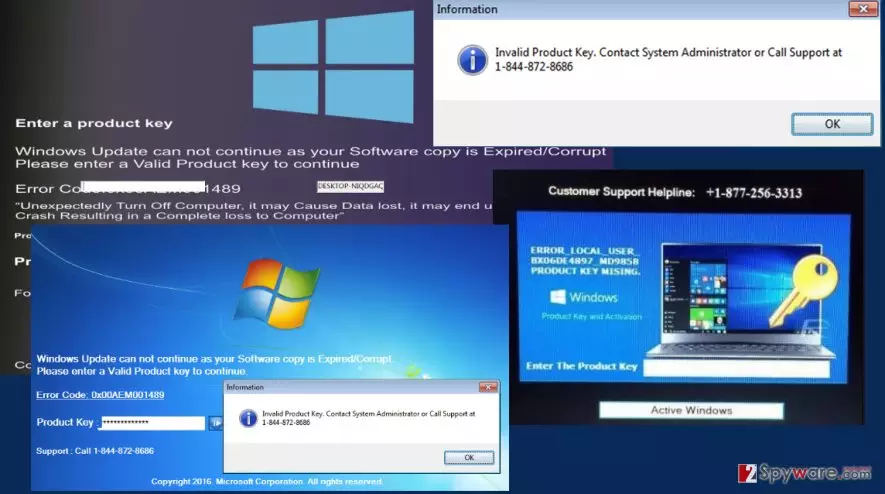
Another thing we should mention about this virus is that it also belongs to the category of tech support scam viruses. These viruses are designed to trick the victims into paying for the non-existent products or services. The Your Windows Licence has Expired ad also encourages the users to contact an indicated number and purchase Windows activation key. Unfortunately, calling the number only connects you to a salesperson trying to push you into obtaining a fake product. In reality, your operating system is not expired, and the key you are offered is either non-functional or does not exist. Thus, by paying up you are simply supporting the shady scammers. But that’s not even the worst that can happen if you keep this adware installed on your computer. It may also expose you to privacy violations which may even result in identity theft all because it secretly spies on you. Adware viruses that involve in tech support scams and similar dirty businesses are especially dangerous, so you better take care of the Your Windows Licence has Expired removal without wasting time. Keep in mind, though that some tech support viruses use lockscreen to prevent users from accessing the applications stored on the computer. This may encumber the whole removal process because no antivirus application can be initiated while the computer screen is locked. If you can’t access your desktop, do not panic and follow the instructions at the end of the article.
How does this adware hijack computers?
As we have already pointed out, the Your Windows Licence has Expired alerts are triggered by an adware hiding on your PC. These ad-based viruses are mostly distributed using the deceptive marketing method called “bundling” which allows potentially unwanted programs to enter computers along with other freeware and shareware applications. Usually, the users are unaware that such dangerous components install on their computers because this process is well-hidden in the “Advanced” and “Custom” setup and can only be witnessed when these particular modes are chosen for installation. Often sneaky programs like Your Windows Licence has Expired adware manage bypass the antivirus defense too. This means that obtaining an antivirus utility is not enough to keep your computer safe. You have to be careful yourself and carefully analyze every program you are allowing to enter your PC.
How should you remove Your Windows Licence has Expired ads?
Despite the seriousness of the consequences of this virus hijack, Your Windows Licence has Expired removal is a rather simple process. All it takes to banish this virus from your computer is initiating a full system scan using a reliable antivirus software. Of course, you virus-fighting utility must come from a reputable source and be updated to its latest version for the removal to go smoothly. Do not forget that if you do not have an antivirus utility installed on your computer (though it is highly recommended), you can always go for an alternative solution and remove Your Windows Licence has Expired adware manually. Removal instructions and everything you need to know about the manual virus elimination is presented below the article.
Did this guide help?
2 comments
Wallis
How do you tell the difference?? Its the worst when viruses are good at imitating normal processes...
Nick Tremp
I almost got tricked with this one! Good thing I know something about scams like that