

How does Windows Games TSS virus act?
Windows Games TSS virus is a fraudulent program that utilizes various intimidation techniques to convince the computer user to call technical support scammers. It falls into malware category because it meets the characteristics of a Trojan horse. It pretends to be an app called “Windows Games,” while in reality, it drops malware on the computer system that displays a lock screen and asks the victim to enter the Windows Product Key because the “computer is suspected of malicious software.” If you see this screen on your computer display, it means that your computer has been compromised. Do not worry – we will help you to remove Windows Games TSS malware and gain access to your PC again.
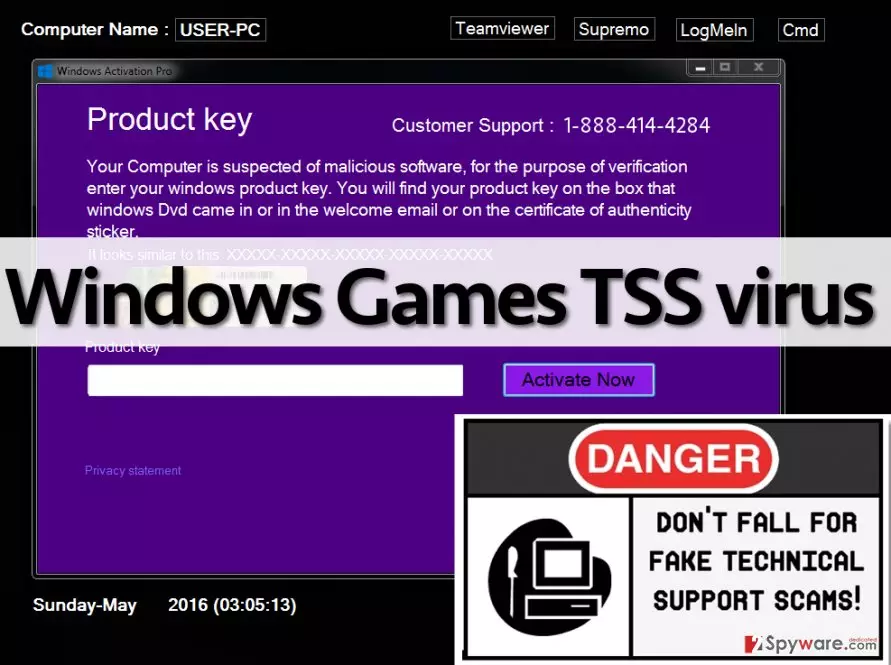
You probably are interested what is the point of creating such programs and attempting to convince the victim to get in touch with scammers via 1-888-414-4284 number. The whole point of this criminal activity is to convince the user to buy fake security software or to allow scammers to control the PC remotely. If the victim calls them, they start telling tales about how much damage the malware (which, in fact, is imaginary) can cause and that the victim must act immediately. Typically, they offer the victim to buy some fake product that is meant to fix user’s computer. If the victim refuses to buy it, scammers change their minds and then offer free help for the victim. They claim that they can access victim’s PC remotely and solve all problems at once. You should never give unknown people remote access to your device! They can plant malware, ransomware, trojans, and other most dangerous computer viruses on the computer system, and that is exactly what these criminals are willing to do. We believe that you do not need no more arguments why Windows Games TSS removal should be completed as soon as possible. You can remove it with a help of an anti-malware program like FortectIntego.
When did you install this piece of malware?
This type of software spreads in numerous ways. In some cases, these viruses spread via software bundles. You can install it from the Internet along a fake software update, app or file. What is more, you can get it by clicking on a corrupted hyperlink or by visiting a harmful website. Please be careful and watch what you click on while browsing the net, or you will end up with malicious programs on the system, which will cause you numerous problems later on. We advise you to stay clear from questionable links and attached files in email; also, install programs only by using Custom or Advanced installation option, and then review components of your download. In case some of them seem suspicious, refuse to install them.
How to remove Windows Games TSS virus?
Do not let this filthy program control your PC – remove Windows Games TSS virus immediately. As we have suggested previously, this program can be eliminated with the anti-malware program, but before you do that, you need to deactivate this virus. Please follow Windows Games TSS removal instructions prepared by us and erase this useless piece of scareware from your PC:
Did this guide help?
4 comments
L0ra
F ing scammers! I hate them! They are so annoying! I dont even need to call them - these freaks call me several times in a week. This is driving me crazy! i block their numbers but they keep calling me again and again!
Dianne
I could not remove this virus, but my brother fixed my computer for me. We used Plumbytes anti-malware, it is not expensive and works great.
Ronnie
I cannot understand, just simply cannot understand why police is unable to catch these scammers.
Steve298
Fixed this, thanx :)