

Why should you not trust the FreeDownloadmanager TSS?
FreeDownloadmanager TSS virus is a Trojan infection which was created by the Internet scammers to earn some easy money. The virus spreads stealthily, so do not be surprised if one day your computer loads into a lockscreen, informing that a major security breach has occurred and you need to verify your Windows copy is legitimate. Do not bother looking for the license key because despite its legitimacy; it will probably be deemed as inactive. This way the scammers are trying to trick you into contacting a remote tech support technician who supposedly has the answer to your problem. Unfortunately, if you do call the indicated number, instead of receiving a professional assistance, you will be offered to obtain some suspicious support services. Often, users fall for the trick because they are simply frightened by the FreeDownloadmanager TSS lockscreen and claims about the supposed malware infection. The principle of tech support scams like this is based on scare tactics so that it would be easier for the scammers to manipulate the less experienced users. Sadly, most of the users only realize they have been scammed after they have already paid up and do not receive the promised services, or these services turn out to be yet another scam attempt. If you did not manage to evade this virus yourself, at least make sure remove FreeDownloadmanager TSS from your computer properly. FortectIntego antivirus should help achieve the best result.
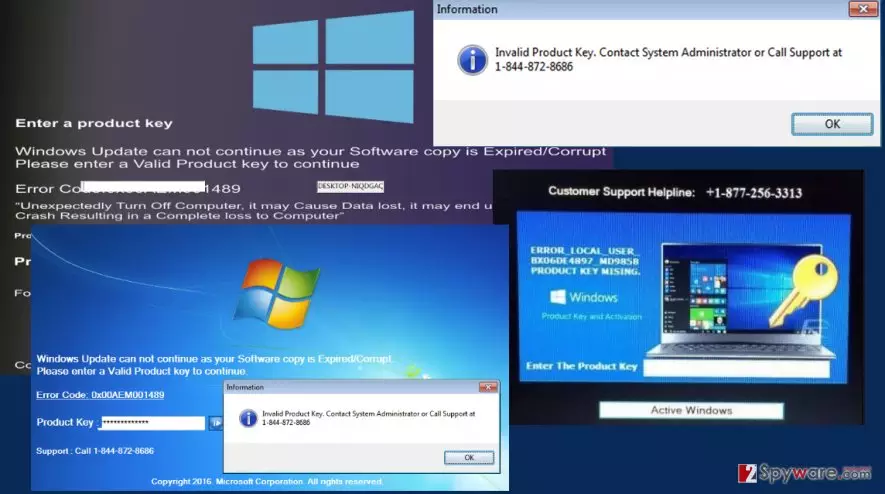
We should also point out that in the fake Windows activation lockscreen you will also find links to open Logmein, TeamViewer, and Supremo sites, supposedly to help the remote technicians to investigate your computer better. Do not attempt to click these links or grant the scammers access to your computer. This might end in your computer being infected with additional malware or result in data leak. If you have already allowed the scammers to connected to your PC, terminate this access immediately, by closing the program or rebooting the computer.
In a way, FreeDownloadmanager TSS also works like a ransomware virus because it will not allow you to access the documents and programs on your computer unless you pay up. Though this money-making technique is less straightforward, the end result is always the same – your bank account becomes slightly emptier. To prevent scammers from robbing you of your money using the credentials used to pay for the fake tech support bundle, do not hesitate to contact your bank or credit card company and explain the situation. In the meanwhile, set your antivirus utility to take care of the FreeDownloadmanager removal.
How can you get infected with the tech support scam virus?
Looking at its code, FreeDownloadmanager TSS virus is more like a potentially unwanted program than a malicious cyber infection. If you do not interact with the virus or purchase the fake software it offers, it should not pose any additional harm to your computer. This Trojan also does not need to use overly complex techniques to get into your computer. All it might take to get infected is downloading virus-infected software of off the Internet. The Trojan may infiltrate the software packages of legitimate applications, hide under a suggested software updates or be spread around the web with the help of corrupted online ads. Such downloads are common on unreliable, obscure websites, so avoid visiting such sites if you do not want to see FreeDownloadmanager TSS on your computer.
How does FreeDownloadmanager TSS removal work?
You can remove FreeDownloadmanager TSS from your computer like any other potentially unwanted program, but since this virus is slightly more complex and uses lockscreen, several extra steps need to be added to the elimination process. Before you can run the antivirus utility and delete the virus from your computer, you have to be able to gain access to your desktop first. The FreeDownloadmanager TSS removal guide below will feature all the necessary information about how to terminate the locksceen and delete the virus from your computer.
Did this guide help?
1 comment
Dion Axton
Yup. Had the same issue too. Though I did not manage to remove the lockscreen and had to take my PC to support... Luckily, none of my files were gone after I got it back :)