

w32.vrbat is a trojan that gets used as a scaring element in various scams, and fake system alert messages
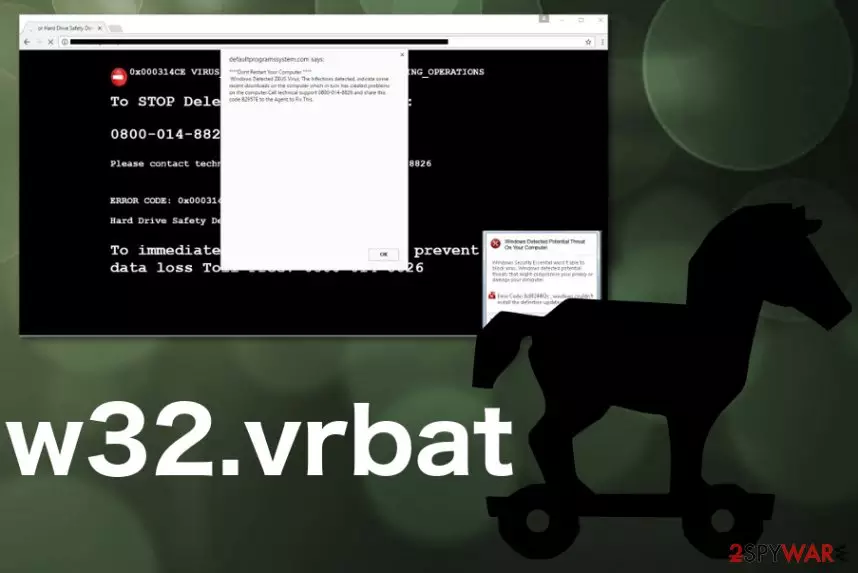
The malicious w32.vrbat trojan is a threat that runs in the background, and the system cannot alert you about the activity automatically, you cannot even notice the processes working behind your back. A trojan is a type of malware that mainly is used to infiltrate the machine to spread other malware on or affect the performance significantly with crypto mining processes or serving as a backdoor for attackers.
| Name | w32.vrbat |
|---|---|
| Type | Trojan |
| Used in | Various online scams as a scary factor |
| Main danger | Can get access to the device and all the data stored on there. Scams used to trick people into purchasing, downloading tools or revealing sensitive details |
| Possibly related | Trojan:W32/Agent, Trojan.Agent, Win32.Trojan.Agent |
| Distribution | With the help of infected email attachments, the trojan gets on the system. All the scams and fraudulent messages are caused by adware and other PUPs |
| Elimination | Get the anti-malware tool to remove w32.vrbat and any other intruders |
| Avoidance tips | Stay away from shady messages with phone numbers, don't fall for scams and install programs from reliable sources only |
Unfortunately, w32.vrbat virus is not the threat that has one function and can only affect the machine in one way. Attackers use this malware for various purposes that even include spreading other viruses or even remotely accessing the device. This is one of the most dangerous cyber threats, so you should note how important it is to fight the trojan once it gets on the machine.
However, since w32.vrbat trojan is known as exceptionally malicious, scammers even use this name to scare people during their fraudulent campaigns. Warnings with different claims about possible danger or already blocked virus should be taken seriously but with caution.
Since w32.vrbat trojan has the w32 at the biginning it may show that Windows systems that run on 32 bit are the ones that get this or a similar trojan only. However, all the trojans with the identification as Trojan:W32 or Win32.Trojan.Agent can also be found on various OSs, even Mac devices. The only difference is the name, but not the behavior or danger level.
Alerts from Microsoft or other tech support teams claiming that your device has w32.vrbat detected on the system, in most cases, are there to trick you into purchasing some fake security tool, calling scammers directly or even revealing your personal details and paying for the alleged tech support help. Legitimate software providers are not sending such alerts to their users.

The real trojan can be set to perform malicious activities, but you cannot see when w32.vrbat gets loaded on the computer because it runs in the background with at least one of these goals:
- spying on victims;
- stealing information stored on the machine;
- installing other malware;
- tracking keystrokes or copying screen view;
- clearing the path for a hacker or other more severe virus;
- using system resources to run additional processes like cryptocurrency mining.
You should make sure to clean the system when you notice any significant difference in the speed of your machine or the general performance. To see if the system is infected, you should get FortectIntego and check the machine. When the system scan is done, you can see all the malware and remove w32.vrbat if needed with the same tool.
Make sure to pay close attention to w32.vrbat removal, because adware that creates all those redirects, pop-ups, and fake messages can cause damage and not get detected. The trojan, on the other hand, can be found with a powerful anti-malware program and a thorough system check.
Warning: virus w32.vrbat has been detected scam messages
If your computer screen suddenly turned into BSoD (“blue screen of death“), it might suggest that “Warning: virus w32.vrbat has been detected” virus has occupied your device. The aim of this cyber threat is to wheedle out money from Internet users. It acts as adware showing fake system error messages.
Do not get deceived by them and instead concentrate on “Warning: virus w32.vrbat has been detected“ removal. The design of this malware spreading campaign might really look terrifying. However, there is an easy way to delete it. You can install an anti-spyware program, FortectIntego, to do all the job for you.
Various commercial domains deliver false alerts and warnings about the detected malware. But remember that proper tech support people are not showing these messages randomly out of anywhere and don't encourage to call or pay for the service. Stay away from calling any number that is delivered in the following or similar message with statements about malware:
Warning! Virus w32.vrbat has been detected in your operating system.
Please call our technical support team right now to remove this virus.
Toll Free 1-888-556-9967.
Hackers did a great job creating a false impression of a real system error notification. The blue screen imparts a dramatic view, locked browser window, or even sound effects create a real frustration. Moreover, the message itself stating that some sort of “w32” virus is detected seems terrifying enough, especially if you already know about the w32.vrbat trojan.
Users who do not specialize in programming might get the impression that something terrible has really happened. We would like to assure you that it is simply an ordinary tech support scam. In any case, if the operating system encounters a problem or processing error, it never provides nor asks you to call the indicated number. Even malware infiltration like w32.vrbat virus, are not triggering such alerts.
If you notice a Windows message or BSoD, and it asks to call the indicated telephone number, there is a 100% guarantee that it is a hoax. The essence of such fraud is to persuade users into purchasing questionable and supposed malware removal utilities. Do not contact or pay these scammers.[1]

Malware infiltrates the infected system with other programs to cause more damage
Surprisingly, the malicious files containing the infection directly or a malicious code dropper can get on the device with the help of other applications. Fake PC optimizers, download accelerates, browser boosters unintentionally provide the disguise for such virtual threats. Windows OS cracks, false Flash Player Updates, and other illegal software get packed with malware droppers all the time.[2]
If you download the application from the unreliable secondary source, there is a chance that you might install a program which contains a fraudulent attachment. Thus, in order to avoid such a scenario next time, make sure you change the sequence of your actions. Opt for the “Advanced” settings. Later on, unmark the checkboxes of optional browser toolbars, plug-ins, and other questionable attachments.
However, these threats like trojans, worms, ransomware, and malware can get on the machine directly from the malicious file attached to the email you receive. When the legitimate-looking email gets on your email box, you, like any other busy person, don't think twice and open the email.
However, when the notification has links, files, other content the only thing you need to do is enable additional code[3] and malware loads on the system directly. Avoid opening emails you were not expecting, downloading attachment files or visiting provided hyperlinks, as many experts[4] always note.
Get anti-malware tools to complete w32.vrbat malware removal
Warning: virus w32.vrbat has been deleted is a scam campaign, but the trojan itself is a virus that operates in more complex ways. It is not recommended to meddle with it manually and try to find the malware. The threat executes its files which might be scattered across the entire registry system, so messing with such an important part of the machine can lead to more severe damage.
Searching for corrupted files or altered registry entries manually might prove to be a futile activity. Therefore, we suggest you remove w32.vrbat with the help of malware elimination utility. FortectIntego or SpyHunterCombo Cleaner, MalwarebytesMalwarebytes can help you with this process. Update the program and start the system scan if you already have one AV tool running on the computer.
The entire w32.vrbat removal process takes only several minutes. Due to the locked screen or even disabled programs, you might not be able to complete the elimination, so regain access to your computer by following the guide below and rebooting the machine in Safe Mode with Networking.
Did this guide help?
2 comments
Peter
Now they really started a real game. It is difficult to tell the difference.
harry
Thanks for the tutorial. For a moment, I thought that the message was real.