

Does Flyper virus pose a threat to your computer?
The virtual community should become alerted as new file-encrypting malware – Flyper virus has been released. Do not underestimate this threat as it may easily get into your computer as well. With the help of RSA encryption tool, it is able to perform its misdeed, i.e. encrypt the files. Thus, usual Flyper removal proves to be a tiresome activity. That is why it is important to take some prevention measures not to run into this virus. Even if the malware managed to lock highly important files, do not consider paying the money. Likewise, the chances of getting the data back will not increase. Instead, let us suggest you the way to remove Flyper. For that purpose, you will require a powerful anti-spyware application. Install FortectIntego right away.
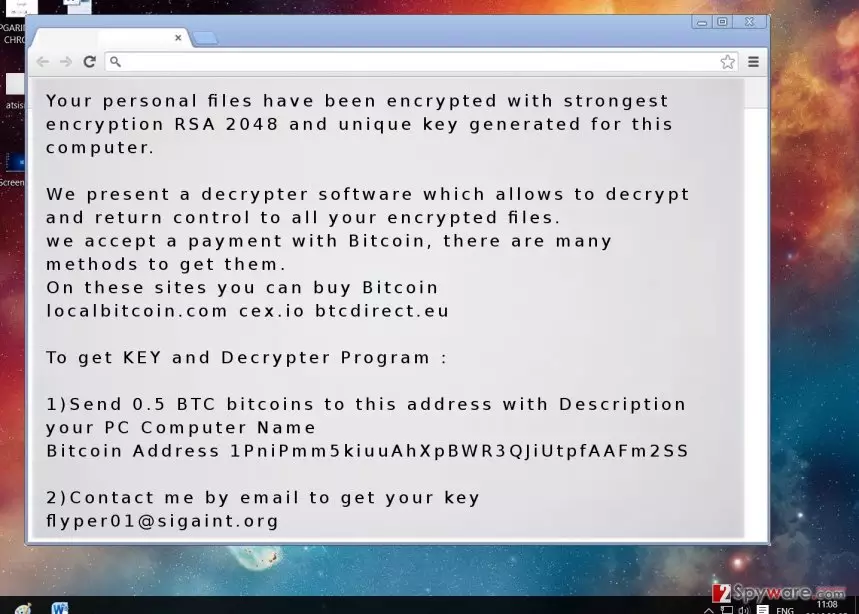
The virus has obtained such title due to its distinctive features. After it manages to invade the computer, it attaches .flyper extension to the affected data. Since Flyper ransomware used an exquisite algorithm, it is a challenge to decode the files without having a matching private key. However, IT experts are working on the decryption tool. Meanwhile, users should not give in to the psychological pressure and transfer the money. When the encryption process is done, the ransomware presents the html file with the instructions how to recover the files. The note states that users have to transfer 0.5 BTC, which is approximately 300-400 USD, to the indicated address. After the transaction, the victims should contact the hackers by using flyper01@sigaint.org. In addition, they promote their own Flyper Decrypter. Do not fall into their trap and avoid installing the questionable tool. There is a high probability that you might install a program which hides malignant files within. The utility might succeed in returning the files, but there is also a probability that after a while, the ransomware hits your computer again.
When does the malware get into computers?
It is likely that the ransomware sneaked into your device when you opened an infected spam email. Recently, there has been a rise in email scams. Hackers pretend to be tax refund specialists or customs officers. Thus, they send out emails which urge you to open a specific attachment. Unfortunately, it might hide Flyper malware or another ransomware within. Thus, exercise utmost attention when reviewing spam emails. The best advice is to ignore and delete them right away. In addition, be aware that such ransomware might be distributed in file sharing domains. They often happen to be infected with various viruses. For the safety of your personal files and the computer, stay away from these websites. Likewise, you will be able to diminish the risk of Flyper hijack.
The ransomware removal instructions
Since the virus happens to be a file-encrypting malware, we do not recommend meddling with it manually. Unless you specialize in IT programming, give it a try. Otherwise, if the virus descended on your operating system, we recommend you remove Flyper as soon as possible. You can do it by running the system scan with an anti-spyware application, such as FortectIntego or MalwarebytesMalwarebytes. When Flyper virus is completely eradicated, start thinking about your data storing alternatives. It would be safe to keep it in several locations. USB sticks and DVD disks come in handy for that purpose. Finally, if you cannot perform Flyper removal because the anti-virus program is not responding or essential computer functions ceased working, use the guidelines provided below.
Did this guide help?
4 comments
Ernie
Those sneaky hackers..when is it going to be the end to all these attacks?
McCormack
I need the decrypter!
maggieG
It is quite funny that they use the same encryption method all the time and the "good guys" still cannot hack the "bad guys."
Allison
Just simply be more cautious on the web and you will not get ransomware for a desert!