

KawaiiLocker ransomware is not kawaii at all
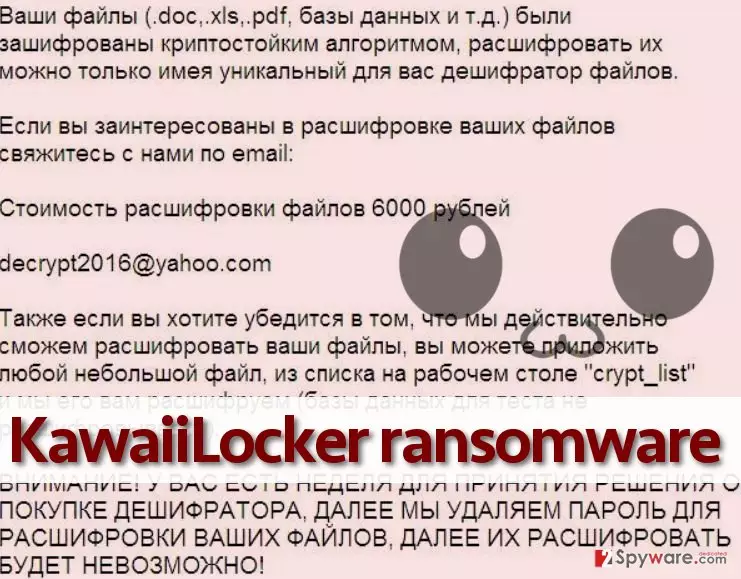
When you hear the word “Kawaii,” the first thing that comes to your mind is Japanese culture, for sure. However, KawaiiLocker virus is not anyhow related to this cute and playful attitude, because it is a malicious computer virus that encrypts files on the infected computer and demands a ransom. After infecting the system, it saves Crypt_list and KawaiiLocker.exe file, which is responsible for data encryption procedure, later on, it creates HOW DECRYPT FILES.TXT file, which appears to be the ransom note. What is more, this ransomware seems to target Russian computer users, since its ransom note is written in The Russian language. It explains what happened to the computer, and that files are unrecoverable unless the victim pays up. It demands 6000 rubles, which, if we convert this amount to USA dollars, is approximately 94$. It is worth mentioning that the ransom price is comparatively low, because, for example, the infamous Zepto virus demands even 4 BTC, which is around 2500$. No matter that the ransom price is not exceedingly high, we still do not recommend paying it. You might receive another infectious file that can compromise your PC system even more. Even if KawaiiLocker decrypter can decrypt your files, it is not recommended to buy it because this way, you would support cyber criminals and allow them to continue their malicious activities.
This ransomware does not provide the link to the payment website and rather leaves criminals’ email address for those who seek to get in touch – decrypt2016@yahoo.com. The victim gets a warning that if he/she does not pay up within one week, the decryption key is going to be destroyed, and files will remain encrypted forever. When you see such threats, it is easy to get scared and start to panic, however, remember that you can always recover your files from a backup. Unfortunately, the virus deletes Windows Volume Shadow Copies by completing this command in Windows Command Prompt – vssadmin delete shadows /for=C: /all /quiet. Now, it is your choice whether you wish to pay the ransom or not. We can only repeat our opinion – we do not encourage victims to do it. One thing that you must do is to remove KawaiiLocker virus from the system using a powerful software capable of removing ransomware threats. We suggest using FortectIntego or SpyHunterCombo Cleaner software for that. Please, do not try to remove KawaiiLocker malware manually because you can do more harm than good!
Techniques used to distribute this virus
Cybercriminals utilize advanced techniques to conceal malicious files and make them look safe. They do their best trying to deceive anti-malware programs and become able to bypass victim’s computer protection. Therefore, it is right to say that authors of this malware tend to spread it using Trojan horse technique. Typically, they send this virus to victims via email, pretending that they are trustworthy people from legitimate companies that deliver important documents or other types of files. They politely ask the victim to open email attachments, which contain malware. Remember – you should never open emails that come from unknown parties! Sometimes, you can identify that a cyber criminal is trying to deceive you by noticing grammar mistakes in their messages (they tend to leave a lot of errors in their messages).
Ransomware can also be distributed via exploit kits, malvertising, and bogus software updates. Unfortunately, it can be very hard to identify which advertisement is the safe one and which one is deceptive, besides, exploit kits can only be blocked with the help of reliable anti-malware software, and that is why you should always keep one installed on your PC.
How to remove KawaiiLocker ransomware?
The consequences of KawaiiLocker ransomware attack can be tragic. This virus can severely mess up your computer system by corrupting essential files. If you happened to infect your PC with this virus accidentally, do not wait any longer and take actions to remove KawaiiLocker virus from the system. This time, we do not provide manual removal instructions because such infections are extremely dangerous, and it can be tough to remove them manually. We strongly recommend using automatic malware removal software for KawaiiLocker removal. Instructions on how to launch it are given below.
Did this guide help?
4 comments
2-Spyware team
Dear visitor,
You can learn how to create data backups here: http://www.2-spyware.com/news/post5073.html
Shayla19
Yeah thats not kawaii at all.
victim
My files are locked, does that mean I will not be able to recover them if I do not have a backup?
Lea
true true. I have intalled anti-virus program to keep my computer secure. I am not sure how to backup my files...