

The main characteristics of the LockLock ransomware:
LockLock ransomware is a malicious computer program said to be based on the source code of the open-source ransomware called EDA2. This particular code, which was initially created purely for the educational purposes, to make people aware of the dangers of ransomware, has been applied and became popular among the malicious ransomware creators. New versions of it do not cease to appear in the ransomware arena. The virus we are discussing today — the LockLock malware — is one of the latest releases. Instead of teaching careless computer users a lesson it punishes them quite painfully. Once it finds its way on the victim’s computer, it immediately starts scanning the system in search of the particular types of files. These files are then locked with an algorithm which has been used for most of the modern ransomware — AES-256. This code is virtually unbreakable so contacting the virus creators remains the only option for the victims to redeem their files. We should point out that crooks charge considerable sums of money for the data decryption, but the file recovery is never guaranteed. The special decryption key they send you may be useless or bring other malware on your PC, so it is much safer to remove LockLock from the computer when possible. Security experts suggest employing professional anti-malware tools to remove with this parasite and avoid dealing with it bare-handedly.
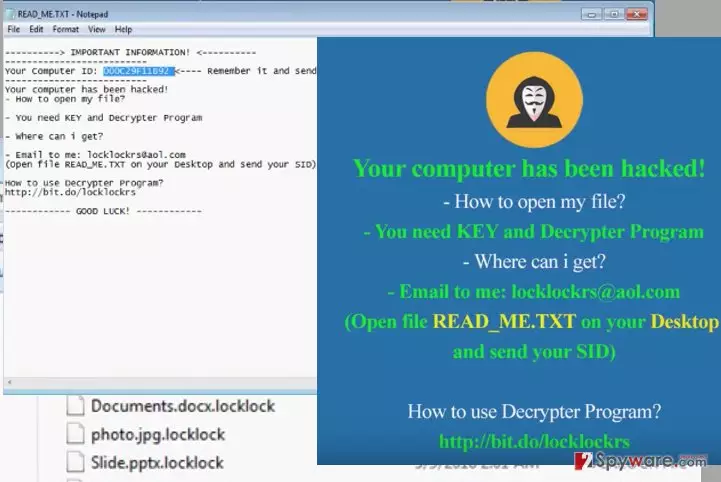
Like other ransomware viruses LockLock targets all sorts of files. The “.locklock” extension is added to every one of the infected files to indicate they are encrypted and will no longer be accessible. As you may have already guessed, this virus is named after this extension. It is interesting, though, that most of its victims are from China. The users from this particular country report that the virus also creates a text file called READ_ME.TXT in which the criminals indicate their email address (locklockrs@aol(dot)com) and Skype name (“locklockrs”) for the victims to contact them in case they want to get their data back. It is a typical way the criminals manipulate their victims. But you should not fall into their trap because such attempt to get your data back may have some very unpleasant consequences. You should better hurry with the LockLock removal and make sure that at least your future data is protected.
Can this ransomware be stopped?
Sadly, there is no way of stopping the LockLock ransomware from spreading around the Internet. However, there are a few preventative measures you can take to keep it away from your computer. First off, forget your habit to browse the web carelessly. There are numerous insecure sites that may contain some infectious content, so you should be careful where you browse, how you do it and, most importantly, what content you allow to access your computer. Refrain from downloading random software and ignore all the flashy ads that may urge you to do it. Also, be especially careful opening emails or navigating through the “Spam” catalog. It is better that you ignore it completely because LockLock and other ransomware viruses may end up there in the form of a malicious email.
LockLock removal and file recovery suggestions:
Your files are inaccessible. Strange extensions appear next to your files. You see threatening ransom notes on your desktop. What do you do? Remove LockLock virus as soon as possible! You will deal with the data recovery later, as for now, you must make sure that the infections virus files are eliminated from your computer. Your safest bet is, of course, and automatic system scan with a reputable antivirus software. Although this approach may have some drawbacks too. The virus may interfere with software blocking the system scan and preventing the LockLock removal. The instructions below explain how to bypass this obstacle. When you are done with that, you can use PhotoRec, R-Studio or Kaspersky virus-fighting utilities to recover your data. Other data recovery options are indicated below.
Did this guide help?
2 comments
Ramdam233
Its scary how these viruses are so unpredictable! You can literally be attacked ANYWHERE
Ulrich Grayson
Its really hard work getting rid of such infections. They are especially dangerous and can destroy your data completely