

How dangerous is FenixLocker ransomware?
FenixLocker virus, which is also known as centrumfr@india.com ransomware, is yet another file-encrypting virus that spreads at alarming rates. It can silently enter the computer system by exploiting security vulnerabilities found in outdated software and similar methods. Once Fenix Locker gets inside the system, it activates itself and starts encrypting data with AES encryption[1]. This procedure transforms your useful files into broken records that cannot be opened or manipulated in any way. Besides, it also renames these files by adding .centrumfr@india.com file extension to them. It can take from one to a few hours to encrypt all files, and once finished, the virus crafts a ransom note and saves it on computer’s desktop. For some reason, the virus names the ransom note as CryptoLocker.txt or Help to decrypt.txt. It might be that it has been using such names just to scare its victims and mislead them into thinking that the virus they are dealing with is an infamous ransomware called Cryptolocker.[2] However, this malware can be called one of low quality ransomware threats[3] that seeks to earn the money for its creators, so there is no doubt that you must remove FenixLocker ransomware as soon as it shows up on your computer. The ransom note provided by this cyber threat claims:
All of your files are encrypted, to decrypt them write me to centrumfr@india.com
Your key: [Victim’s ID]
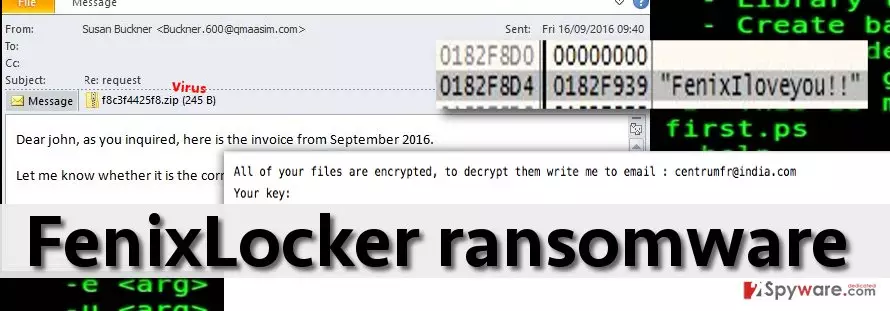
We already know how everything goes after victims send a letter to the provided email – crooks ask them to pay the money via Bitcoin payment system using Tor browser[4]. Please do not start searching for your wallet and bitcoins because you should not pay the ransom. Not only because you will support cyber criminals by funding their projects. Also, there is a free FenixLocker decrypter released by security experts some time ago. However, before using this tool we highly recommend you to remove this malware from the system. For instance, you can use FortectIntego to remove malicious files from your computer. We do not recommend opting for manual FenixLocker removal because this can be done only by advanced IT experts who know how to deal with such viruses and where do criminals tend to save malicious components. If you have no experience in dealing with malware, better use a professional automatic virus removal software instead.
How did this virus infect my computer?
FenixLocker ransomware spreads over the Internet concealed as a safe-looking file, in other words, it attempts to utilize Trojan horse technique. It can be added to malicious emails that criminals send to victim’s; it might also enter the system after installing a fake Java update[5]. Besides, now criminals are so advanced that they can infect even legitimate websites by delivering malware-laden ads; they also use exploit kits to take advantage of vulnerabilities in software that victim has installed on his/hers computer. The only way to prevent such malicious programs as FenixLocker from attacking the system is to establish a reliable protection software and avoid visiting suspicious domains, opening questionable emails or clicking on pushy ads. It is also a good idea to enable automatic updates to allow programs install their latest updates automatically – this way you will be sure that they are less vulnerable to computer threats and cannot be exploited that easily.
How do I remove FenixLocker virus from the infected computer?
If you have already been infected with this ransomware, you have to remove FenixLocker virus from the system without wasting your time. Please, do NOT postpone this and perform a full removal procedure on your computer immediately to prevent additional loss of your files. For that, we highly recommend using FortectIntego, SpyHunterCombo Cleaner and similar software which is considered powerful in ransomware removal. Besides, it will help you if you do not want to deal with the similar damage on your computer in the future. After you remove this cyber infection fully, you can use the free FenixLocker decryption tool and restore encrypted data. Make sure you don’t mix these steps and use the decrypter AFTER FenixLocker removal. Otherwise, you can find that your files are encrypted by this ransomware again.
Did this guide help?
4 comments
Lauren
Cyber criminals seem to be really excited about this virus type. They do not stop creating them...
Greg
FenixLocker ransomware has attacked me, but I can claim that I have recovered my files using FenixLocker decryptor provided there. Removed the virus with anti-malware tool before that, of course. :)
simmy
Removed the ransomware, time for decryption!
Baili
THANKS!!!