

Crucial information about Centrumfr@india.com virus
Permit us to introduce a new variant of file-encrypting malware – Centrumfr@india.com virus. This virus seems to be the property of the hackers who have preoccupied the IT experts with their multiple cyber threats. They all bore @india.com element in their titles: green_ray@india.com, siddhiup2@india.com virus, etc. It seems that these cyber criminals are back in business as they livened their activity. However, there is no room for panic or concern. What you must do right now is to remove centrumfr@india.com before it wreaks more havoc. For that purpose, we recommend installing FortectIntego. This utility will help you get rid of the threat quickly. However, file decryption is another matter. In this article, we will present a short overview of the ransomware operation tendencies and possible options to recover the files. While you are reading, do not waste time and perform centrumfr@india.com removal.
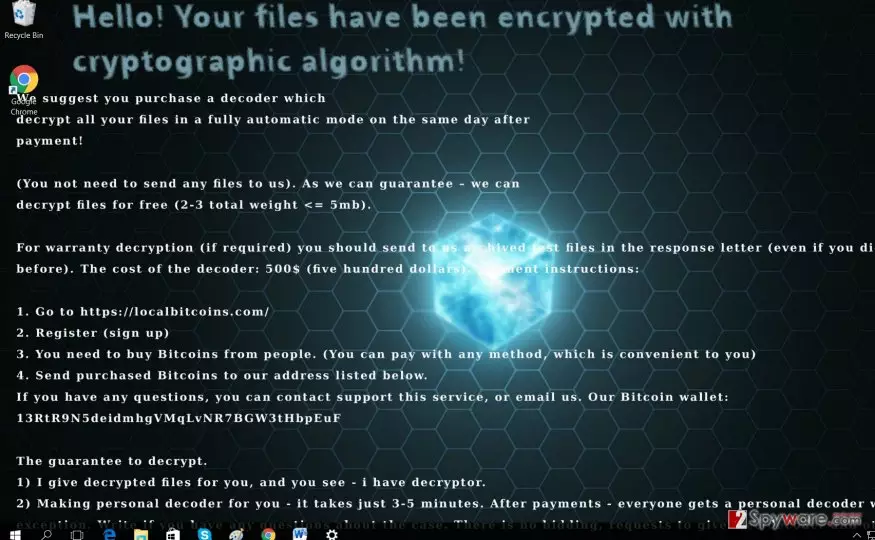
Looking back at the ransomware viruses which made the appearance this year, there were only a few which were worth additional attention. The majority of them were created in almost the same way. Their encryption strategies do not differ much. While there have been such viruses which simply moved the files to a protected folder without locking them, AES and RSA asymmetric encryption was and still is a prevalent method. Though the ransomware market was flooded with such cyber threats, the virus researchers still struggle to decode them. Likewise, centrumfr@india.com ransomware presents a challenge as well. It sneaks into the computer, finds possibly important files, and then encodes them. After a moment, the malware opens up its .txt file with the instructions to recover the files. This time, the crooks are quite greedy as they demand 500 USD in exchange for the encoded files. Moreover, if you do not manage to collect and transfer the money within two days, the sum will increase by $250. Though they guarantee to transfer Centrumfr Decrypter after the payment is received, do not take such claims for granted.
When does the malware take control of the computer?
As usual, Centrumfr@india.com malware might await for its victims in torrent file sharing websites, gaming portals or silently hide in a spam message. Perhaps, you are not aware how creative and persuasive cyber criminals have become. They might test you by sending you a false tax refund message or other official invoice or financial report. Unfortunately, such bait still proves to be successful and profitable. It would be better not to make a rush opening such emails, especially the attachments. Make sure that the sender is legitimate. In relation to this, it is vital to install an anti-spyware application. It might help you reduce the amount of received spam.
Centrumfr@india.com termination steps
Initiate centrumfr@india.com removal by running a security application (FortectIntego, MalwarebytesMalwarebytes, etc). The program will deal with the threat effectively. It will save you trouble from having to remove centrumfr@india.com virus on your own. Manual elimination is not recommended unless you specialize in the IT sphere. Later on, you can concentrate on the file recovery. If you struggle to delete the ransomware, follow the access recovery instructions below.
Did this guide help?
3 comments
reflection02
Still, its not as powerful as Locky...
DavisLouie
Any ideas how to remove it manually?
Rainmaker-n
Greedy ones...