

Information about Legioner_seven@aol.com ransomware
Victims who have their computers infected with Legioner_seven@aol.com virus find it impossible to open their essential personal files. It seems that this virus is yet another version of XTBL ransomware group and is reportedly related to Crysis ransomware. Viruses that belong to the XTBL group are known for their feature to append specific file extensions to their target files. In this case, ransomware [1] appends .[victim’s ID].Legioner_seven@aol.com.xtbl file extension to every file it encrypts. If you do not understand what is the purpose of the data encryption procedure, you should look at category name that this virus. This virus wants the extract people’s money, so it takes their files hostage and requests a specific ransom. There are several ways to avoid making this payment: you can use data recovery steps that are provided in the end of this article or prepare for such attacks in advance by backing up your data and using other tips for its protection. [2] Authors of Legioner_seven@aol.com virus are known to be very greedy so make sure you take care of your files properly.
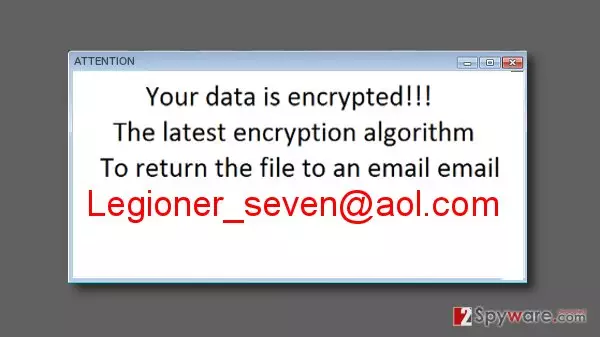
When the virus ends the system scan and ensures that all files are encrypted, it creates a message (which is known as ransom note) and saves it on the desktop. The ransom note contains the following lines:
Attention! Your computer was attacked by virus-encoder.
All your files are encrypted using a cryptographically strong algorithm. Without the original key recovery is impossible.
This text can slightly differ depending on the version of Crysis virus. The ransom note does not provide a lot of information but warns the victim that there will be no exceptions and no mercy. It asks to send a letter to Legioner_seven@aol.com virus developers and write victim’s ID number (which is integrated into encrypted data names) in the subject field. If you wrote a letter to this email, you would get a response asking to buy Bitcoins and send them to a provided e-mail address. However, there are some cases when victims of ransomware reported that they did NOT get any response from criminals after paying the ransom, so we suggest you to keep your money to yourself and not waste it by paying ransoms to cyber criminals.[3] There is a free decryption tool that you can try that work with some versions of Crysis and might help you to decrypt files encrypted by Legioner_seven@aol.com ransomware. However, before you try to restore the encrypted data, you need to eliminate malicious files from the system to prevent their encryption in the future. To remove Legioner_seven@aol.com from the system, you can use FortectIntego which is a recommended removal tool. We highly recommend you not to try to remove this malware manually because it is a seriously-complicated task that requires specific knowledge. Automatic Legioner Seven removal is the only process that does more good than harm (especially if you are not experienced PC user).
What technique is used to distribute such malicious programs?
Cybercriminals tend to rely on several malware distribution techniques that have proved to be the most efficient ones:
- Spam. Criminals send spam emails to thousands of computer users containing malicious attachments that are filled with malware. If the victim recklessly opens such attachment, the virus sneaks into the computer system as a Trojan horse and then starts corrupting files right away. Unfortunately, but the amount of such fake messages keeps increasing [4] what means that the risk of getting infected grows each day.
- Exploit kits. [5] Exploit kits are tools used to explore vulnerabilities in software on the victim’s computer. Exploit kits are injected into compromised websites, and once victim visits them, they scan the system for weak software. If exploit kit detects security holes, it takes advantage of them and delivers malware payload then.
How to remove Legioner_seven@aol.com malware?
To eliminate this ransomware variant from the system, we strongly advise using FortectIntego or MalwarebytesMalwarebytes malware removers. Please, do not play with your system if you are not an expert in computing and do not try manual Legioner_seven@aol.com removal. Otherwise, you might delete the wrong files but not the infection itself. Besides, this ransomware can arrive in a bundle with other malware, so it is essential to scan the system with a powerful malware removal software to remove Legioner_seven@aol.com virus entirely. This procedure will also help you get rid other malicious components from your computer. Beware that ransomware viruses can block your security software to prevent their elimination. To avoid this removal issue, you should firstly reboot your PC in a Safe Mode first. Instructions on how to do it are presented below. At the end of this page, you can find several data recovery tips that might help you to restore encrypted data.
Did this guide help?
3 comments
Freddie
I am SO glad that I had a backup...
Rositta23
iF anyone knows how to decrypt files please post there...
help
Oh my god please do not tell me that there is no way back!!!!1