

Crucial information about Taka ransomware
Reviewing the highlights of today's IT news, let us present Taka virus. It operates as file-encrypting malware. Though the threat still delays its grand appearance in the virtual stage, significant information has been gathered about the malware already. The ransomware does not stand out since it prefers using proven asymmetric methods of encryption to conduct its mission. As it is common for other ransomware threats, it presents the demands in the .txt message. Moreover, the cyber criminals exploit prevalent strategy to pressure the victims to remit the payment sooner as they threaten to delete the files after the specified amount of time. The virtual community has already seen numerous similar ransomware. Thus, should you treat this ransomware seriously? While you will be getting acquainted with the operation and Taka removal options, install a security application, such as FortectIntego. It will ensure that the process goes undisturbed since it is crucial to fully eradicate the threat. In case, you struggle to remove Taka, use the guide provided below this article.
While ransomware is associated with the encrypted data, ransom demands, and, generally, tons of problems for ordinary users, virus researchers take a different approach. Though the file-encrypting threats tend to use traditional AES and RSA encryption algorithms, each virus is of interest for an IT expert. Moreover, other people enjoy observing what trends dominate among the ransomware authors, as you might spot not only menacing looking malware but file-encrypting viruses bearing random titles or names associated with pop-culture and mythology. Speaking of Taka malware, some users may trace relations with the monetary unit of Bangladesh. Others may suspect that it leads to the hackers who favor the Japanese culture, as “taka” means hawk, respectively. In any case, the hackers of this virtual aggressor made sure to retain their anonymity.
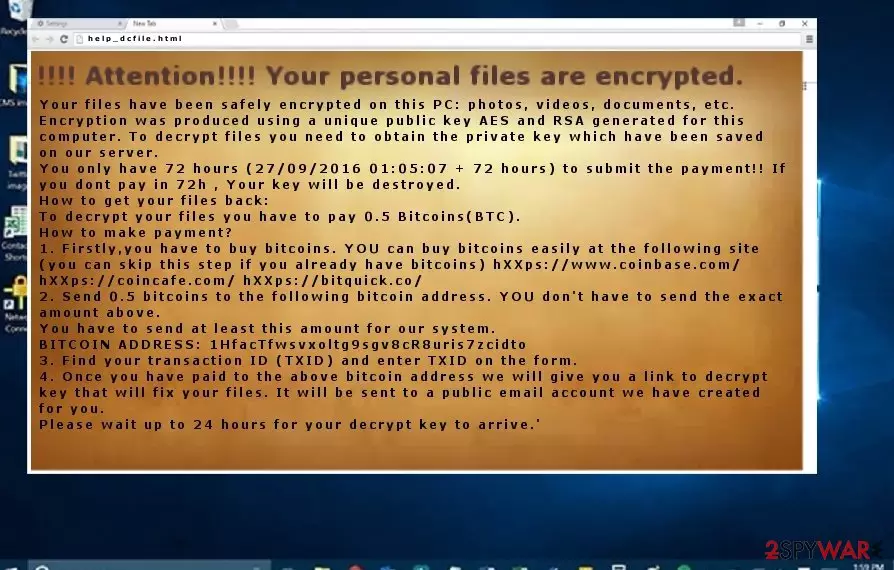
In the help_dcfile.txt file, the crooks inform of their misdeed by declaring that valuable documents have been locked with the help of AES and RSA algorithms. Therefore, they further instruct victims to create Bitcoin wallet. In contrast to some previous file-encrypting threats which used Tor browser for collecting ransoms, this virus suggests visiting hXXps://www.coinbase.com/, hXXps://coincafe.com/, and hXXps://bitquick.co/ for obtaining bitcoins. Furthermore, when you finish the steps, the hackers ask you to transfer the bitcoins to the indicated address. Moreover, the payment should be remitted within 72 hours. Otherwise, they delete files permanently. Certainly, such psychological terror might work for some users. The hackers require paying 0,5 bitcoins which equal $300. On the other However, despite how important files were, keep in mind that their retrieval rests entirely upon the crooks‘ conscience.
How did the ransomware get into the computer?
Most likely, Taka ransomware used a spam message with the infected link. Hackers have mastered various techniques to persuade users into opening the attachments. Beware of the emails which bear .doc or .scr files. They might be disguised under fake customs declarations forms or delivery information files. Even if you see the logo of the local court, do not rush to open the file as a highly damaging ransomware, such as Taka, might hide there. In addition, keep in mind that torrent sharing websites often disguise trojans or file-encrypting threats as well.
Remove the threat efficiently
Regarding the full elimination, we recommend opting for automatic Taka removal. Install an anti-spyware application, e.g. FortectIntego or MalwarebytesMalwarebytes. Either of this application facilitates the complete termination. It is crucial to locate all files of the malware. If you cannot remove Taka virus because your security application is forcefully shut down or your downloading function has been ceased, follow our access recovery guidelines.
Did this guide help?
3 comments
JimTheDriver
Luckily, my security applications are still working.
Dean
There are so many of them. Do people get really infected by them? Are they all active?
jenyhu7
Isn‘t it possible to track their locations? I‘m really curious in their identities...