

1-844-324-6233 Tech Support Scam virus seeks to scare users with fake error screen
1-844-324-6233 Tech Support Scam virus is a malicious program created by shameless technical support scammers. It belongs to the huge group of Tech Support Scam malware – these programs are all meant to deceive the computer user, pull wool over his or hers eyes, and convince him or her to follow scammer’s commands that supposedly can fix the computer. The virus arrives in the form of WinCPU.exe file, which entirely differs from other Tech Support Scam threats. It appears that this virus establishes a backdoor on the compromised system. Once installed, this Trojan horse connects to its Command&Control server and waits for commands. It checks the remote server every 5 minutes to see if new commands have been created, and executes them immediately. The virus saves the following files to AppData folder:
- ImageLoader.exe;
- AutoUpdare.bat;
- WinCPU.exe.
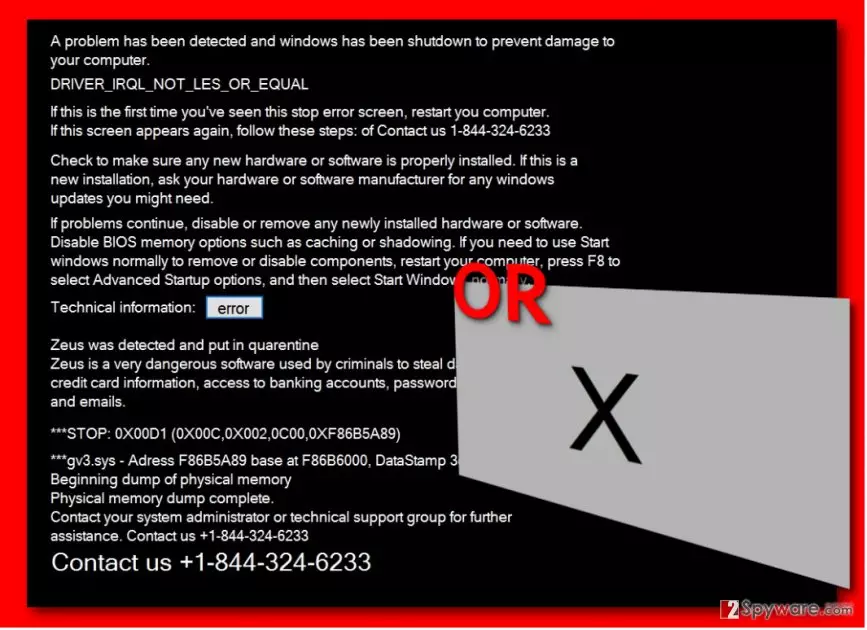
In the case of successful 1-844-324-6233 Tech Support Scam Trojan attack, the virus launches a big black window on the compromised PC’s screen containing a message that tells the victim to dial 1-844-324-6233 for help immediately. The virus displays the following warnings to intimidate the user:
A problem has been detected and windows has been shutdown to prevent damage to your computer.
DRIVER_IRQL_NOT_LESS_OR_EQUALIf this is the first time you’ve seen this stop error screen, restart your computer.
If this screen appears again, follow these steps: of Contact us 1-844-324-6233
Then the fake message continues to babble about problems that might have caused the error and suggests checking if any new hardware or software has been installed correctly. Suddenly, it changes the topic and suggests installing Windows updates, disabling BIOS memory options, and applying other “fixes” that should help to fix the made-up “problem.” The message is clearly designed to confuse inexperienced PC users and make them feel like they need some professional help. Then again, all of sudden the bogus message announces that Zeus Trojan has been detected on the system. It showcases such lines for the victim:
Zeus was detected and put in quarentine
Zeus is very dangerous software used by criminals to steal data such as credit card information, access to banking accounts, passwords to social networks and emails.
***STOP: 0X00D1 (0X00C,0X002,0X00,0XF86B5A89)
***gv3.sys – Address F86B5A89 at FB6B6000, DataStamp 3dd991eb
The trojan is not precisely programmed, and in case its installation gets interrupted, it becomes unable to display the error message and launches a large gray screen with an X in the middle of it. Now, we would like to talk about what needs to be done in case the real or the corrupted window appears on your computer screen. It goes without saying that you should NOT call tech support scammers; instead, you should immediately run a system scan with anti-malware software. A powerful anti-malware should detect the malware automatically and remove 1-844-324-6233 Tech Support Scam from the system. Make sure you use a right anti-malware tool – we suggest FortectIntego, but feel free to use any other reliable anti-malware tool if you wish to.
How does this virus spread?
What’s unusual about this virus is that it still spreads like a simple potentially unwanted program (PUP), which means that it can arrive in a software bundle along harmless free programs that can be easily downloaded from the Internet. We highly advise you to adjust setup settings and use Advanced or Custom settings for the installation to make sure that you notice all bundled items. To exclude them, just deselect them. However, this Trojan horse can be distributed with the help of other malware distribution techniques such as malvertising or malicious email campaigns.
How to remove 1-844-324-6233 Tech Support Scam?
1-844-324-6233 Tech Support Scam removal should be completed ONLY with a powerful malware removal tool. You should not try to remove 1-844-324-6233 Tech Support Scam virus manually since you do not know what commands this Trojan horse had time to execute behind your eyes. A thorough system scan with a professional anti-malware tool is highly recommended in this case. If you do not have such program, install one of the trustworthy ones that we recommend, and if this piece of malware attempts to stop you from launching the security program, follow these steps:
Did this guide help?
4 comments
Paul8
Found this on my PC this morning
Help
This virus doesnt uninstall whyy??
Martha
Virus! i want to remove it as soon as possible, hope Reimage can do it!
Amy
Computer is clean - antivirus killed this threat!