

Deadly ransomware is actually deadly: how does it act?
Deadly virus is not some fancy expression; it is the name of a new crypto-ransomware virus, which has been discovered in the middle of October 2016. The virus slips into the computer system using Trojan horse technique, spreads malicious files on the system, prepares for the attack and then executes itself. The malicious processes it runs scan the entire computer system looking for certain file extensions and once it finds a file that has one of the target file extensions, encrypts it. The virus applies AES-256 encryption, so trying to brute-force the decryption key would take years even if you use the most powerful computers. After encrypting the data, the virus removes the decryption key from the computer and transfers it to its secret server. Then Deadly ransomware creates a ransom note, stating that it’s “Deadly v.1.01 For a Good Purpose,” and then explains what happened to the data. Traditionally, ransomware wants money, so it asks for a ransom worth 500 USD. Cyber criminals want to get a secured payment and stay anonymous, so they request the victim to transfer this sum to a provided Bitcoin address. Once the payment is made, the victim should contact a provided email and reveal the transaction details as well as the unique identification code. The virus warns users not to remove Deadly ransomware until the payment is made, because “this will result in immediate elimination of the private key by the server.” The ransom note includes a button that shows the list of encrypted files.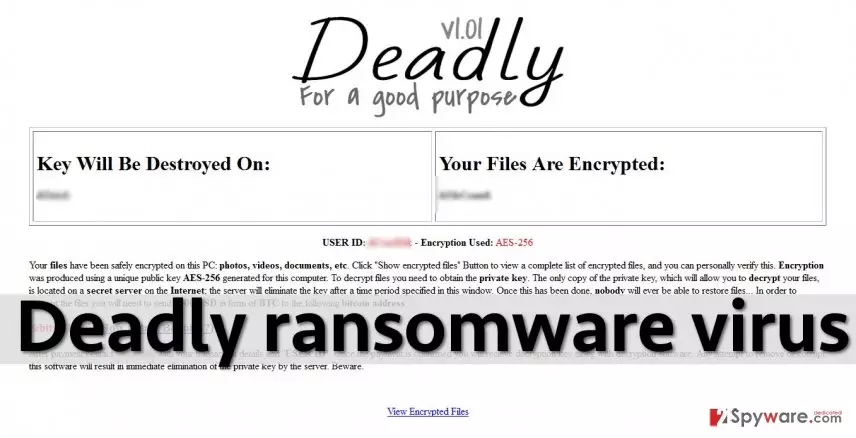
If you are a victim of Deadly malware, do not obey its order and do not pay the ransom. Paying the ransom is not a solution, and unless it is the only way to help your business or organization, please, do not pay it. The more people pay ransoms, the more cyber criminals start these criminal activities because they know it is a very profitable but filthy business. If you have a backup, you can restore lost files right now, but before that, you must remove Deadly virus. Use an anti-malware tool like FortectIntego for that. To run it, you might need to use Deadly removal instructions presented below this article.
How do cyber criminals distribute this virus?
Cybercriminals use a variety of techniques to install malware on users’ computer systems. The most popular ones are these:
- Malicious email campaigns;
- Malware-laden ads;
- Exploit kits.
To protect yourself from these attacks, you must follow safe browsing rules and mind general Internet hazards, because careless browsing is a direct way into cybercriminals’ hands. Frauds are not some mid-level programmers – they are professionals, and they have already proved that they can compromise even well-known and legitimate websites by injecting malicious ads into them. Therefore, it means that a one click on a banner while exploring a legitimate and popular website can result in computer infection. Even more popular way to outspread ransomware viruses is to send them to victims via email, so please do not open emails sent by individuals or organizations that you’re not familiar with.
How to remove Deadly ransomware?
If you suspect that your computer has been attacked by Deadly virus, please run an anti-malware software to detect the infection. If you encounter difficulties when trying to launch the security software, it means that the virus is blocking it. Then you will have to boot your PC into Safe Mode with Networking and try to remove Deadly malware again. Instructions on how to do it are provided below.
Did this guide help?
4 comments
Dana
Well, actually deadly. My files cannot be opened and are useless.
alina
I wish my kids werent so curious... They have installed this nasty ransomware on my computer and all my photos and music files are gone. Ugh! This is so annoying...
Liam
I know, I know, its my mistake that I didnt have antivirus or backups but how do I decrypt the files now? There must be a way to do that
Br42-1
sadly, there isnt