

Ransomware family has a new family member – Rotor virus
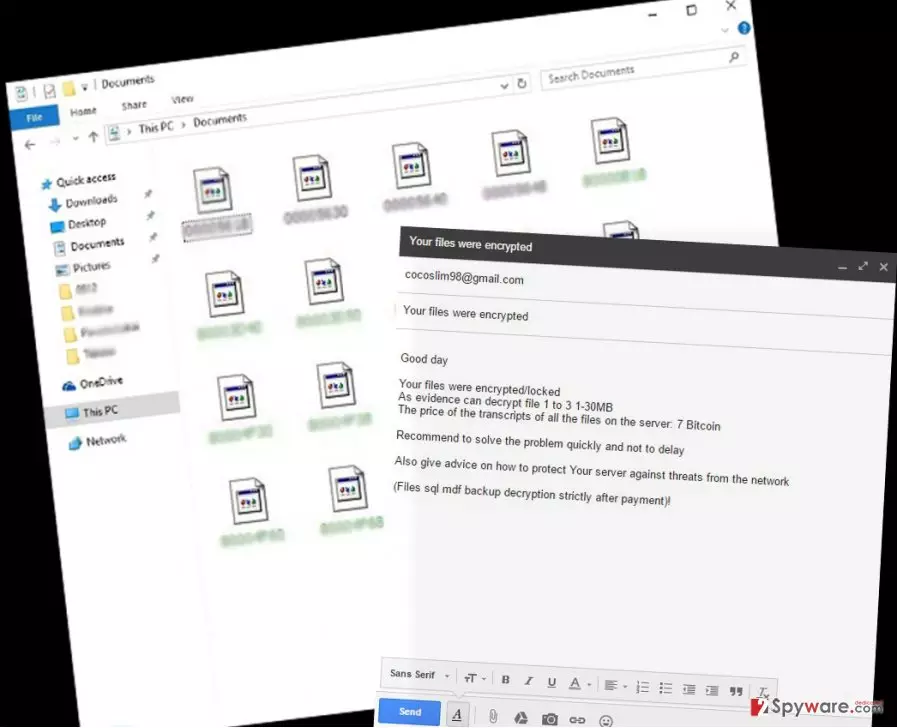
Rotor virus is a brand new ransomware virus that has been recently spotted spreading online. File-encrypting viruses are quite trendy right now. Hackers are inspired by famous and successful ransomware viruses that swindle huge amounts of money. In this case, Rotor ransomware does not differ from other viruses belonging to this category. The virus is designed to corrupt various types of files and make them useless by appending unique file extensions. After data encryption, virus appends !____GLOK9200@GMAIL.COM____.tar or !____cocoslim98@gmail.com____.tar file extensions. Indeed, these extensions are email addresses that victims need to contact cyber criminals in order to get more information about the possibility to get back access to their personal files. However, if your computer was infected with this malware, you don’t need to waste your time and contact crooks. We already know what they say. They ask to pay a huge ransom for the opportunity to decrypt your files. Instead of chatting and sending data to the criminals, remove Rotor from your PC. The easiest way to eliminate malware is to use FortectIntego or other strong anti-malware program.
Ransomware viruses usually change desktop background with a scary picture and drop various ransom notes on the desktop, or other folders were corrupted files are. However, Rotor virus keeps information related to file encryption and decryption as a secret until victims contact them. Hackers are not willing to chat via email as well. They briefly explain that victims need to pay 7 Bitcoins (that equals to 4400 USD) for encoding files. Indeed, the price is enormous, and we do not recommend paying it. However, criminals want to earn victims’ trust by offering them to decrypt one file for free: they have to send one file that is not bigger than 30 MB and crooks will send decrypted file soon. If Rotor damaged your files, you might want to get back at least one important file for free, but we don’t recommend playing with criminals. This activity might be dangerous and put your computer at even bigger risk. With an encoded file, you might get other malware as well. The size of the ransom is really huge compared to other ransomware viruses. Usually, victims are asked to pay from about 1 to 3 Bitcoins. We never advise paying any money for cyber criminals. According to various researchers, hackers tend to disappear after receiving the money. The main purpose of ransomware is to wheedle money from terrified computer users. If ransomware has infected your computer, you should worry about your computer’s state first. The virus not only corrupts your files but also might let other malware inside. Therefore, you have to initiate Rotor removal as soon as you see it’s dirty steps on your PC.
How can my computer get infected with ransomware?
One particular distribution technique of Rotor malware is still unknown. However, the authors of malware might be using the same strategies as other ransomware developers. Spam emails are the primary distribution technique, so you might receive the virus in your personal or work email. We always recommend double check information about the sender before opening any attachments. Ransomware might spread via safely-named Word or PDF files. Malware is also distributed via infected ads which might be placed not only on questionable and high-risk websites but also on reputable and official sites. Indeed, it might be difficult to understand which advertisement is safe and which one – dangerous. In this case, reliable antivirus programs help a lot. Moreover, Rotor ransomware might infiltrate your computer if you install software or updates from unknown and insecure sources. So, stay away from Torrents and various file-sharing services.
How to get rid of Rotor ransomware virus?
To remove Rotor from your computer, you have to reboot your PC into Safe Mode with Networking. Then, you have to employ powerful malware removal tool. Sometimes ransomware block access or particular features of the antivirus program. In this case, you should carefully follow our prepared instructions below and eliminate malware manually. When you complete the last Rotor removal step, scan your computer with an updated anti-malware program. For virus elimination and further protection we recommend FortectIntego, SpyHunterCombo Cleaner or MalwarebytesMalwarebytes.
Did this guide help?
4 comments
William
4000 dollars?! Are they insane? I cant imagine who can spend so much money for decrypting files...
Jennifer
I learned it the hard way that making backup copies is important. Be careful, because ransomware viruses are horrible!
Tom
New ransomware again? Oh my God...
Joe
I will let my co-workers know about this new file-file encrypting virus. Those women always manage to catch funny computer infections. However, this one seems like a big problem.