

How does Versiegelt virus act?
Versiegelt virus is named after file extensions it adds to the files it corrupts. It is a new ransomware-type virus that encrypts files and demands a ransom, and it seems that this virus targets German-speaking computer users, because the ransom note it saves on computer’s desktop is written not in English, but in The German language. The virus uses AES cipher to encrypt victim’s files and also adds .versiegelt file extensions to them. Once encrypted, files become useless because the victim loses the opportunity to access or manipulate them entirely. To restore files to the initial condition, the victim needs to have a decryption key, which is securely hidden in cyber criminals’ servers.
That is why Versiegelt ransomware launches a program that contains the pay-the-ransom text and offers the decryption key and automatic Versiegelt removal for 100 Euros in Bitcoin currency, or in other words, they demand a ransom. Of course, we do not recommend paying it, because it does not guarantee data recovery; besides, criminals can send more dangerous malware to you along with the “decrypter.” This ransomware warns that no service centers can help to recover files, which is true, no matter how sad it is. However, malware researchers are working on it and sooner or later a free decryption tool should be released. In the meantime, remove Versiegelt ransomware with FortectIntego and read more about ransomware prevention strategies.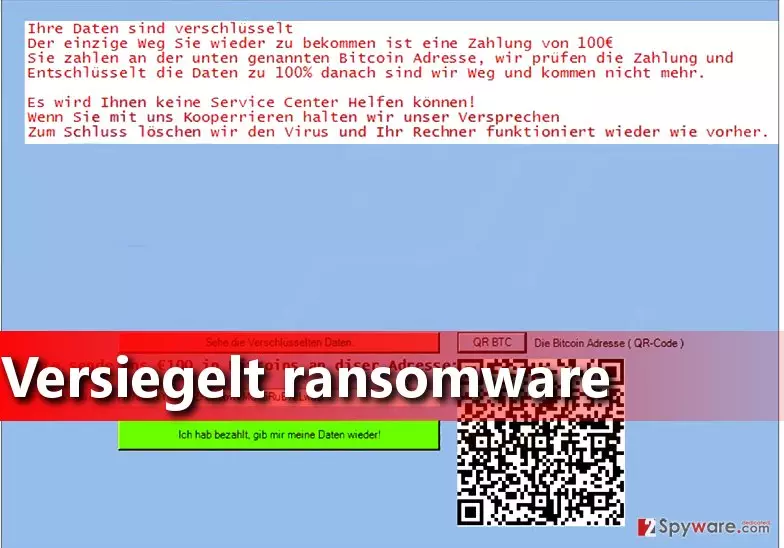
How does a ransomware virus proliferate?
Ransomware is a hideous computer infection that can attack innocent computer users and encrypt their data. Clearly, nobody wants to be affected by such computer virus. Therefore, one should take special actions to protect the computer in advance, because ransomware is a virus that does irreversible damage to the PC. To prevent ransomware attacks, install a proper antivirus or even better – anti-malware program. It helps to keep your PC safe and sound and also removes all computer threats at once. Next, backup your data. This is extremely important, because if you have extra file copies, you can use them when a virus corrupts, deletes, or modifies your files in some suspicious and irreversible way. Data backup should be exported to an external data storage device. Finally, we recommend you to stay away from questionable emails that you receive, because cyber criminals can deceive you by providing a professionally-written message, and suggest opening a file attached to such letter. Do not do it if you do not know the sender well enough!
How to remove Versiegelt ransomware?
To remove Versiegelt virus, you will need the anti-malware program. First of all, you will need to prepare your computer for Versiegelt removal, and it means that you will have to start it in a Safe Mode with Networking. It is not a hard thing to do if you follow instructions provided below. Please do not try to eliminate this malware without anti-malware tool because 1) it is a hard thing to do; 2) you can delete or modify wrong files or settings and make the situation even worse.
Did this guide help?
2 comments
Joe
I cant get my files back....
London82
I have no idea why did this virus attack me I dont even speak german