

Why should you ignore Nomoneynohoney@india.com demands and remove it from the computer?
Nomoneynohoney@india.com virus is a malicious computer program that is named after a joke that has been made in a parody video of Vinnie the Pooh. In this video, Vinnie tells the piglet that if he has no money, then he gets no honey. Nomoneynohoney@india.com ransomware puts the victim in a quite similar position – it encrypts personal files and demands a ransom payment in order to make them accessible again. Just like the other CrySiS (XTBL) ransomware versions, it adds victim’s ID and the contact email address to each filename as well as the .xtbl file extension. For example, a file that is named example.jpg becomes example.jpg.<Victim’s ID>.Nomoneynohoney@india.com.xtbl. The majority of CrySiS viruses are undefeatable and cannot be decrypted, so users should protect their computers prior to ransomware attack.
The virus deletes Volume Shadow Copies, which can help to restore a big part of the decrypted data. Once it ensures that data recovery is impossible, it changes desktop background with a picture displaying a warning and also saves a ransom note on the desktop. Both these files are meant to inform the victim about data encryption and convince the victim to contact cyber criminals for help. They command the victim to write to Nomoneynohoney@india.com email for help. Typically, ransomware authors just ask the victim to purchase Bitcoins and transmit them to a certain Bitcoin wallet using Tor browser. Ransomware authors typically ask for a huge ransom, typically $500-$1000, and we believe that sum is enormous, especially because even after paying criminals might not provide the decryption software or ask to pay more. Therefore, we suggest you remove Nomoneynohoney@india.com virus using anti-malware software (FortectIntego or SpyHunterCombo Cleaner) and restore your files from a backup. For successful Nomoneynohoney@india.com removal, start the computer in a Safe Mode with Networking first. You can find instructions on how to do it below the article. 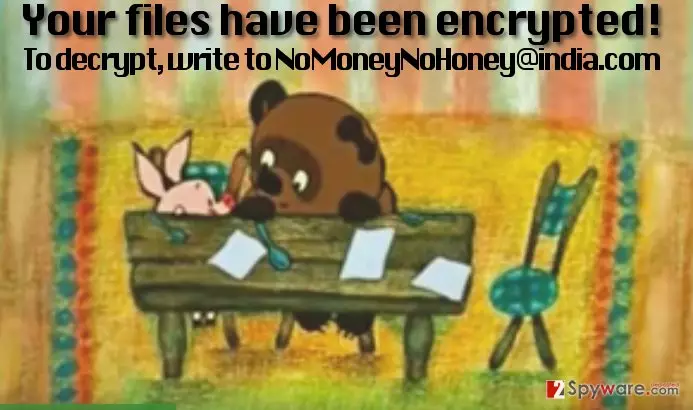
How does this virus proliferate?
XTBL ransomware viruses are known to be actively distributed via malware-laden ads, exploit kits, and malicious email spam campaigns. All these techniques help scammers to spread the virus as far as possible and affect thousands of computers quickly. Sadly, many computer users believe in deceptive messages that criminals craft and open attachments added to such emails. Typically, scammers entitle such attachments as “invoice,” “Phone_bill,” “ fine” and so on. Stay away from emails that come from unknown senders – it is the best thing you can do to prevent ransomware attacks. Of course, you also need to protect your computer by installing anti-malware software, because dangers such as exploit kits or malware-laden ads can hardly be recognized or prevented manually. You can never know which ad is safe and which one is not, because scammers sometimes manage to infect ad networks and then display malware-laden ads even on legitimate websites.
How to remove Nomoneynohoney@india.com virus from the compromised PC?
Now that you have learned how this virus acts and spreads, it is time for the most important part – Nomoneynohoney@india.com removal. We strongly recommend you to uninstall this program automatically, because unlike regular computer programs, this one does not have an uninstaller and it tucks away its files and components deeply in the system. To remove Nomoneynohoney@india.com virus, start your PC in a Safe Mode with Networking as instructed below.
Did this guide help?
4 comments
Jaimie
Hysterical. No money no honey... yeah right. Id better have no honey rather than no money and no honey.
Lynne
The fact that files cannot be decrypted just drives me insane...
showtime98
Thanks for helping with virus removal. I have a backup - used your advice in the past and created a backup. Thanks God I have done that!
Creative..
no money no honey. ok, so thats how ransomware viruses are dubbed nowadays