

Error 268D3-XC00037 Tech Support scam continues to deceive people
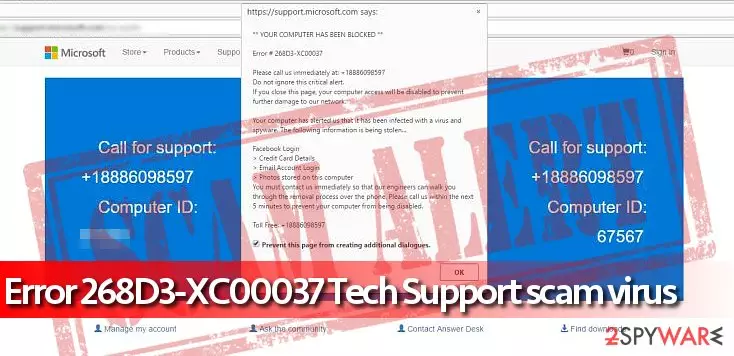
Error 268D3-XC00037 Tech Support scam is a malicious program which is trying to swindle money from gullible people[1]. This virus displays a fake pop-up stating that your computer is blocked due to the Error # 268D3-XC00037. Scammers try to make the message look convincing by saying that all the sensitive information has been stolen and you should contact call via the indicated number.
However, this is just an attempt to trick you into dealing with malevolent people via phone. They will pretend to be Microsoft Support group which should help you to fix the problem. Note that despite how legitimate Error 268D3-XC00037 scam message looks, it is not real.
Once error 268D3-XC00037 Tech Support virus loads the deceptive website, it also triggers a pop-up message that says:
** YOUR COMPUTER HAS BEEN BLOCKED **
Error # 268D3-XC00037
Please call us immediately at +18886098597
The following information states that user’s computer “has alerted” Microsoft about a suspicious infection and that valuable personal information is being stolen from the system by some mysterious virus. No matter how bizarre and suspicious these statements sound, some computer users believe in them and call the fake tech support number provided in Error 268D3-XC00037 Tech Support scam.

If you see that your computer acts suspiciously, you should first search the web for more information about it before taking any actions, and scan the system with the anti-malware software to detect and root out all infections. If the computer starts opening web pages like Error 268D3-XC00037 Tech Support scam, asking you to call for help, realize that it is infected with a phony malware that displays false information to you and only wants to scare you.
If you called this number, you would get in touch with scammers who try to sell useless software or services. If you have been attacked by tech support scam virus that is described in this article, you should remove Error 268D3-XC00037 Tech Support Scam virus with FortectIntego or another decent anti-malware software quickly.
Note that any attempts to try to get rid of the malware without specific IT knowledge might lead to permanent computer damage. Therefore, be aware that Error 268D3-XC00037 Tech Support scam removal should be held with extreme care. For that, follow the guide given at the end of this article.
Malicious programs are brought to your system by freeware
Malware and other potentially dangerous programs can be installed on your system together with free applications[2]. It is because they are bundled together, and the information about additional programs is hidden among the optional components.
Therefore, you should never pick Quick/Recommended options for the installer. They do not show you the checkmarks which are usually pre-selected and gives your permission to infiltrate highly suspicious and malicious programs. Instead, experts from NoVirus.uk[3] recommend choosing Custom/Advanced options and de-selecting those marks.
Learn how to perform Error 268D3-XC00037 Tech Support scam virus elimination
Since this is a malicious computer threat, manual termination cannot be even considered. Do not overestimate your computing skills by trying to get rid of the scam messages. You can either fail to succeed in Error 268D3-XC00037 Tech Support scam removal or even damage your system.
Instead, remove Error 268D3-XC00037 Tech Support scam automatically with the help of a powerful anti-malware software. For that, we suggest using FortectIntego, SpyHunterCombo Cleaner and MalwarebytesMalwarebytes. They are tested and recommended by DieViren.de experts. By choosing the automatic elimination, you ensure quick and safe removal.
Did this guide help?
4 comments
Hackley
Error 268D3-XC00037 pop-ups bother me every day...
moss
Damn these tech support scammers. They speak with a strong indian accent and the one who have talked to me wanted to sell Windows Defender to me. Do you understand what it means? Its almost hysterical. However, users who are not that experienced in computing might buy that... Oh God. I cannot believe that there are people who fall for such scams... Its so sad
Aimee
Cant stop these ads, everytime i close them they reappear
markarth
Thats why you need to uninstall the virus that sends these ads to you...