

The same scenario: iRansom demands money in return for the data
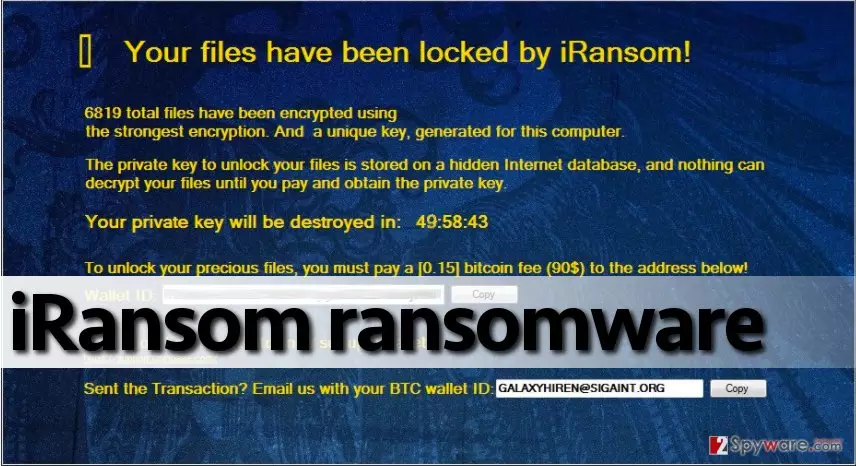
iRansom virus has joined the enormous collection of other file-encrypting malware. Naturally, it encodes the files and requires to remit the payment in exchange for the data. Usually, the amount of ransom equals $90 USD. The users affected by the virus might panic thinking that there is no solution. Note that know that ransomware viruses work as military-grade encryptors that use specific ciphers to generate encryption and decryption keys. Such threats create unique key sets for each compromised computer, so key sharing isn’t going to restore files. The virus adds .locked file extensions to encrypted data and then launches a ransom note declaring:
Your files have been locked by iRansom!
[number of encrypted files] total files have been encrypted using the strongest encryption.
The entire ransom message can be seen in the picture provided below. The ransom-demanding program showcases a countdown clock that promises to destroy the private decryption key when its value reaches zero. Of course, like any other ransom-demanding parasite, iRansom malware wants to receive the ransom in Bitcoins (approximately 0.15 BTC equals to 90$). To explain to the victim how to transfer the payment to a provided Bitcoin wallet, the ransom note presents a link to a website that provides more information on how to get Bitcoins and set up a wallet. The user is asked to contact criminals via galaxyhiren@sigaint.org email address. However, we suggest you leave those $90 to yourself because malware researchers have already started talking about iRansom decryption tool that might be released soon. Therefore, we advise you to to be patient and not pay the ransom. We strongly recommend you to run FortectIntego to remove iRansom virus and then backup encrypted files to have their copies before experimenting with decryption tools. We invite users who cannot start their anti-malware programs to look at iRansom removal instructions presented below this article.
The distribution tendencies of the malware
Ransomware uses tricky techniques to get unauthorized access to victim’s computer. In most cases, ransomware authors disguise malicious files like documents or JS files, which they add to malicious spam emails that they send out to thousands of recipients. Malicious emails are hard to recognize because typically they look like they came from legitimate and trustworthy companies. These days scammers have no shame to hide behind legitimate companies’ and organizations’ good names, so be suspicious of every email that you get. We suggest you inspect how does the sender’s email address look like, and check if there are any grammatical errors in the message. Frauds are typically unlettered people, and they can hardly write even short messages without making tens of obvious grammatical mistakes. However, you should also beware of menaces such as exploit kits and drive-by downloads, which also help to deliver ransom-demanding viruses to target computers. The most effective way to fight against such threats is to protect the computer with anti-malware software.
Infected with iRansom? You can remove it!
Have you been attacked by iRansom virus? If so, do not wait any longer and take actions to find and remove all components of this virus. Otherwise, it can initiate the another encryption of your files. The best way to remove iRansom virus is to scan the system with a powerful malware-detecting tool, such as FortectIntego or MalwarebytesMalwarebytes, and let it wipe out malicious components automatically. If you can see that your security software is blocked by this malware, you should follow iRansom virus-free.
Did this guide help?
4 comments
Hurgada
Oh, yeah, wheres my wallet... just joking not gonna pay the goddamn ransom. screw criminals. Id better invest in a good antimalware tool.
djay
iRansom has encrypted my files unexpectedly I havent noticed any suspicious signs which is weird!!
iRansomsucks
iRansom authors - you suck! And Im not gonna pay the ransom. Byeeeee
jumbo
Okay this was quite unexpected. Is it actually not possible to recover files now?...