

Important information about PaySafeGen ransomware virus
PaySafeGen virus appears to be German-speaking ransomware. It encrypts victim’s files using AES-128 encryption, generates a special decryption key and removes it from victim’s computer to prevent the victim from decrypting files free of charge. Then it displays a ransom note/screen locker, which explains what happened to the computer. It says that all files have been corrupted with AES cryptography and data recovery is impossible without the 128 digit code, which cyber criminals suggest purchasing for 100 Euros. It is nothing but a filthy blackmail, and you should definitely not pay the ransom. The ransom note announces that the decryption key is available for the next 72 hours only, and after that, it shall be destroyed. If the victim does not get a response from criminals for a while, they suggest writing to cry_16@hmamail.com. However, we believe that you should not respond to this cyber attack in any way because files cannot be decrypted. Besides, paying the ransom means funding criminals and helping them initiate even more dangerous malware campaigns sooner. We strongly recommend you to restore your private data using a backup, but firstly, remove PaySafeGen virus. To do it, you should use tools like FortectIntego or SpyHunterCombo Cleaner. Don’t pay the cyber criminal and do not let him/her to manipulate you.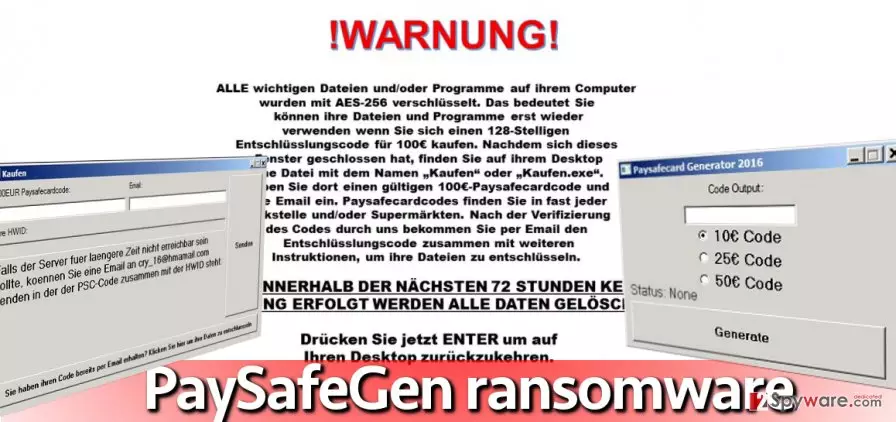
How did my PC get infected with this virus?
This virus reportedly spreads in the form of a fake Paysafecard generator, which tricks users into installing it. It promises to function like some kind of a cash generator that can generate genuine Paysafecard codes to make the victim wealthier. Of course, that is not true. The funny thing is, this fake code generator asks to pay a ransom by buying an actual PaySafeCard and typing its code into the malicious program. It proves that free cheese comes in a mousetrap only. However, let’s discuss general ransomware distribution techniques.
The fact that ransomware somehow managed to enter your computer system is naturally a bad sign. It indicates that your computer is either unprotected or that your anti-malware tool lacks necessary updates. Besides, you might be practicing unsafe web browsing habits. If you enjoy surfing suspicious Internet sites, watching random “shocking” or “never seen before” videos, or if you like to open every single email that you receive, you become a potential target for cyber attackers. Please avoid browsing shady websites and clicking on random links. Web sites that promise you to provide compelling content but keeps asking you to visit other pages or even install software updates should be considered untrustworthy. They can either redirect you to a malicious domain or convince you to install malicious software packages that include destructive payloads. Besides, you can also activate a malicious payload by opening shady email attachments sent to you by unknown individuals. We have already mentioned it hundreds of times in the past, but we repeat this again – do not open emails or email attachments that are sent to you by unknown people! You can never know what their intentions are.
PaySafeGen ransomware removal options
PaySafeGen virus can infect Windows OS users, so consequently, victims should use anti-malware tools that are compatible with Windows. For PaySafeGen removal, we strongly recommend using the FortectIntego software. It is a powerful, quick, and reputable tool that has quickly gained popularity among computer users. You might experience some issues trying to launch it while the ransomware is active, so to remove PaySafeGen with ease, we strongly recommend you to run your PC in a Safe mode with Networking first. Follows steps provided below to uninstall the virus.
Did this guide help?
4 comments
Lydia
Ach!!! I cannot understand a word what this virus says!
Anton
Is it possible to get files back.
Phoenix63
Help my files were encrypted i know that everybody says that but i desperately need them right now and i dont want to pay the ransom, there must be a way to restore them without paying such amount of money!
dubingi
Cannot open these files but removed the virus already. Should I delete these files?