

Important details about GPCode ransomware virus
GPC virus is also known as .LOL! or .OMG! Ransomware. However, victims rarely laugh out loud after ransomware attack; however, they may ask help from a God. This ransomware virus infiltrates the system silently and starts encrypting important files located on the affected computer. It uses RSA1024 and AES ciphers and appends either .LOL! or .OMG! file extension to make records inaccessible. Then GPCode ransomware drops a long ransom note where victims can learn what have happened to their data and possibilities to restore their work files, holiday memories, music collection and other damaged files. There’s no surprise that creators of the ransomware demand a particular amount of money. However, we do not recommend paying the ransom, because you may end up with money loss. No one can guarantee that hackers will provide a necessary decryption tool or key. It’s better to remove GPCode from the system and recover lost files from data backups or using alternative data recovery methods.
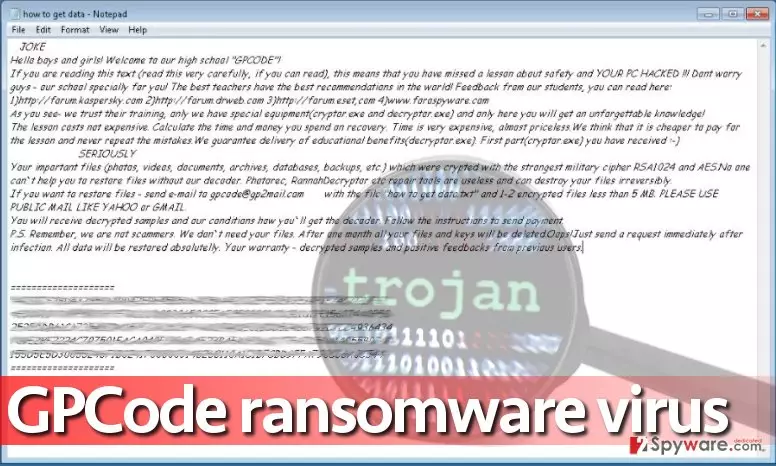
Hello, boys and girls! Welcome to our high school “GPCODE”!
The following saying is the first line of the ransom note. The how to get data.txt file opens up in the Notepad automatically and explains about the attack. Hackers state that the victim has to read the ransom-demanding message only because he or she “has missed a lesson about safety” and now the computer is hacked. Cyber criminals explain that GPCode virus consists of two programs – cryptor.exe, which the victim already has on the system, and the decryptor.exe, which can unlock encoded data if victims have a necessary decryption tool. To get the right decryption tool, victims are asked to write to gpcode@gp2mail.com and also attach the “how to get data.txt” file along with one or two encrypted files that weight less than 5 Mb. The reason why scammers ask for the ransom note is that it contains the victim’s ID. Criminals say that they are not scammers and that they don’t need victim’s files – they just want to “teach computer users a lesson.” What is more, criminals provide several links leading to security-related sites, saying that the victim can find “feedback from previous students” there. We believe that scammers are talking about online forums where victims share their experience about ransomware attacks. However, that is not the reason to pay scammers – they have no moral and might intentionally do not provide the decryption key even if you pay up. Therefore, we strongly recommend initiating GPCode removal immediately malware removal tools like FortectIntego or SpyHunterCombo Cleaner and then create a data backup to experiment with various decryption tools.
How is it possible to get infected with ransomware?
An interesting fact is, in the majority of cases ransomware needs to be installed manually. Only in rare cases scammers manage to infect ad networks or use exploit kits to contaminate victim’s computer without user’s intervention. Most of the time, such viruses as GPCode ransomware, are distributed via malicious emails in a form of attachments that seem legitimate at first sight. For example, be careful and do not open suspicious emails that supposedly bring you documents that you were not supposed to get at all. Be it an invoice, speeding ticket or a resume, do not open it. In general, stay away from emails that come from unknown senders. Also, pay great attention to sender’s email address. Even if the sender claims he’s working at Amazon or other legitimate company, you should realize that johnsmith965856@protonmail.ru is not an appropriate email address for an official employee of some legitimate and well-known company and such email should be deleted. If your system has been contaminated with GPCode.ak virus, better remove it as soon as you can.
Guidelines for GPCode ransomware removal
To remove GPCode virus from the system, you have to use a strong and professional malware removal tools such as FortectIntego or SpyHunterCombo Cleaner. Keep in mind that antivirus or anti-malware programs do not recover corrupted files. They are not designed for this task; however, it is crucial to remove malware before recovering lost files. If you have data backups, you will have no problems with data recovery. Plug in the backup device into the computer and then just simply import intact files to the computer by dragging and dropping them to a certain folder. Please do not plug the storage device into the compromised system before you complete GPCode removal because the virus can encrypt files on external devices connected to the computer with ease.
Did this guide help?
3 comments
Richardo
NO WAY TO DECRYPT? BUT WHY
scammers ou tai
I hope someone manages to catch all cybercriminals one day!
Desperate
need my files back... if somebody can provide any useful info about possible decryption methods that would be amazing