

3 main facts you should know about Vindows Locker ransomware
Vindows Locker ransomware is not a typical file-encrypting infection. After looking at it closer, you can see that it resembles a Tech Support Scam virus which aim is to trick users into thinking that their PC system is infected and that they need to contact the special tech support. However, this malware is actually considered to be the ransomware-type parasite because it can also encrypt your files and ask you to pay the special ransom. Besides, Vindows Locker virus can also initiate a lock screen imitating the attack of Zeus malware [1] on your computer’s desktop. This old trojan horse is really dangerous, so its appearance on the system can threaten almost every PC user that he or she needs to dial the special number (1-844-609-3192 in this case) and pay $349.99 to fix the computer.
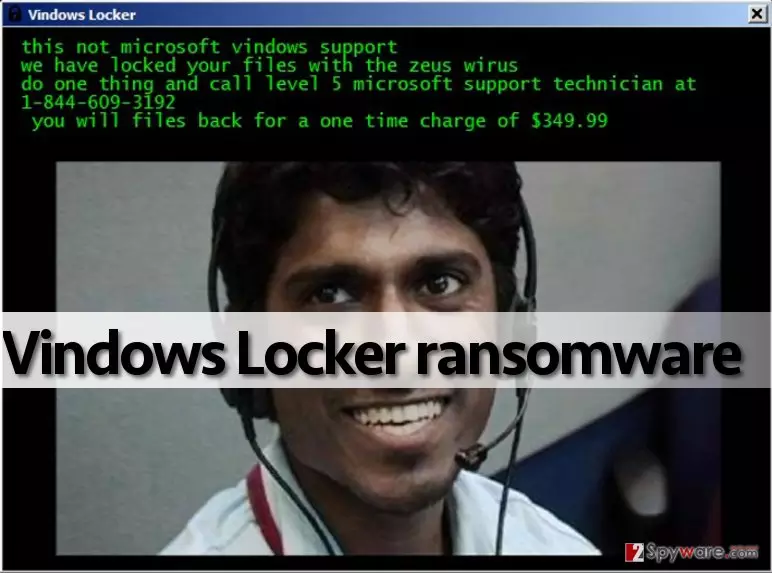
When infected with Vindows Locker, you can see how many files it can affect. The list of files includes photos, videos, documents, music, databases, and more. All affected files have .vindows file extension appended right after the original file extension. They can’t be opened, so you can find yourself in a big trouble if these documents are your business files or similar data which is considered important. Later on, the ransomware displays a huge window named “Vindows Locker” which provides the following information:
This not microsoft vindows support
We have locked your files with the zeus wirus
Do one thing and call level 5 microsoft support technician at 1-844-609-3192
You will files back for a one time charge of $349.99
This message is very confusing because criminals deny themselves in it. Firstly, they state on their warning message that “this is not Microsoft Windows support”. However, then they encourage people to contact “level 5 Microsoft Windows support technician” and pay the money. What is more interesting is that, unlike typical ransomware-producing criminals, authors of this particular malware do not ask people to buy Bitcoins and transfer them to a certain wallet [2]. They want you to provide your credit card details and buy some suspicious services over the phone. This is primarily why this virus reminds us of Tech Support Scam viruses. However, these infections do not normally encrypt victims files. It means that tech support scammers have improved their filthy games and started to apply more aggressive methods to extort cash from computer users.
If the window of Vindows Locker ransomware popped on your screen, you should know only one thing – your PC has been attacked by criminals, who distribute a malicious program over the Internet and seek to convince inattentive computer users to download and install it. Therefore, it is right to say that it spreads like a Trojan horse. Keep in mind that this virus might come along other malware example, so to completely clean your system, you must use proper malware removal tool. Use your antivirus or download one of our recommended programs (for instance, FortectIntego or SpyHunterCombo Cleaner) to properly remove Vindows Locker and related malware from the system. Before you start Vindows Locker removal procedure, reboot your PC in a Safe Mode with Networking. To find out how to do this, read instructions provided further.
November 2016 update:
In November 2016, security experts from Malwarebytes Lab found a crack in Vindows Locker ransomware code and come up with a working decryption tool [3]. However, according to experts, their tool should be used only on the infected machine – if transferred to some other environment, it will not be functional. However, you can download Vindows Locker decrypter for free and try it on your infected computer just by clicking the link provided at the end of the article. If you don’t want to install anything, you can also try data recovery instructions provided by 2-spyware experts. In this case, you should remove its files at first. Then you should perform steps given in “Data Recovery” section.
Ransomware uses system vulnerabilities to infect computers
If you have been infected with .vindows file extension virus, you should remember what files or programs you have recently installed. Have you visited suspicious websites lately?[4] Have you been asked to install some updates, applications, or download some questionable files? Maybe you have received a vague email lately and opened files attached to it? There are many locations where you can catch the malicious Vindows Locker payload and “help” it infect your computer system, and sadly it happens very frequently because scammers manage to obfuscate malicious viruses and make them appear secure. This is why such threats sometimes manage to bypass antivirus protection. Therefore, you should keep your anti-malware software up-to-date, avoid visiting shady Internet sites, install freeware using Custom or Advanced options only, and never open questionable email letters that carry attachments or contain shady hyperlinks because they can involve you to phishing attacks [5]. Clicking on them and opening them can unleash the Vindows Locker malware and severely damage your computer system!
Things to remember about Vindows Locker removal:
If this tech support scam virus-like ransomware has infected your PC, and now you see a picture of an indian hacker on your screen, do not panic. You shouldn’t pay such amount of money to criminals, which most likely will not help you to recover your files. So instead of searching for your wallet, remove Vindows Locker virus using anti-malware programs. Do not try to carry out Vindows Locker removal manually unless you are an expert in programming. Otherwise, follow these instructions to start your computer in a Safe Mode with Networking and start wiping malicious files with the help of anti-malware software.
Did this guide help?
4 comments
Santos
Incredible Indian scammers... Theyre good at coding but they need to learn damn english
Kevine
zeus wirus. vindows. yeah right. somebody donate some money to tech support scammers so that they could get normal education and not try to earn money by creating viruses.
Harry
so now you can pay ransoms via phone...what a time to be alive.
9009
Such a polished ransom note... I try not to laugh. My colleague has been attacked and theres nothing funny about it but cyber criminals are just deplorable.