

NoValid ransomware targets careless internet surfers
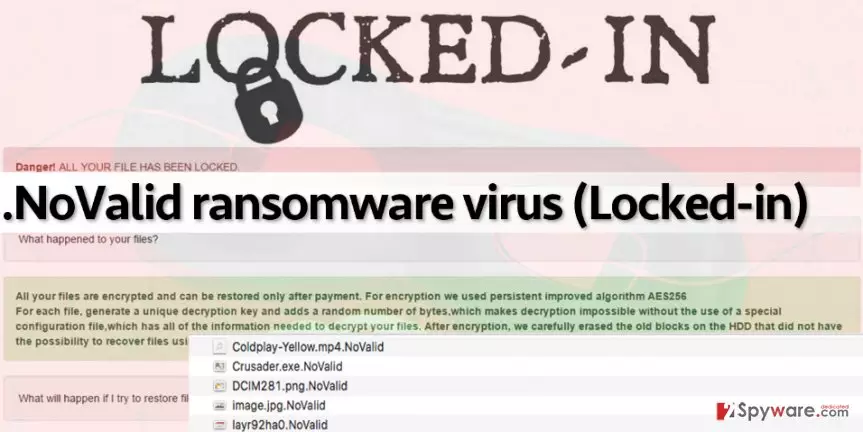
NoValid virus is a file-locking, money-extorting virus, also known as the Locked-in ransomware. The hackers behind this malware are highly proficient in human psychology and manipulation, so they are aware of the blackmailing tricks [1] which help swindle money from the victims. The parasite is designed to sneak into the computer systems stealthily [2] and, once there, scan all the containing drives for certain filetypes. As soon as it finds a file that it is programmed to encode, it distorts it by applying an encryption to it. Encrypted files are configured on a structural level, which means that they cannot be launched or modified in any way. According to research, NoValid ransomware utilizes AES-256 cipher [3] to render victim’s files useless and appends .novalid file extensions to them. When files are corrupted, NoValid virus carries out the last step in its Task List — it creates and saves a note with information from cyber criminals (on desktop and some of the infected folders).
According to the message the virus leaves on victim’s desktop, the victim has to buy a decryption key to recover personal data back. This message is widely known as the “ransom note,” which, in this case, is called RESTORE_NOVALID_FILES.HTML. You can see the full content of this message below:
LOCKED-IN
Danger! ALL YOUR FILES HAS BEEN LOCKED
All your files are encrypted and can be restored after payment. For encryption, we used persistent improved algorithm AES256. For each file generated a unique decryption key and added a random number which makes decryption impossible without the use of a special configuration file which has ll the information needed to decrypt your files.
Sadly, it appears that encrypted files cannot be restored using any basic data recovery tricks because the virus deletes Volume Shadow Copies and other backups that are typically used for data retrieval. It means that there is no way to recover all files at all unless you have a backup. If you do not have it, you can try to get the decryptor [4] by paying 0.5-1 Bitcoin ransom; however, paying doesn’t guarantee that you will get your files back. In fact, it does not guarantee that you will even receive any attention from the scammers at all. Therefore, before you pay the required sum of money to cyber frauds, you should consider if such amount of money means something to you or not. If you decide to not pay the ransom, follow NoValid removal guidelines given at the end of this post and delete the virus from the system.
It is essential to perform NoValid removal properly because leaving at least one or two components of it on the computer can lead to disastrous consequences. For example, most ransomware viruses spread in conjunction with other malware, so deleting one ransomware typically means that the system remains contaminated no matter what. Therefore, we suggest using a good anti-malware software that can recognize even the most hideous threats and remove them successfully. Our team recommends using the FortectIntego software.
How did the virus infiltrate your device?
To insert .NoValid file extension virus on victim’s computer, the attacked does not need to touch it physically. It only needs to obfuscate the malicious files and deliver them to the victim using various channels. For example, you can receive the malicious virus via email, in a form of an attached PDF, Word or SCV file [5]. To avoid malware attacks, it is highly recommended to bypass emails coming from unknown senders. Alternative malware distribution technique is known as malvertising, which, as the name suggests, is based on malware-laden ads. If you encounter a lot of suspicious pop-up ads or banners while browsing the Internet, then it is likely that your PC system is contaminated with a shady adware program, or that you tend to browse through highly questionable Internet websites. We suggest you stay away from ads that suggest installing free programs or updates because such pieces of software typically contain a few “bonus” files that can mess up your computer system.
What is the safest way to remove NoValid virus?
The first and foremost task you should complete now is to remove NoValid virus. Unless you’re willing to pay a ransom, you should get rid of this malicious program – the sooner, the better. For NoValid removal, use strong anti-malware tools. However, we must warn you and say that malware removers are meant to remove malicious programs from the system, but not to restore files they encrypt. Data recovery with the unique decryption key is impossible, especially if you do not have a data backup. However, there are still some tools that you can try (there’s nothing to lose if you do not have a backup and if you are not willing to pay the ransom, anyways). Just don’t forget to remove NoValid before you get to the recovery process!
Did this guide help?
4 comments
Carina
Dont pay ransoms!!!!! People dont be blind!!! why would scammers waste their time sending you decryption tools!!! they have done their job, infected ur computer, and scared you enough to convince you to pay! however, you shouldnt pay, cuz they arent gonna spend any single minute on you!
Twix
My nephew called technicians, paid a fortune, and didnt recover files at the end. Dont waste your money. Start from the beginning, and thats it.
Katelyn
Cant believe Im all encrypted... Ive been pwned by a computer virus. First time in my life. Ridiculous
bundem
Thanks for information... but files are gone, and im still sad...