

M4N1F3STO fakes ransomware attack and tries to steal your money
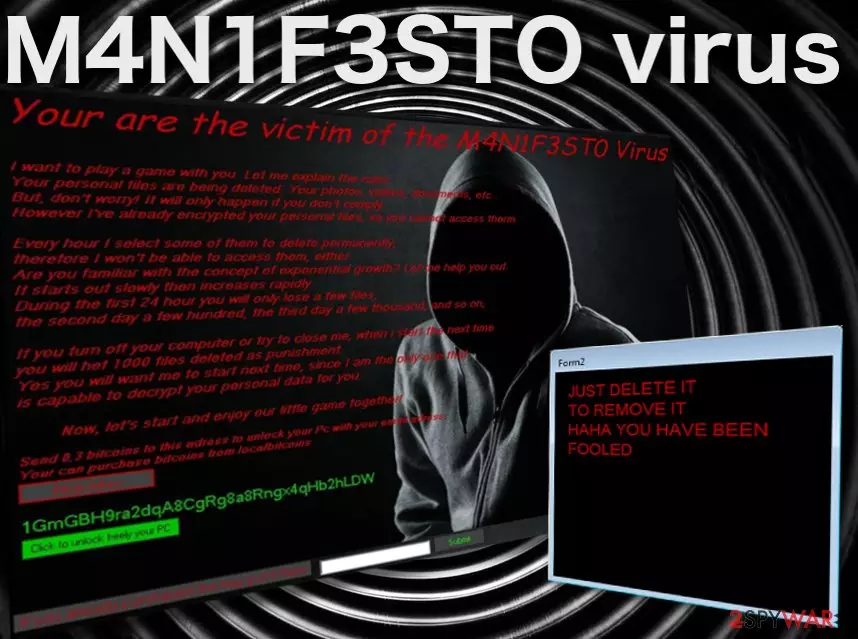
M4N1F3STO virus is one of those nasty screenlocker-type [1] computer infections designed to imitate ransomware attacks and swindle users out of their money by selling them fake data decryption keys. For those unfamiliar with leet speak [2], the virus title decodes as MANIFESTO. The bogus ransomware usually lacks a lot of the malicious functionalities that the real ones possess.
In other words, everything that is written in the ransom note should be ignored as all the made claims are false. Your files are not actually encrypted, and they won't be deleted either, so to not pay the demanded 0.3 BTC for the alleged decryptor. Instead, you can enter a password that can be found in a
made by a security researcher and then remove malware from your system.| Name | M4N1F3STO ransomware |
| Type | Screenlocker |
| Ransom size | 0.3 BTC |
| Operation | Blocks access to normal computer functions with a lock screen and demands ransom to be paid. Does not encrypt files and does not provide a working decryptor; claims about data being deleted from the computer are also fabricated |
| Removal | Get rid of ransomware by performing a full system scan with SpyHunterCombo Cleaner or another |
| System fix | Malware can damage Windows files, resulting in system crashes or errors. To fix these problems, we recommend using FortectIntego repair software |
There is plenty of deception when it comes to this ransomware, as it does not actually encrypt the infected computer files but merely drops a threatening lock screen whenever the victim attempts to launch the system. This lock screen obstructs the victim from booting the system properly and accessing the data stored on the device.
Consequently, the victims remain unaware of the fact that, in reality, no encryption process ever took place and that the extortionists are only playing tricks to get them to pay for the non-existent decryption tools. You can see the content of the lock screen message below:
I want to play a game with you. Let me explain the rules:
Your personal files are being deleted. Your photos, videos, documents, etc…
But, don't worry! It will only happen if you don't comply.
However I've already encrypted your personal files, so you cannot access therm.
Every hour I select some of them to delete permanently,
therefore I won't be able to access them, either.
Are you familiar with the concept of exponential growth? Let me help you out.
It starts out slowly then increases rapidly.
During the first 24 hour you will only lose a few files,
the second day a few hundred, the third day a few thousand, and so on,
If you turn off your computer or try to close me, when i start the next time
you will het 1000 files deleted as punishment.
Yes you will want me to start next time, since I am the only one that
is capable to decrypt your personal data for you.
Now, let's start and enjoy our little game together!”
1GmGBH9ra2dqA8CgRg8a8Rngx4qHb2hLDW
Send 0,3 bitcoins to this adress to unlock your Pc with your email adress.
Your can purchase bitcoins from localbitcoins
Luckily, the threats in this note remain in their written form, and no actual data destruction occurs, even if the user refuses to follow the extortionists’ rules. In fact, this is exactly what you should do if you ever in such a situation – remove the virus from your device as soon as possible. We suggest doing that with the help of sophisticated malware-fighting tools, such as FortectIntego.
At this point, you might be wondering what you should do about the lock screen. How do you scan your PC with an antivirus utility when you cannot access your desktop or any programs installed on the computer? The virus analysts have found a way to bypass this obstacle already.
They have examined the program’s source code and found that the M4N1F3STO lockscreen removal code can be extracted from the virus executable. Thus, you don’t have to pay the demanded 0.3 Bitcoin [3] for the supposed data decryption. Instead, you can access your desktop and take care of the malware removal.
Malware spreading tactics and avoidance tips
There is currently no information about how the virus attacks computers. But we can presume that it either spreads via malicious spam email attachments [4], corrupt ads, or gets downloaded on the computer disguised as software updates or legitimate applications.
Nevertheless, the files found on the computer after the attack leads us to believe that the virus arrives on the computer mostly through spam. The malicious WindowsApplication1.exe and Receipt.exe files feature titles inconspicuous enough to be downloaded by regular users without suspecting about their malicious nature [5].
This only proves how easily malware can enter a computer. Hence, any content that may potentially reach our computers should be carefully investigated and examined with software specialized for malware detection.
The best M4N1F3STO removal approach
In case your device has been affected by this fraudulent ransomware-imitating infection, don’t hesitate for a second and remove the M4N1F3STO virus from your computer. To do that, you will first have to terminate the lock screen, and only then will you be able to access the antivirus tool required for the virus extermination.
If our previously indicated lock screen termination code does not work, check out a couple of alternative lockscreen removal instructions below. Finally, when every obstacle is eliminated, you can proceed with a malware elimination.
Did this guide help?
2 comments
Boucheme
If only I could turn back time...
Mender
How to fix the messed up registry? cant seem to find any reliable solution