

Why can’t you trust Antivirus 10 with your computer’s security?
Play pretend is not a children’s game anymore as deceptive programs like Antivirus 10 virus are making their way to the Web in increasing numbers. This particular virus is a rogue application which manipulates social engineering tactics [1] and deceptive software design to imitate a legitimate antivirus program and coax the users into purchasing its full version. The virus not only replicates the appearance of a regular antivirus software but, more importantly, fakes system scans and presents false reports about the system’s condition. Moreover, the victims are threatened that if they ignore the scan results and do not “clean up” their devices using the full version of the program, their computer system and containing files might be damaged; sensitive information may leak and trigger various privacy infringements. Let us assure you. This is unlikely to happen because your computer is not actually at any major risk. In fact, the only thing that might be causing trouble on your device is the Antivirus 10 malware that has gained unauthorized access to your device and started running on it without being explicitly asked to. Besides, the program modifies itself to launch at startup and run scheduled “scans” every few hours. As you can imagine, these constant processes are not beneficial for the performance of your computer. Because of the increased CPU usage [2], the device may start running slower; other programs may begin to crash or freeze more often. If you, your family or friends find this rogue application on your computers, please take the proper precautions and remove Antivirus 10 from your devices safely. To avoid mistakes and further damage, employ trusted antivirus tools like FortectIntego for the virus elimination.
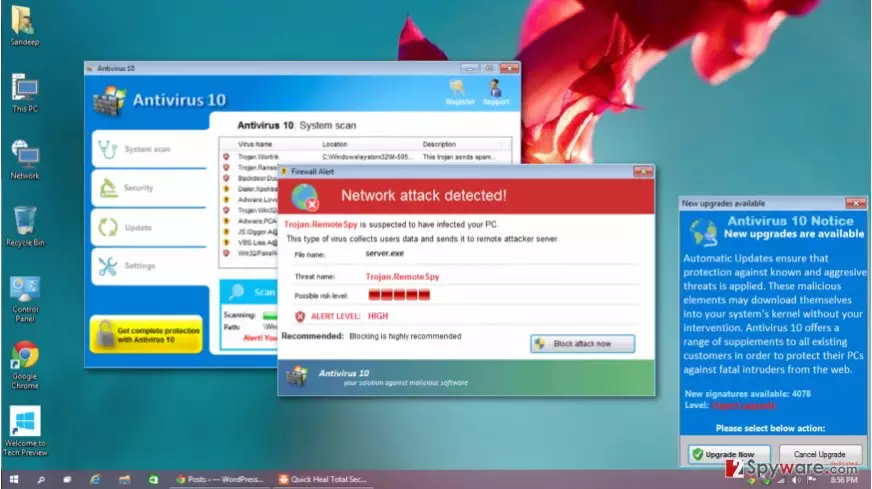
Antivirus 10 hijack is annoying and malicious in a lot of aspects. Besides the already mentioned negative impact on the system’s performance, the windows scan results and ads urging you to purchase the full version of the application may pop-up randomly, overlaying other running windows and programs. This is inevitably interferes with the computer usage experience. What also causes inconveniences to the infected computer users is the fact that the virus also blocks chrome.exe, opera.exe, firefox.exe and a variety of other programs, including Microsoft Office apps and even antivirus scanners. This helps the virus create an impression of a seriously infected system and persuade the users into purchasing the full program. Needless to say, you should better consider the Antivirus 10 removal instead because not only is this program useless, but it also poses a serious danger to the computer’s stability and security.
How did this scareware end up on my PC?
The security experts introduce Antivirus 10 as a Trojan [3] which is a type of virus which infiltrates computers disguised as legitimate software or comes attached to the pirated software or illegal program cracks [4]. Such programs are usually distributed via shady software distribution sites, peer-to-peer sharing networks, and torrent sites. Nevertheless, it is not uncommon to find completely legitimate software bundled with Antivirus 10 on inconspicuous websites as well. Thus, you should stay vigilant at all times and always to a research before trusting your computer’s security to programs you are unfamiliar with.
What is the secret of Antivirus 10 removal?
First of all, we should remind you that Antivirus 10 virus is not a regular antivirus program that can be simply uninstalled from the Add/Remove programs list. To avoid removal, the virus may scatter its malicious files all over your PC, making the manual Antivirus 10 removal extremely complicated. But if you cannot exterminate the virus manually and the malicious source code is blocking your antivirus from running, how should you remove Antivirus 10 from your PC? Well, first, you will have to run your computer in Safe Mode [5] to decontaminate some of the malware’s functionalities. You will find the following steps indicated below.
Did this guide help?
Be the first to comment