

Beware of “(13) Viruses have been detected on system” Tech support scam!
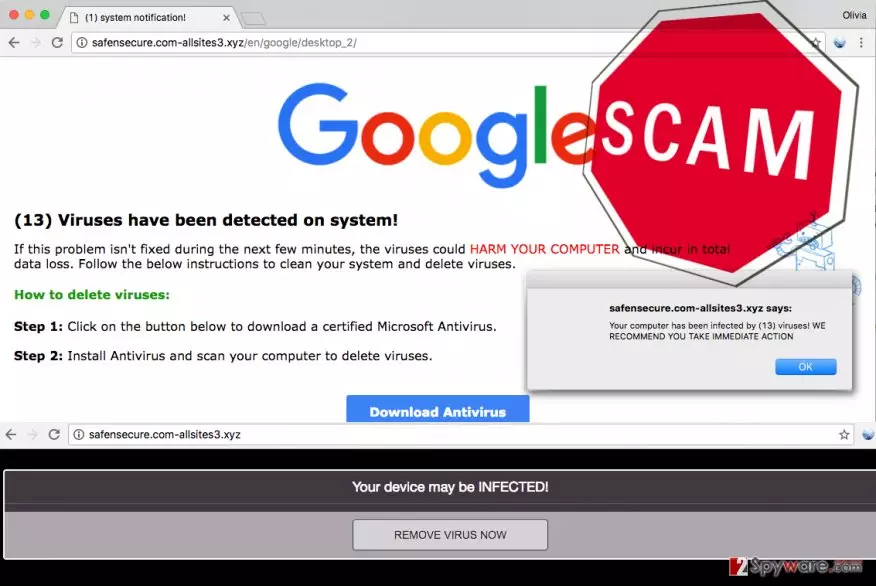
If your browser redirects you to a suspicious website that says “(13) Viruses have been detected on system,” then most likely your computer is infected with so-called (13) Viruses have been detected on system virus, which belongs to Tech Support Scam[1] category. You can read more about such malware here. If you looked at such phishing[2] website’s URL, you would notice that it looks long, complicated, and, to say at least – suspicious. This virus typically causes redirections via victim’s web browsers to sites that display the following information:
Your computer has been infected by (13) viruses! WE RECOMMEND YOU TAKE IMMEDIATE ACTION
(13) Viruses have been detected on system!
If this problem isn’t fixed during the next few minutes, the viruses could HARM YOUR COMPUTER and incur in data loss. Follow the instructions to clean your system and delete viruses.
How to delete viruses:
Step 1: Click on the button below to download a certified Microsoft Antivirus.
Step 2: Install Antivirus and scan your computer to delete viruses.
If you see this message on your screen, do not rush to click the “Download Antivirus” button because you are simply facing a scam. Clicking on this button most likely downloads malware that can block access to your computer[3], asking you to call tech support scammers for help. If you do not want to experience more problems, shut down your browser immediately and take actions to remove (13) Viruses have been detected on system malware immediately. For (13) Viruses have been detected on system malware removal, use a proper tool – FortectIntego or SpyHunterCombo Cleaner.
How did I get infected with this suspicious software?
If your browser continuously redirects you to suspicious websites such as hxxp://safensecure.com-allsites3.xyz/en/google/desktop_2, it means that your device has been hijacked[4] by a potentially unwanted or malicious program. It could have happened due to careless behavior online, for example, you may have clicked on an infectious link or downloaded a bundled software pack that contained tech support scam malware. The fact that you have been infected with this virus shows that your computer system is unprotected, or that you are using an outdated security software. We highly recommend you to update your computer protection programs or install one if you do not have it yet. Finally, follow these simple safe browsing rules:
- Never open URLs or attachments sent to you by unknown people. No matter if you receive a link or attachment via Facebook Messenger or email, do not open it unless it looks entirely safe and is sent by a person that you personally know.
- Download programs from legitimate websites only. If you ever enter a file sharing website that looks shady (f.e., contains many ads and way too many download buttons here and there), do not download any content from it.
- Bypass offers to update Java, Adobe and other programs[5] if the offer appears in aggressive pop-up windows or loads in new tabs unexpectedly.
How can you remove (13) Viruses have been detected on system virus?
If these annoying pop-ups and redirections that we described above torture you on a daily basis, take actions to remove (13) Viruses have been detected on system virus immediately. We do not recommend you to try to remove this malware manually because it is a hard thing to do. Even if you have the anti-malware program, the virus might attempt to block it and prevent it from cleaning the infection from the compromised system. Therefore, we suggest you follow these detailed (13) Viruses have been detected on system removal instructions presented below – they will help you to fix your computer without hassle.
Did this guide help?
4 comments
caesar
Ive been getting these pop-ups for a while now... Time to block them once and for all, Id say...
Lucas
(13) Viruses have been detected on system scared the hell out of me!!!! Someone report that phishing website! if its not closed already...
Margharet
Thank you - I was about to install that malware. So glad Ive googled about it before clicking the "download" button.
fresh:p
Removed this virus with Reimage, thanks a lot.