

What does the “Windows has detected some suspicious activity from your IP address” alert actually mean?
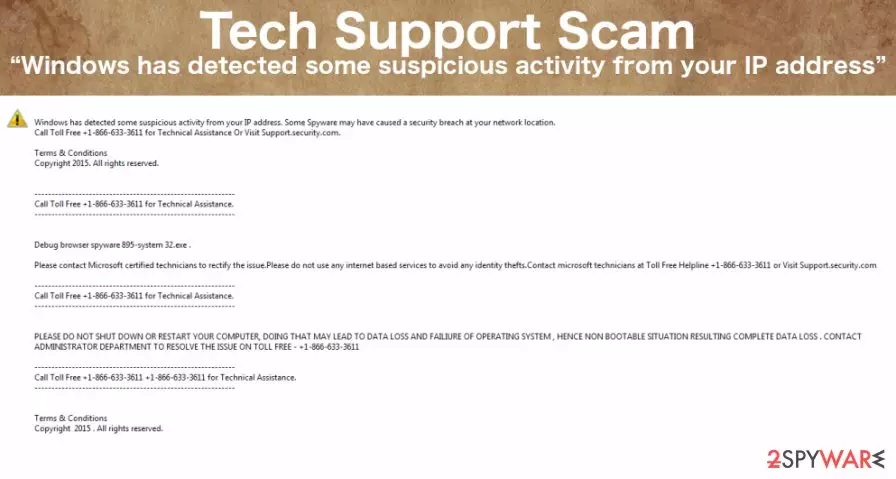
Lock screen Technical Support Scams [1] are currently booming and “Windows has detected some suspicious activity from your IP address” virus is one of the latest ones we want to talk about in this article. Over the years, tech support scam viruses have evolved and are now using more serious techniques of infecting users computers and achieving their goals once there. One of the most recently acquired strategies is the already mentioned screen locking [2] function. Setting up a lock screen is the first thing the virus does once it infiltrates the computer. It does that by altering Windows registry and assigning a lock screen to appear at the system’s startup. This way, the victims are unable to access their files and any of the computer functions in general. It is a good starting point of the scammers’ attempt to convince [3] the victims into thinking their devices are in a critical state and must be handled by professional technicians. “Windows has detected some suspicious activity from your IP address” malware tries to do that with the following message:
This site says:
Windows has detected some suspicious activity from your IP address.
Cydoor Spyware may have caused a security breach at your network location.
Your personal and financial information might be at risk. Call Toll Free 1-800-990-183.
Please Contact Microsoft Certified technicians at Toll Free HelpLine: 1-800-990-183
Please do not shut down or restart your browser.
As you can see, the scammers even speak under the name of the “Microsoft Certified technicians” to sound more believable. But the truth is, the actual party behind this warning is not trying to help you. On the opposite, these scammers are only try to help themselves, sell shady software or services and earn some easy money. So if this virus ever infiltrates your PC, be sure to remove “Windows has detected some suspicious activity from your IP address” without calling anyone and, more importantly, spending money on questionable goods. Keep in mind that anti-malware software like FortectIntego can quickly navigate this virus on your computer and eliminate it without a problem.
Also, you shouldn’t forget that “Windows has detected some suspicious activity from your IP address” lock screen is just a tip of the iceberg. You can never know what other unwanted activities this potentially unwanted program (PUP) [4] can engage in. You might find your personal data being leaked to black market or other privacy infringements may take place, thus we highly suggest taking care of the “Windows has detected some suspicious activity from your IP address” removal when you have the first chance.
What causes Tech Support Scam infection?
Usually, careless web browsing [5] is the root cause of the infection and random software installation only increases the chance of becoming a target of the Tech Support Scam. What is important to keep in mind is that viruses like “Windows has detected some suspicious activity from your IP address” will need your direct permission to enter the computer. Thus, you should be especially careful when installing freeware or shareware packages downloaded from the internet. Such packages usually contain a variety of bundled software and “Windows has detected some suspicious activity from your IP address” virus can easily be one of these bundled components.
“Windows has detected some suspicious activity from your IP address” removal:
Despite the panic and inconveniences that the “Windows has detected some suspicious activity from your IP address” virus may trigger, it is not a difficult virus to get rid of. This malware can be approached either manually or automatically, the latter being a more preferred option. However, despite which “Windows has detected some suspicious activity from your IP address” removal strategy you choose, you still have to get rid of the lock screen first. We will give a couple suggestions on how to tackle this obstacle below. Then, when the lock screen is eliminated you can move on and take steps to remove “Windows has detected some suspicious activity from your IP address” virus.
Did this guide help?
2 comments
Federico Sabotnine
Ok, so is this really something that the scammers earn money from or they just do it for the gags? I cant how such poor scams can be successfull
Lucretia
Lock screen wont go away!! There is no way Ill finish my essays in time